Thinkwise Platform Overview
The Thinkwise Platform is an AI-augmented, model-driven integrated development environment to build large enterprise applications and modernize business-critical legacy applications.
It is built on AI-augmented, model-driven development, which keeps technology and functionality strictly separate. With the Thinkwise Platform, you can develop and adjust that functionality continuously, without worrying about the underlying technology. Thinkwise makes sure the technology of your application always stays up to date, so you are free to focus on what makes your business unique.
Functionality is captured in a technology-agnostic model rather than in hand-written code, which results in a high degree of functionality with a minimal amount of code. Indicium and the user interfaces interpret this model at runtime, so a fully functional application is available as soon as the data model is in place. Standard functionality such as create, read, update, and delete (CRUD) operations, searching, filtering, and data import and export is provided out of the box, without additional development effort.
- YouTube - the Thinkwise Platform introduction in 4 minutes (Dutch).
- Thinkwise Academy - Thinkwise Platform introduction (Pre-Associate).
The components of the Thinkwise Platform
The Thinkwise Platform consists of several key components that work together to facilitate the development, management, and modernization of software applications.
-
The Software Factory is used during the development and test phase to develop an application on the basis of a model (blueprint). The user interfaces interpret the model during runtime so that the user can work directly with the application. Once the development is completed, the model is transferred to the Intelligent Application Manager in the production environment.
-
The Intelligent Application Manager manages all the models of applications that are in the acceptance and production phases. The application managers can also set up authorizations using IAM. The presentation for the user is again provided by the Universal UI. Users can set up their own user preferences via the user interfaces and get suggestions from IAM to optimize their user experience.
-
The Thinkwise Universal UI is available as the user interface for the most common devices and platforms: desktop, laptop, web, smartphone, and tablet.
-
The Thinkwise Indicium Application Tier is the central integration hub of the Thinkwise Platform. It provides secure access to the data, processes, and business logic of Thinkwise applications through an open REST API.
-
The modernization of software applications takes place with the Thinkwise Upcycler.
The diagram below shows the positioning of the various Thinkwise components. Blue components are part of the Thinkwise Platform. Green components are created by the developer or application manager, and gray components are created automatically.
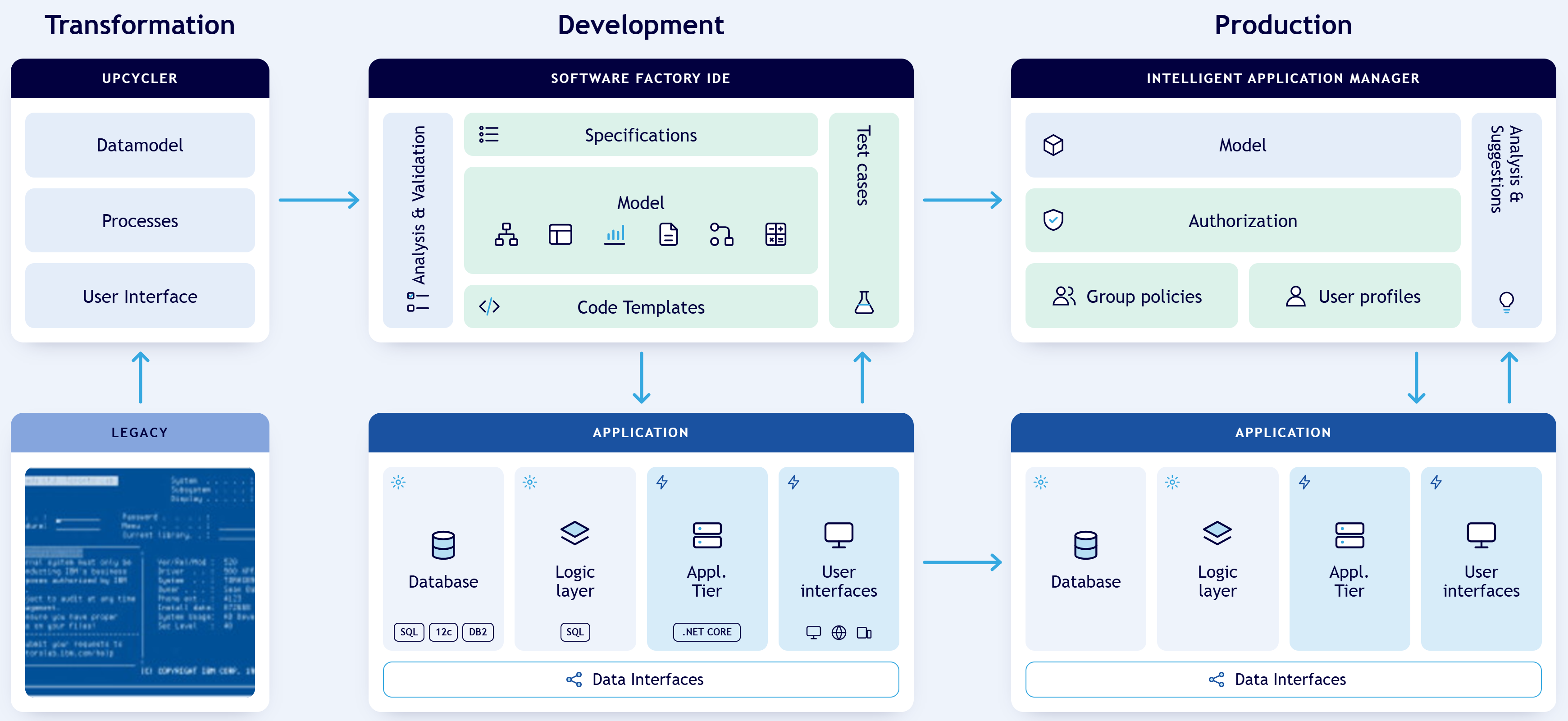 Thinkwise Platform overview
Extensive online documentation is available for the Software Factory, Intelligent Application Manager, user interfaces and Indicium Application Tier. The requirements for their installation are also described in the documentation.
You can find definitions of Thinkwise-specific terminology in our Glossary of terms.
From legacy to modernized application
The Thinkwise Platform supports modernization in three phases: transform, optimize, and accelerate (TOA).
- Transform: Reduce technical debt by modernizing your existing application automatically. With the Thinkwise Upcycler, you can often migrate screens, data, and business rules one-to-one into the Thinkwise Platform.
- Optimize: Reduce functional debt after the transformation. You work through your backlog step by step, simplify processes, and deliver improvements in short development cycles.
- Accelerate: Use the full potential of the Thinkwise Platform. You can implement new ideas and run experiments faster.
Visit our website to read our customer success stories.
This is an example of a legacy application that is modernized using the Thinkwise Platform.
The legacy screen:
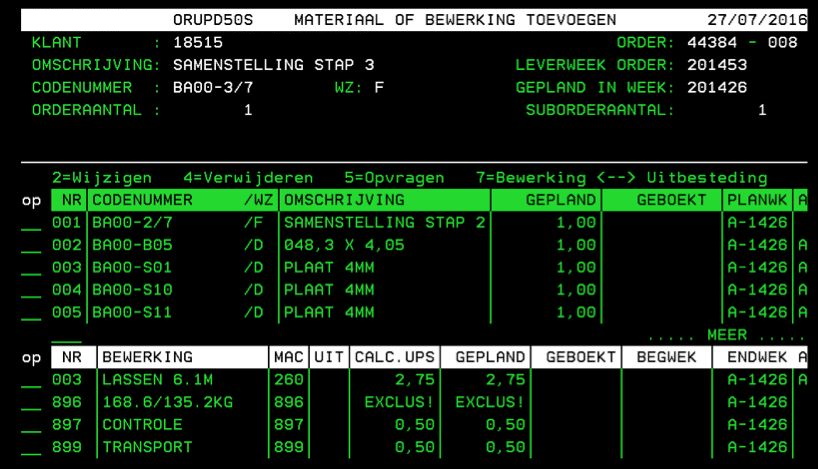 Example of a legacy application
The modernized screen:
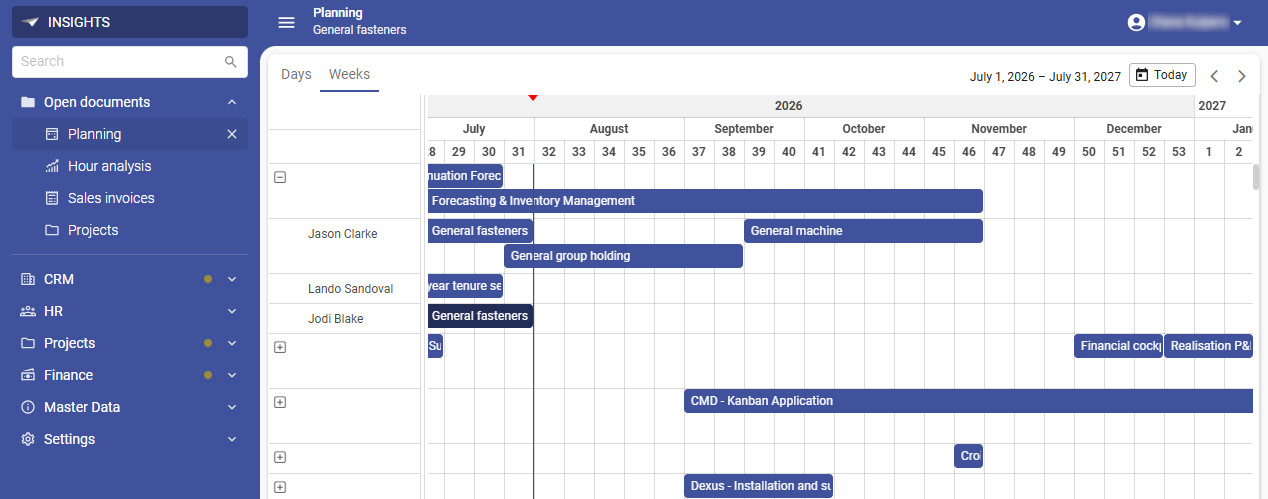 Example of a modernized application
Application architecture
Thinkwise applications consist of a data tier, an application tier (Indicium Application Tier), and a presentation tier (user interfaces).
Thinkwise applications can run on SQL Server, DB2 for IBM i, Oracle Database, and PostgreSQL. One model can target multiple database platforms, so you do not need a separate model for each platform. The Software Factory and IAM run on SQL Server. For the supported database versions, see Lifecycle policy.
You can deploy the Thinkwise Platform and your applications on-premises, with a cloud provider such as Microsoft Azure, AWS, or Google Cloud, or in the Thinkwise Cloud, where Thinkwise manages the infrastructure for you. Container images are available for deployment with Docker or Kubernetes, see Container deployment.
Your application model describes the application in generic concepts. When you generate the application, the Software Factory creates a platform-specific definition from the model, for example for SQL Server or Oracle. The Software Factory then generates the code for that platform.
The Indicium Application Tier and the user interfaces interpret the model at runtime. Indicium detects changes to the model and reloads it automatically, without downtime. Because the user interfaces and Indicium interpret your model at runtime, Thinkwise can update them to support new technologies. Your application gets these updates without being rebuilt.
In addition to the Universal UI, it is also possible to connect custom-built or third-party user interfaces or applications to the Thinkwise API to access the data, processes, and business logic of Thinkwise applications.
The business logic containing customer-specific functionality is included in the data tier in the form of SQL procedures. Through the Thinkwise Application Tier, it is also possible to connect external services to integrate external or custom-built business logic in a wide range of programming languages and protocols.
For possible configurations of the platform's infrastructure, see Reference architecture.
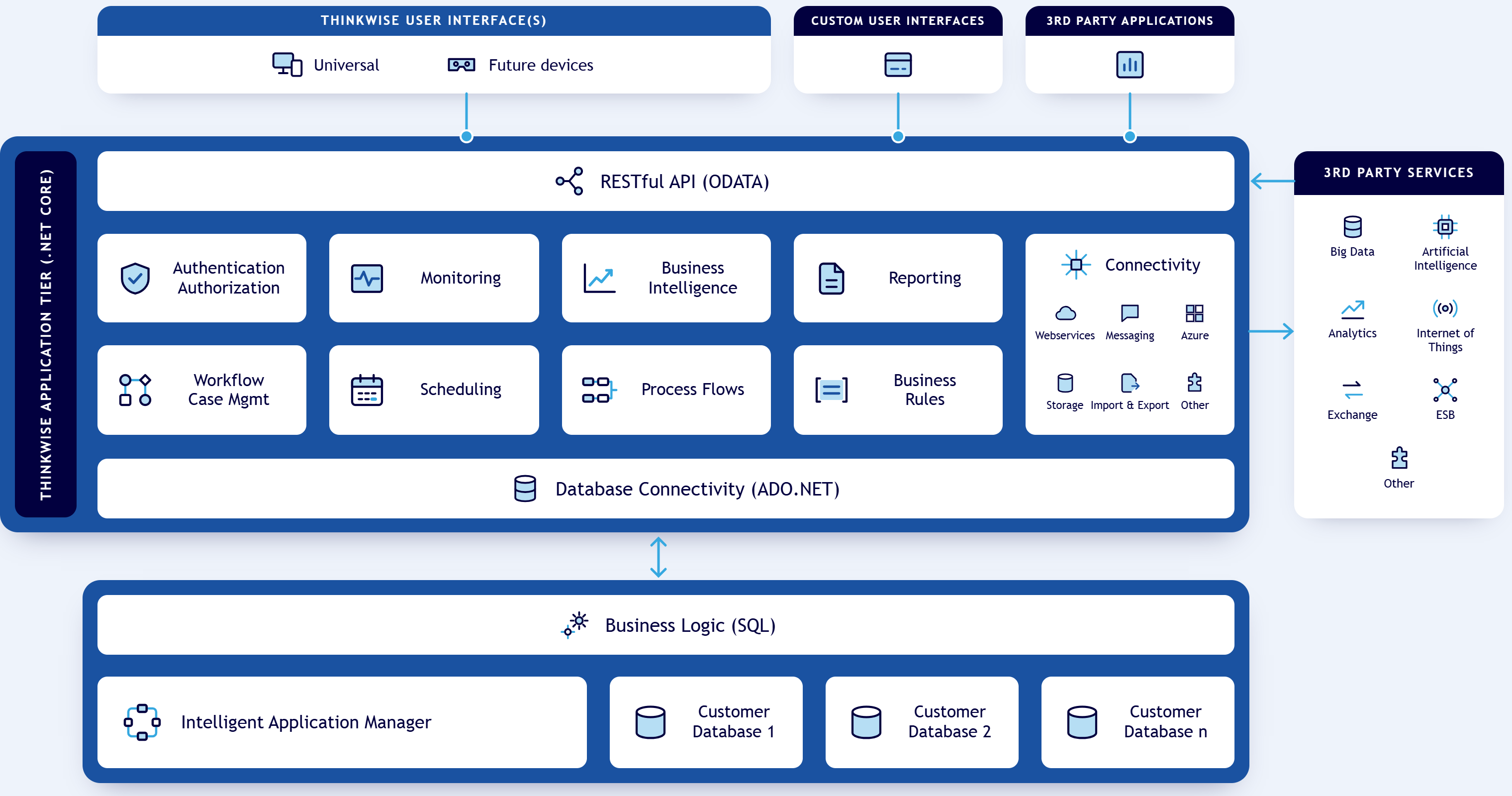 Thinkwise Application Architecture
Software Factory
The development process with the Software Factory consists of the following main areas:
- Modeling and Validation
- Third-party integration
- Artificial intelligence
- Development and testing
- Developer tools
- Quality control
- Productivity
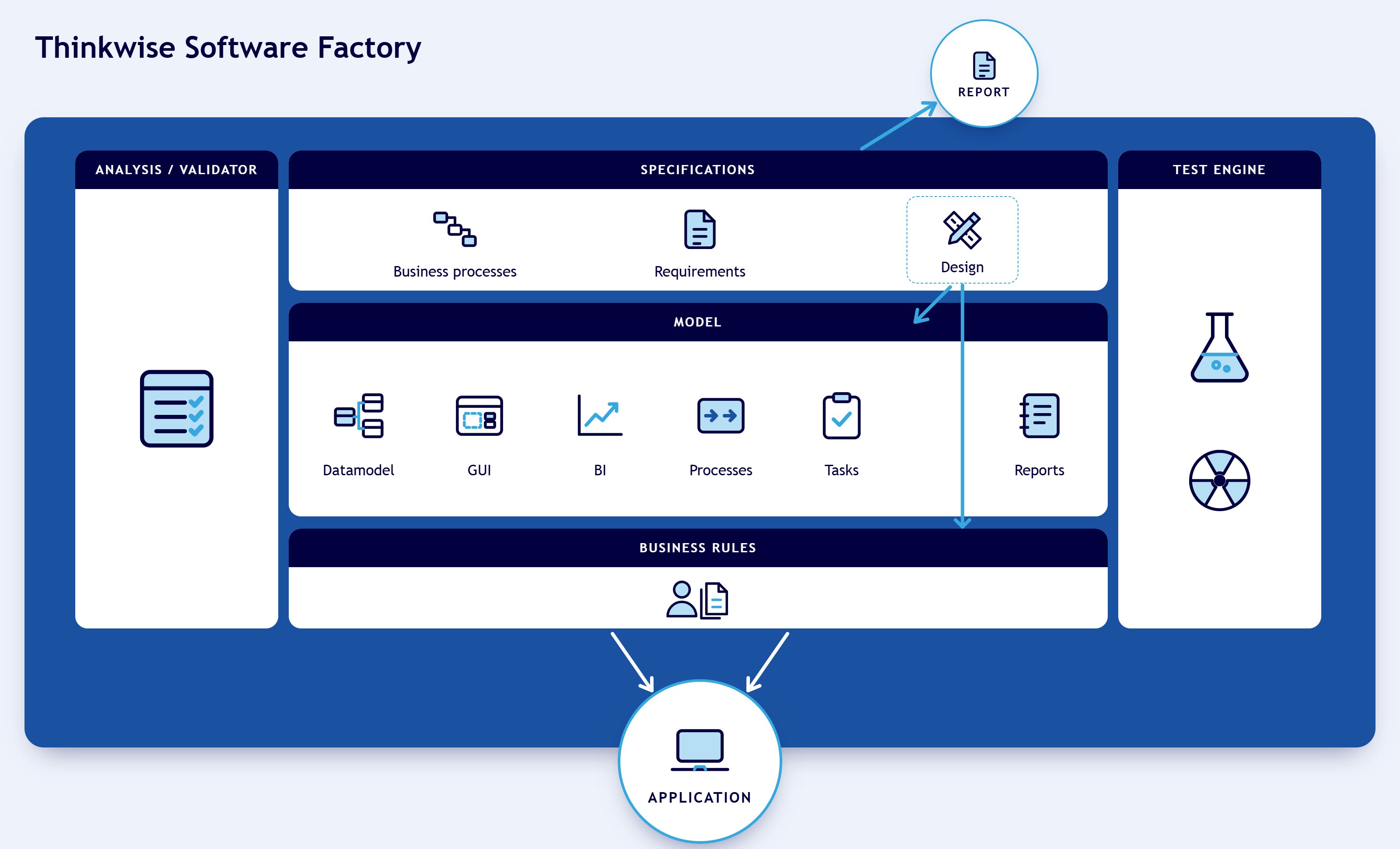 Development in multiple phases
These phases correspond to the menu in the Software Factory development environment. The development team has access to the components of these phases via the menu on the left-hand side of the screen.
Modeling and Validation
During the modeling phase, developers specify the models that make up the application. The foundation is the data model, which can be extended with enrichments. The user interface consists of menus, screen types, subjects, messages, icons, and cubes. Maps and themes can also be added to it.
To reach a wider audience, translations and localization, and help content are added. Finally, the application's behavior is modeled with process flows, tasks, and reports.
All these components form the basis for the application without it being necessary to have to program them.
The quality of the model is monitored with validations. Thinkwise provides hundreds of validation rules, but company-specific validation rules can also be added.
When the model is created, a demonstration can be given to the business to show at an early stage what the application will look like and how it will work. This demonstration helps build a bridge between the business and IT.
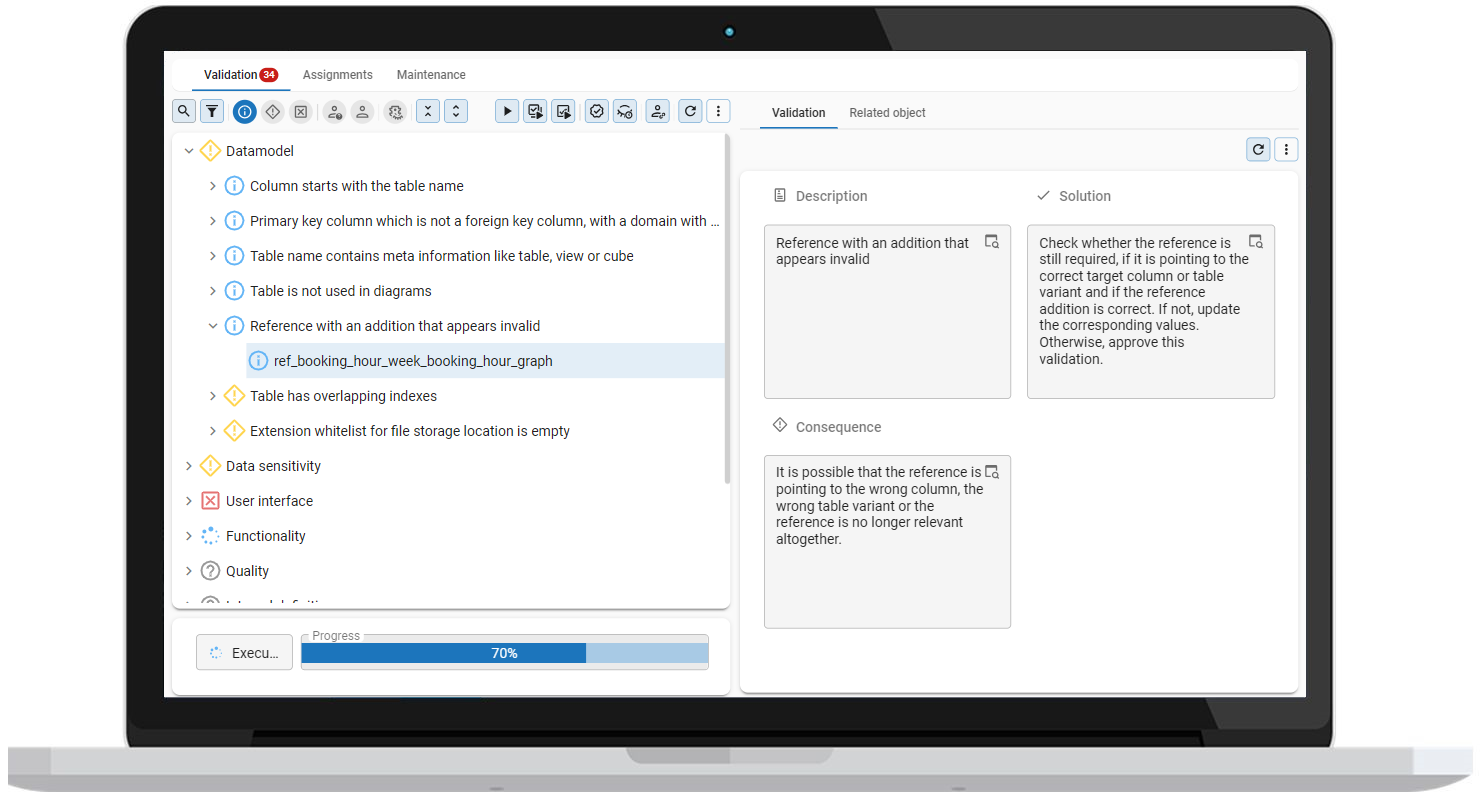 Validation messages in the Software Factory
Data model
The database of the application is designed using the data model, which is presented graphically, as shown in the figure below. The same table can be displayed in different ways by creating variants. You can use a variant, for example, to optimize a table for a specific platform.
You can also use multiple RDBMS types for a data model. One model that targets multiple database platforms can be maintained without needing to create separate models for each platform. Migrating to another database is significantly easier and can reduce platform costs.
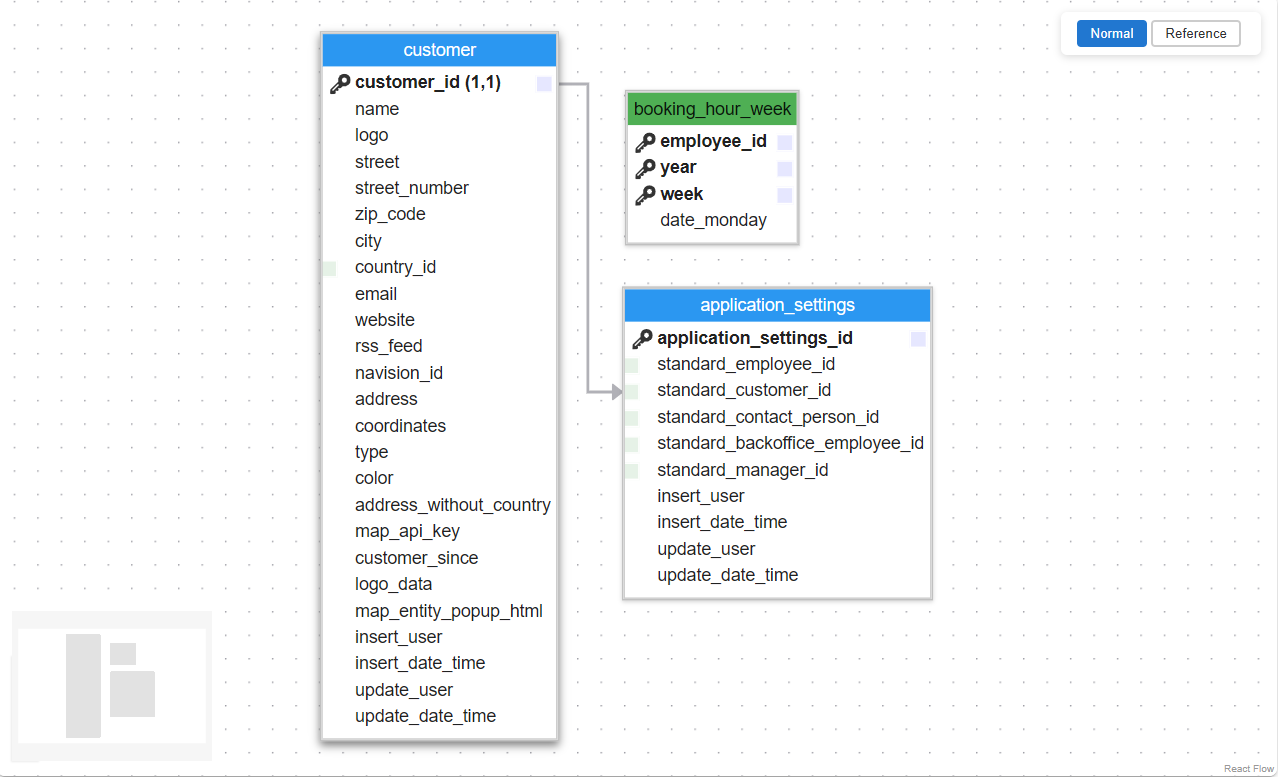 Example of a graphical data model in the Software Factory
Enrichment
Different ways of enriching your model are available in the Software Factory. They facilitate and speed up the development of your application.
-
Model enrichment is the process of automating parts of your manual workflows. The Software Factory comes with a large number of ready-made enrichments that are also available as tasks in the screens where they are most relevant, but you can also create your own.
There are three types of enrichments:
- A model-driven enrichment can be used to check, for example, the consistency in your application. You can re-run it on a need-to basis.
- A data-driven enrichment will prompt you for a runtime configuration when you start it. It queries the database to load the information required to present the model updates. Examples of this type of enrichment include generating missing indexes, creating mock data based on table content, and deriving control types and elements from data in the database.
- An AI-powered enrichment will use the configured generative AI provider of the Software Factory to retrieve information from a large language model. Examples include generating descriptions, translations, comments, etc.
-
The Thinkstore in the Software Factory is a fully integrated way for downloading and installing ready-made solutions directly into your models. It contains an extensive collection of free scripts and samples created by Thinkwise developers to help you get the most out of the Thinkwise Platform.
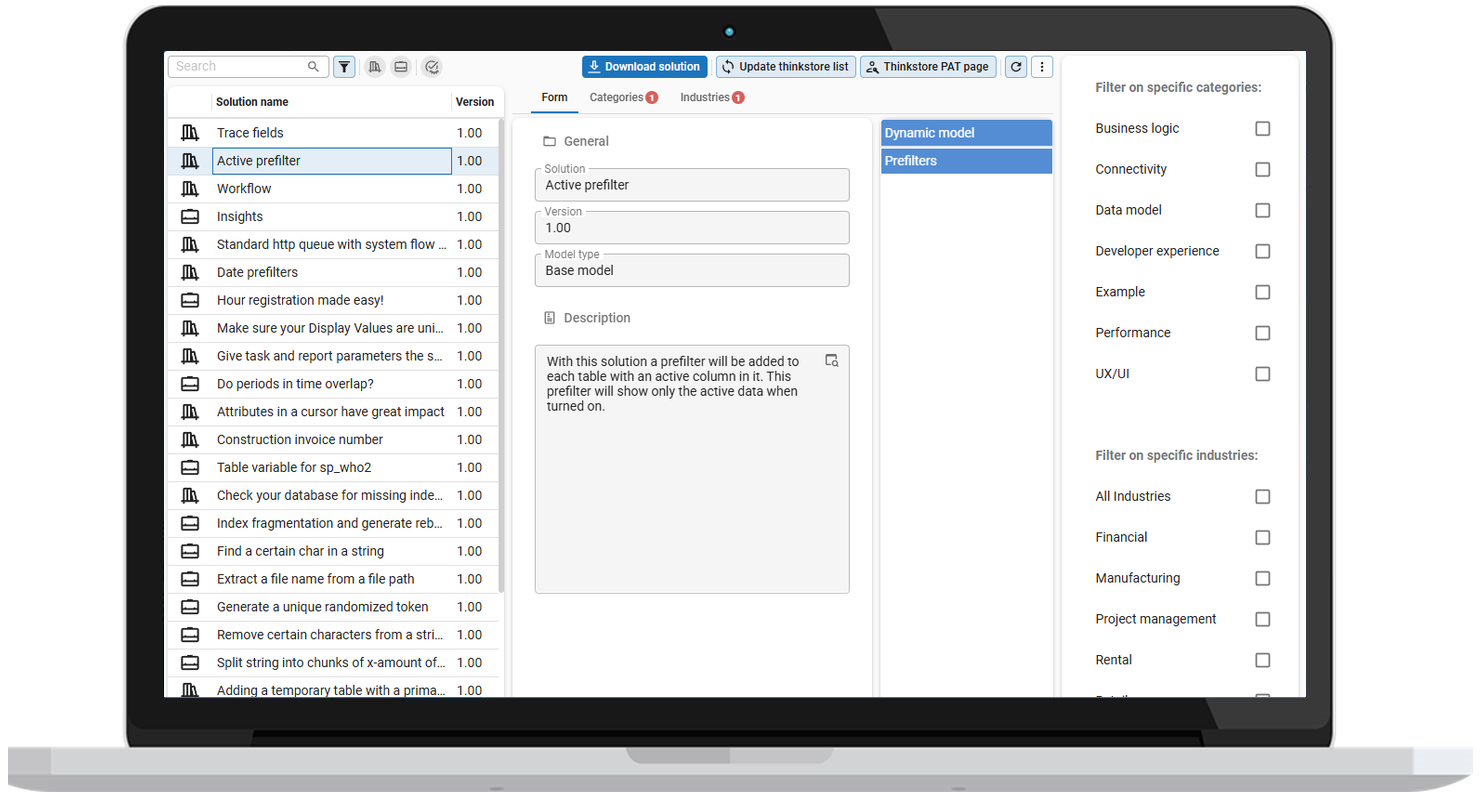 Ready-made solutions in the Thinkstore
If the solution you need cannot be created in the Software Factory and is not available in the Thinkstore, you can extend your model with dynamic modeling. This means including meta control procedures in the generation process to improve your model. Data modeling especially concerns your data model and user interfaces model that form a main theme throughout the application.
The following are examples of data modeling:
- Adding trace columns (added on/by, changed on/by) to all tables and display on a separate tab in the user interfaces.
- Add an update counter column to tables that are updated.
- Create indices on standard forms of the user interfaces
As soon as a meta procedure is added, the aspect is automatically added and requires no more maintenance if the model is modified or extended. SQL code must be programmed once for each metaprocedure and requires knowledge of the Software Factory metadata and its concepts.
User Interface
The user interface is also designed without programming. The design is flexible so that screens automatically adjust themselves to the various resolutions. By linking (self-designed) screen types to the subjects of your model, a user interface can quickly be developed for hundreds of objects.
The user interface is multilingual and contains possibilities for integrated Business Intelligence (pivot tables and graphs). In addition, graphical plans and geographic presentations are easy to integrate.
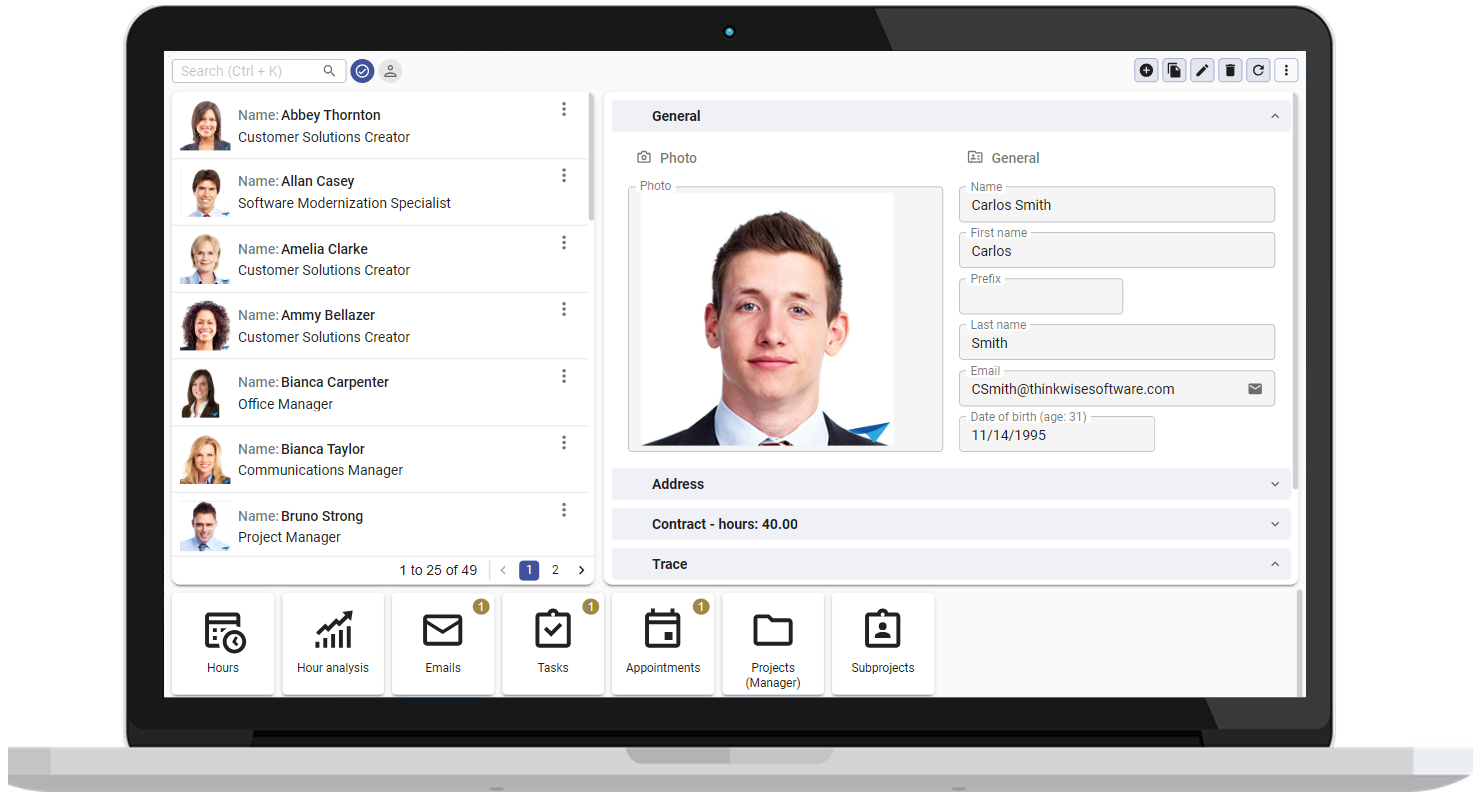 Application screen in the Universal user interface
Cubes
The Thinkwise user interfaces includes integrated business intelligence (cubes) functionality for presenting interactive pivot tables and graphs that make operational management information available.
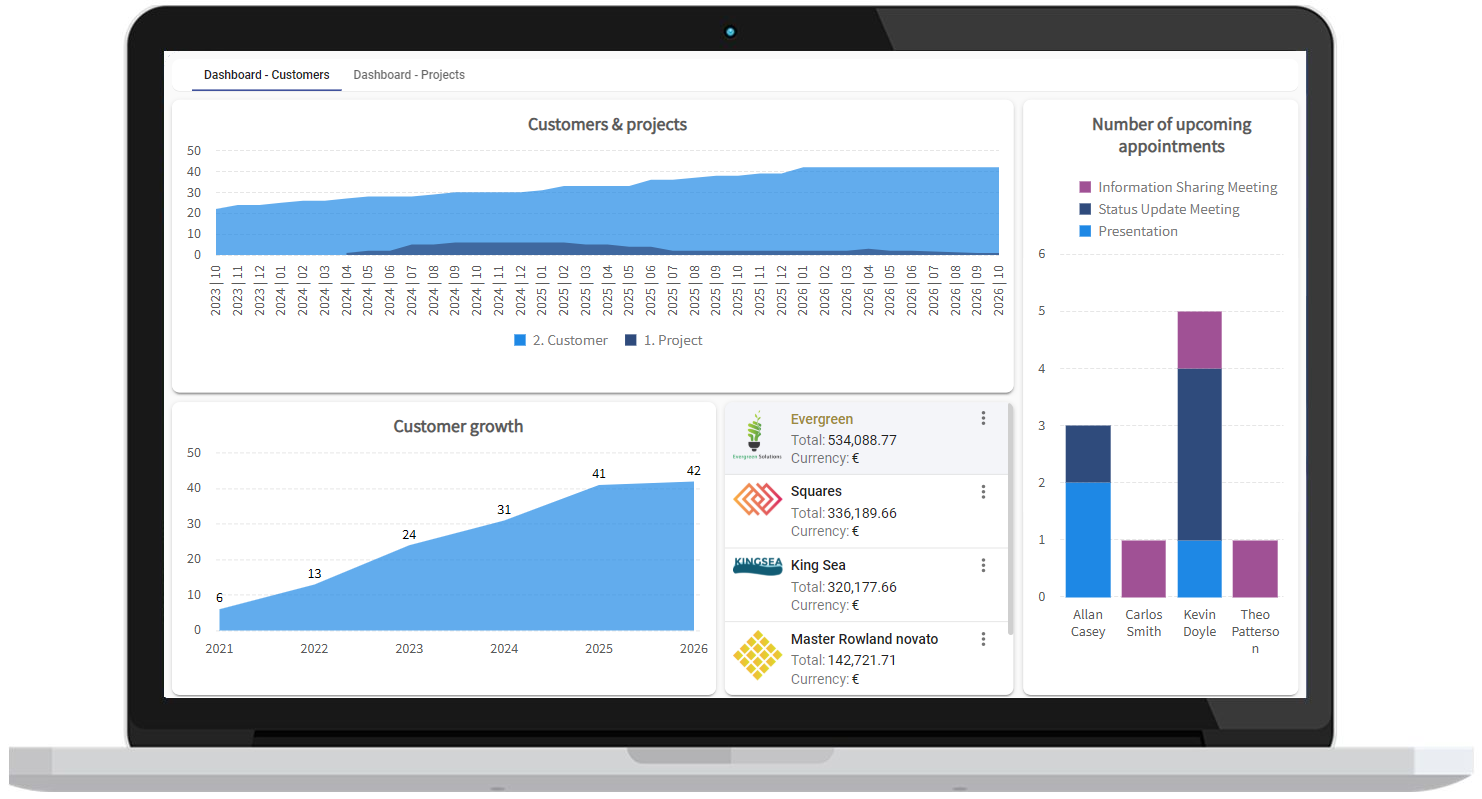 Dashboard with integrated charts
Themes
The theme (style) of the user interface is defined in the model. A theme determines the colors, fonts, and images that are used and is defined for all components of the user interface. .
Conditional layouts can be defined to adapt the user interface to different contexts, for grids, forms, tasks, reports and cubes.
Translations and localization
All objects in user interfaces, such as labels, buttons, tables, and columns, can be translated. Translation objects are automatically created for most new translatable objects. Each subject has its own Translation tab, but translations can also be managed from an overview of all translation objects.
Tooltips and help
Tooltips give users extra information right where they need it. They appear when users hover over user interface elements, such as fields, grid headers, and buttons, and you can add them to all translatable model objects.
For more extensive guidance, you can define help texts in the Software Factory for each process and object. The help text can be set up fully multilingual. The user interfaces are context-sensitive and immediately show the relevant part of the help text.
Process flows
End users are automatically guided through the application with the help of process flows, where the subsequent process steps that must be acted upon are presented to them. System flows are process flows that do not require user input. They can contain reusable subflows. Process flows are designed graphically, as seen below.
Scheduled process flows let applications run autonomously in the background without user interaction.
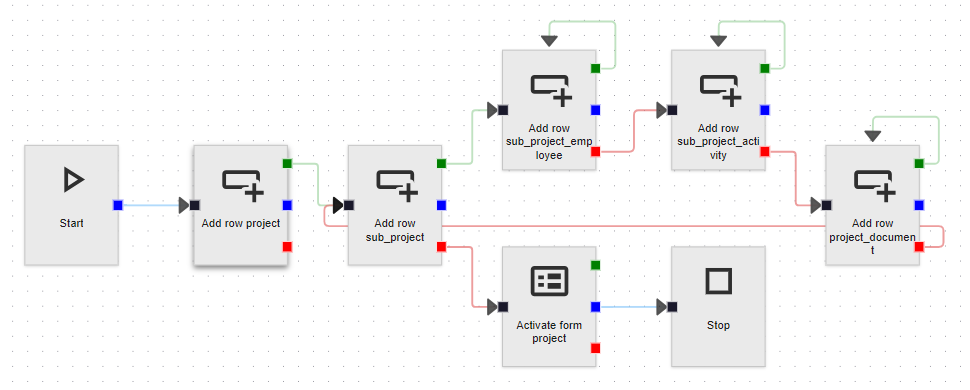 Process flow in the process flow modeler
Tasks
Batch tasks or interactive tasks can be modeled, for example, to execute a calculation or generate invoices. These tasks can be started automatically by a scheduler or manually via the user interfaces. Interactive tasks can request input from the user before they start.
Reports
For the generation of reports, a process flow can be configured, and a connection can be made to various reporting tools, such as DevExpress Reports, Crystal Reports, Microsoft Word, SQL Server Reports, and i-net Clear Reports. These reports can be viewed, printed, mailed, and exported to various formats automatically or via the user interfaces.
Customizing reports is possible with a parameter property in the Software Factory or by overriding the default report file in IAM.
Third-party integration
The Thinkwise Platform offers a wide range of integration options, allowing you to connect your application to virtually any third-party application, tool or service. You can use functional third-party integrations as well as third-party integrations for the DevOps Lifecycle.
In many cases, out-of-the-box integrations are available, such as components, controls, connectors, and message brokers. For all other integration needs, the platform provides generic connectors that allow you to connect to web services or APIs, databases, cloud services, and more.
Artificial intelligence
The Software Factory facilitates using Artificial Intelligence (AI) to support and improve your business processes.
- Large Language Models (LLMs) are trained to transform or predict text. Use these, for example, to summarize texts, set up a chat, or find related tickets. The Software Factory contains process actions with integrated LLMs that you can use in process flows. You can connect to OpenAI, Azure OpenAI, or any OpenAI-compatible provider, such as Anthropic (Claude) or a model that runs on your own infrastructure.
- Model Context Protocol (MCP) is an open standard that lets AI agents connect to your applications. Use it, for example, to analyze application data, automate repetitive tasks, or develop applications in the Software Factory. AI agents can only access the data and actions that users delegate to them through IAM.
- A large number of AI-powered enrichments and tasks is available to facilitate and speed up your development process. You can also create your own AI-powered enrichments.
Development and testing
The last phase of the project consists of programming and testing the business logic.
Development
Code templates are written according to the design specifications. This is the only component that is actually programmed. Templates are woven into the correct position in the business logic layer, based on the definitions in the model.
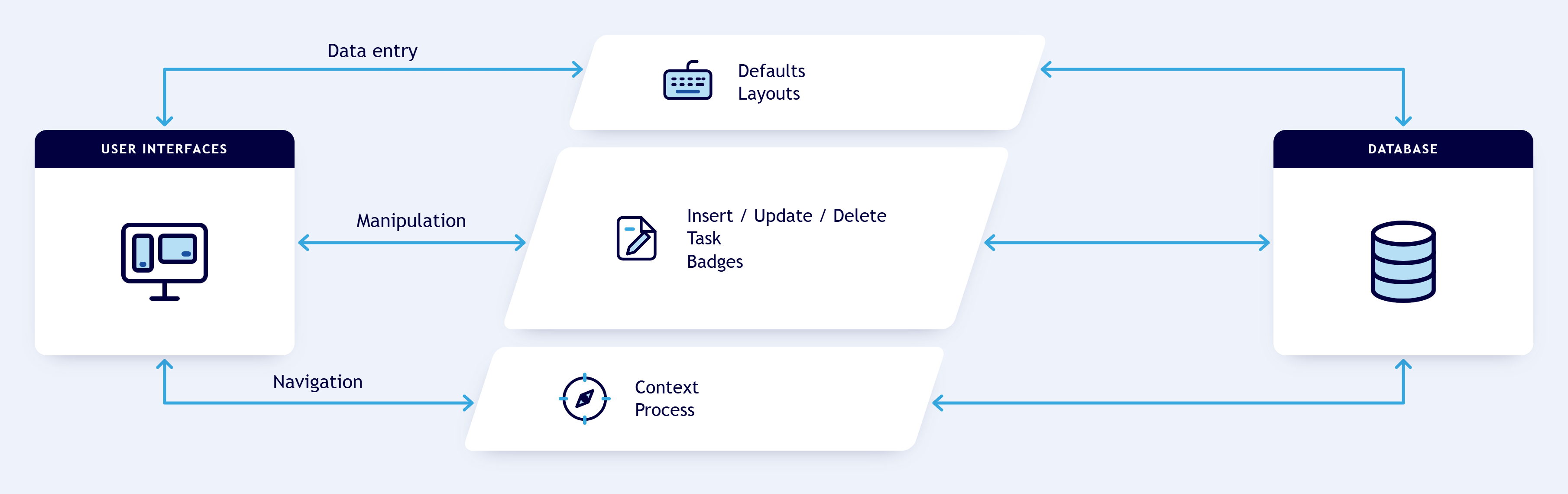 Architecture of the programmed business logic
Testing
The programmed templates can be tested automatically with unit tests. Smoke tests and process tests are available to test business rules/code. Manual testing is supported through manual test administration. All tests are stored in the Software Factory.
With the integrated test tooling, a test only needs to be specified once and can thereafter be executed automatically. This guarantees that existing functionality continues to work after additions and modifications.
-
Unit tests can be used to test individual business rules. Any data that is required for a unit test (mock data) can be specified as part of the unit test.
-
Smoke tests are preliminary tests to reveal simple failures severe enough to, for example, reject an upcoming software release. In the Software Factory, these are available to ensure a basic quality level of queries in your application.
-
Manual tests can be used to set up manual test scenarios with steps and test them in runs. Problems found can be documented in test findings.
-
End-to-end tests help you verify the complete flow of an application from the perspective of your users. They complement other quality measures such as branching and merging, code reviews, unit tests, smoke tests, and validations by providing confidence that the system works as intended in real-world scenarios. Where unit and integration tests focus on smaller components, end-to-end tests confirm that these components work together correctly.
Developer tools
Along with the development tools, Thinkwise also offers tools to analyze the model and convert it to an actual application. These tools can be found under the menus Models, Deployment, and Analysis.
Development management
The continued development of the model of an application takes place in the Software Factory through the use of models and branches. By performing a difference analysis, it is automatically determined what must be modified in the database and business logic. The data in the database is retained and will automatically be converted to the new structure.
DTAP
Usually a DTAP street is used during development. DTAP stands for the Development - Test - Acceptance - Production process which every version must pass. By working in branches and utilizing Runtime configurations, the Thinkwise Platform is extremely suitable for this.
Deployment automation (CI/CD)
Since all the creation and deployment jobs are performed by the Indicium Application Tier, it is possible to automate your entire deployment process. Automation supports the CI/CD automation processes in your organization. It allows you to update and test your application in the development environment, update acceptance environments, and prepare deployment packages to roll out to your production environments.
Working in teams
A model for an application can be split into one or more branches. This allows different teams and team members to work on the same application (within their own branch) without getting in each other's way.
Finally, the modifications and expansions of a branch are combined (merged). Conflicts can possibly occur during merging, but these are automatically detected by the Thinkwise Platform and presented to the developer.
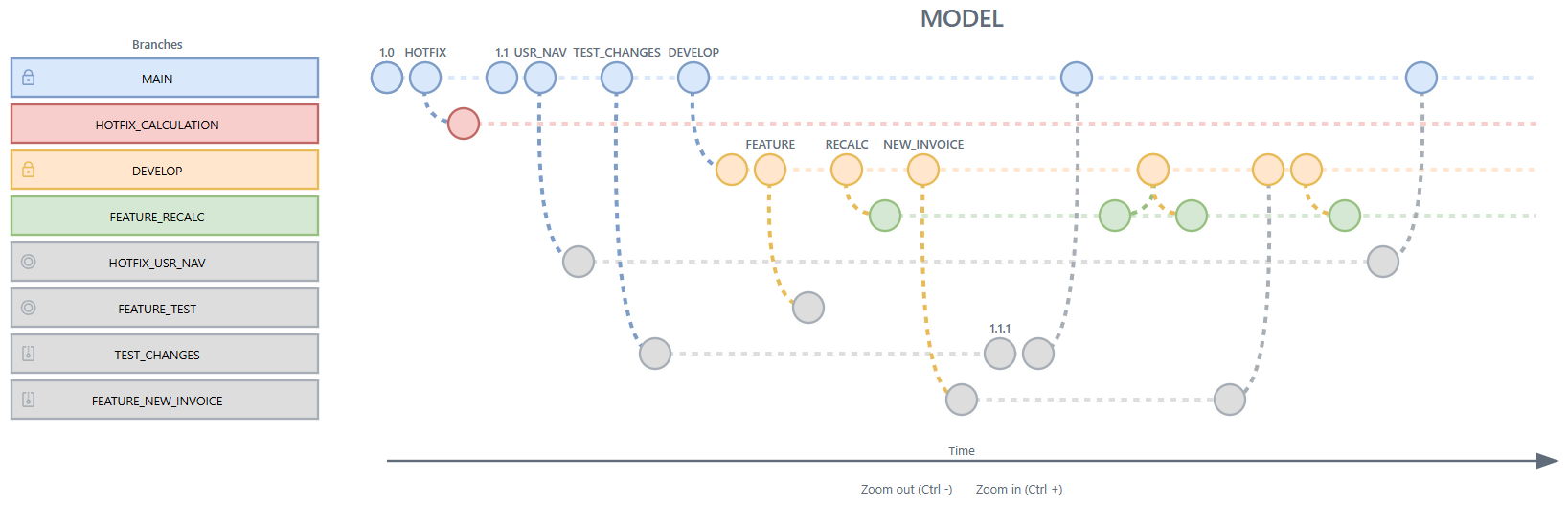 Branching and merging in a branch diagram
Quality control
The Quality Dashboard provides an overview of the quality of all models in the Software Factory.
The model quality is calculated based on:
- Model quality: the amount of validations with unsolved messages.
- Code quality: the control procedures that are in development and review per developer, the overall code reduction ratio, and the ratio comment/code.
- Test quality: the amount and success of unit tests and smoke tests.
- Role quality: how well roles are used.
Productivity
Function Point Analysis (FPA) is a method to measure the functional scope of an information system. FPA measures this functional scope by examining the functions and (logical) data collections that are relevant for users. The measurement unit is the function point (fp), and so the scope of a system is expressed in number of function points.
Function points are a good measure of the size of a system. The function point measurement unit can be used in several ways. An often-used application of FPA is the estimation of system development. The costs of developing a system are related to its size. The larger the system, the more expensive it will be. FPA can be used both for new development and for maintenance projects.
From previous experiences, it is known how many hours on average are needed to develop one function point. This defines the productivity. Size (number of function points) x productivity (required hours per function point) provides a basis for the project budget.
FPA is a objective method that does not require IT knowledge. With sufficient documentation, an FPA count for a system of 1000 development hours can be made in approximately 1 hour.
| Programming language | Hours per function point |
|---|---|
| Java | 10.6 |
| C# | 15.5 |
| SQL | 10.8 |
| ABAP | 19.9 |
| Other low-code platforms | 2.5 |
Market average for each technology
The Software Factory automatically counts the function points of an application. The count uses Easy Functional Sizing (ISO/IEC 25986), a standard advocated by Nesma, and the implementation is verified by AgileBenchmark. In addition, Thinkwise is a member of NESMA (Dutch Software Metrics Users Association).
| Thinkwise Customer | Hours per function point | Function points |
|---|---|---|
| Combifloat | 0.25 | 5536 |
| Foresight | 0.10 | 8938 |
| Laura Metaal | 0.14 | 15306 |
| Manter | 0.55 | 4604 |
| Paul Meijering | 0.26 | 14318 |
| Staay Food Group | 0.63 | 13144 |
| VDL | 0.56 | 22563 |
| WEC Lines | 0.31 | 6730 |
Function Point measurements of Thinkwise projects. The time spent in hours includes the design, development, and test phases of the applications. The mentioned function points are based on one user interface technology only.
Intelligent Application Manager
Through the Intelligent Application Manager, applications are provided with authentication, authorization, user administration, and user preferences in a simple and well-organized manner.
Users get one user interface with which they can obtain access to all applications to which they are authorized. These applications can even be located on different servers and RDBMSs. You can create users and user groups manually or import them from Active Directory.
Synchronization
To make a new or existing branch available as an application in IAM, you need to synchronize it with the Software Factory. This means that the blueprint is copied from the Software Factory to IAM. You can synchronize using direct database access or using the IAM API. Next, the authorization for this application can be set up via IAM.
Authorization and multi-tenancy
Authorization is linked to roles and user groups using Role Based Access Control. A user group contains several users, but a user may also be a member of several user groups. If required, membership is time-related, so access rights automatically expire after some time (for example, with temporary contracts). Authorization can be defined down to field level and on cross-sections of data.
Which data is accessible to an end user depends on the configuration of various actors and settings. To ensure all actors and settings are aligned, IAM offers security checks to assert the correct configuration.
In some scenarios, multi-tenancy can be a suitable solution for your organization. Tenants are isolated environments where administrators can work solely with their own users and user groups. Every user and user group can be a member of a single tenant. For Independent Software Vendors (ISVs), the term 'tenant' in a SaaS environment can usually be exchanged with 'customer'.
Login pages
You can customize the login user experience with for each web domain and tenant another login page and configurable login messages. With custom CSS styling, you can further enhance the appearance of the login pages.
Notifications
You can send different types of notifications to users, such as in-app notifications, e-mails, and push notifications. Push notifications can be sent to inform users of important events, such as task assignments or system alerts.
Authentication
Users and external parties can be authenticated via Personal Access Tokens (PATs), Client applications, Single Sign-on (OpenID), IAM authentication, Windows authentication, Kerberos, or the RDBMS.
Client applications can get limited API access through roles that users delegate to them.
Two-factor authentication using e-mail, SMS, or TOTP can be used as an extra layer of protection.
User preferences
You can configure user preferences, which define how the interface appears for each user. You can also determine the level of control a user has over the interface. This includes enabling the ability to collapse or expand menu items, resize screen elements or creating personal prefilters. User preferences are automatically stored when a user makes changes to the user interface. For example, splitter positions can be retained, column positions modified, and screen types changed.
Self-learning
IAM can analyze each user's way of working and provide suggestions to optimize the user experience. As an administrator, you can decide to apply each recommendation or not.
If a user frequently opens the customer screen and then filters on a customer, IAM can recommend opening the customer screen with the application. This will not immediately retrieve the customer details from the database but first show the filter screen. This leads to fewer user actions and a lower load for the server.
The analysis can also be a reason to provide the user with additional training.
Simulation to provide support
Because the user interfaces can differ for each user through authorization and user preferences, support employees can start an application using the settings and authorization of a specific user. This way, the support desk employee sees the same user interfaces and user preferences, and can provide better support to the user.
Logging and monitoring
Logging is available in IAM for the multiple purposes, such as:
- Authorization - All changes related to authorization are logged automatically. This helps maintain SOx compliance and meet important control guidelines.
- User monitoring - Logs are available for session analysis (for individual users or all users), two-factor authentication analysis (for individual users or all users), and OpenID analysis.
- Environment interaction monitoring - Environment interaction logs are available in 3-tier production environments. These logs help detect malfunctioning external services, disks and printers, application connectivity issues, and provider misconfigurations.
- Slow query log - The slow query log helps identify performance bottlenecks early on in development. The data values that are included in the log entries can be controlled. This helps to prevent sensitive data from being included, and to comply with the current privacy and security standards.
Maintenance
Several types of system flows for maintenance can be scheduled to run automatically:
- For IAM, you can schedule system flows to automatically clean up applications, branches, and models that are no longer in use.
- For IAM, more system flows are available for keeping your environment tidy.
- For IAM, the Software Factory, and your applications, a system flow is available to improve SQL Server performance when many indexes are fragmented, or statistics are outdated.
User interface
Thinkwise ensures that their user interfaces are available for future technologies so your applications automatically remain up-to-date. The current Thinkwise Universal user interface is a progressive user interface for all platforms.
A user interface does not need to be programmed. It is completely built during runtime on the basis of:
- Model
- contains the definition of the user interfaces.
- is defined in the Software Factory and synchronized with IAM.
- Authorization
- omits everything for which a user is not authorized.
- is defined in IAM.
- Theme
- consists of a color scheme, logos, etc., and can, for example, differ for users of a customer in a customer portal.
- is defined in the Software Factory and selected in IAM.
- User preferences
- provide an individual display of what a user is authorized for.
- are provided by the user interface and recorded in IAM.
The user interfaces are fully multilingual and communicate with the same business logic layer.
A summary of the functionality for each type of user interface is given below. A comprehensive description is given in the various manuals. The screen examples come from the Insights application that is used by Thinkwise for training purposes.
Universal UI
The Thinkwise Universal user interface provides a modern user experience on mobile devices, desktops, and the web. It has been designed, along with the Indicium service tier, with an emphasis on performance, security, and user experience.
This user interface is a Progressive Web App (PWA), built using React and following the Material Design guidelines, a comprehensive guide for visual, motion, and interaction design across platforms.
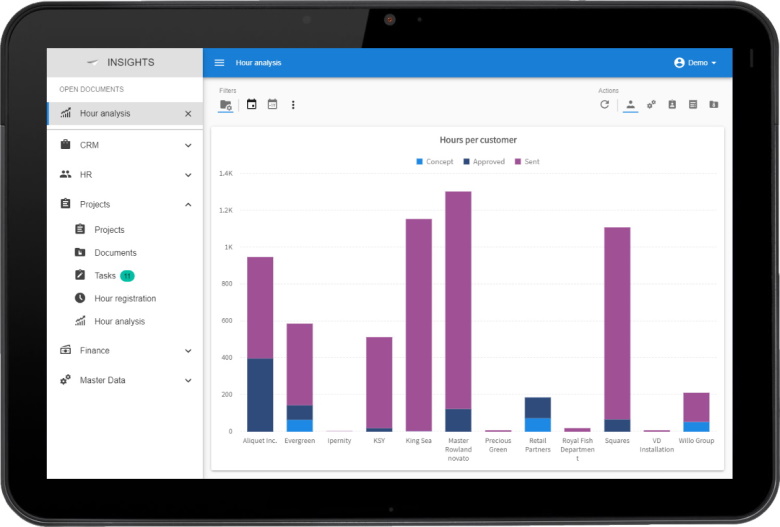 Example screen of the Universal user interface on a tablet
The Universal user interface is a fully responsive Web App running on any device. Your users get all the functionality of your application on every device, not just a limited set as is common with native apps. It automatically adapts to the device's characteristics, such as the screen size and input method. The Universal user interface is deployed as a web application but, being a Progressive Web App, can be easily installed onto the user's device like a native desktop or mobile app. It can use native device features, such as camera and location services.
The Universal user interface offers a wide range of default functionality, available through customizable button bars and overflow menus. Data can be visualized in hierarchically structured screens with multiple subjects using grids, forms, maps, schedulers, charts and pivot tables, document previews, dashboards, and more. It is also possible to integrate advanced graphic applications in your application.
A diverse set of search, filter, and sort options is available for users to find and organize their data effectively.
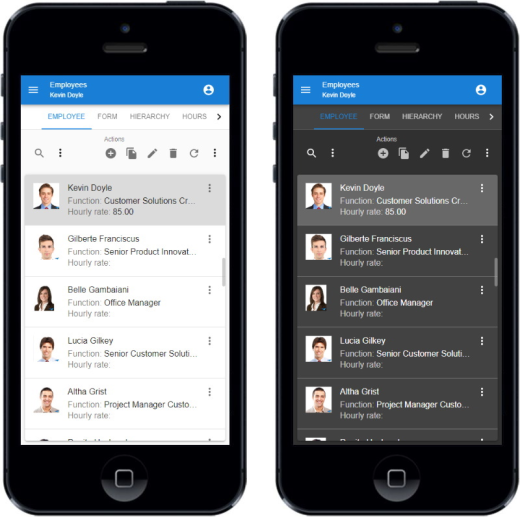 Example screen of the Universal user interface on a smartphone in a light and dark theme
Indicium Application Tier
The Thinkwise Indicium Application Tier is the central integration hub of the Thinkwise Platform.
It provides secure access to the data, processes, and business logic of Thinkwise applications through an open REST API.
The Indicium Application Tier can be used with the Universal user interface, and via the API.
Connectivity
The Thinkwise Indicium Application Tier provides a solution for all integration challenges. With automated processes and a range of default connectors, the Thinkwise Platform can connect to a wide range of third-party services and applications, like:
- Artificial Intelligence services (Bots, Virtual Assistants, Image recognition, AI agents through MCP)
- Big Data solutions (Search, Analytics, Internet of Things)
- Office integration (Exchange, Office 365, SharePoint)
- Third-party applications (custom user interfaces, financial applications, Power BI)
Third-party applications and services, in turn, can connect to Thinkwise applications with minimal effort using the provided webhooks and REST API. The Thinkwise Application Tier uses the OData protocol for its API, one of the most widely used standards for RESTful web services.
Here are a few examples:
Microsoft Graph solution
Thinkwise applications can synchronize events and e-mails with Microsoft 365 services using the Microsoft Graph solution.
Web services
SOAP and JSON/REST services can be called, for instance, to retrieve distances, postal codes, and CoC details. Furthermore, all data, processes, and business logic of Thinkwise applications is available through web services and can be used by other applications and services.
Maps
The user interfaces can visualize geographic data such as locations and routes on maps from various providers, such as Google Maps, MapQuest, and Here Maps.
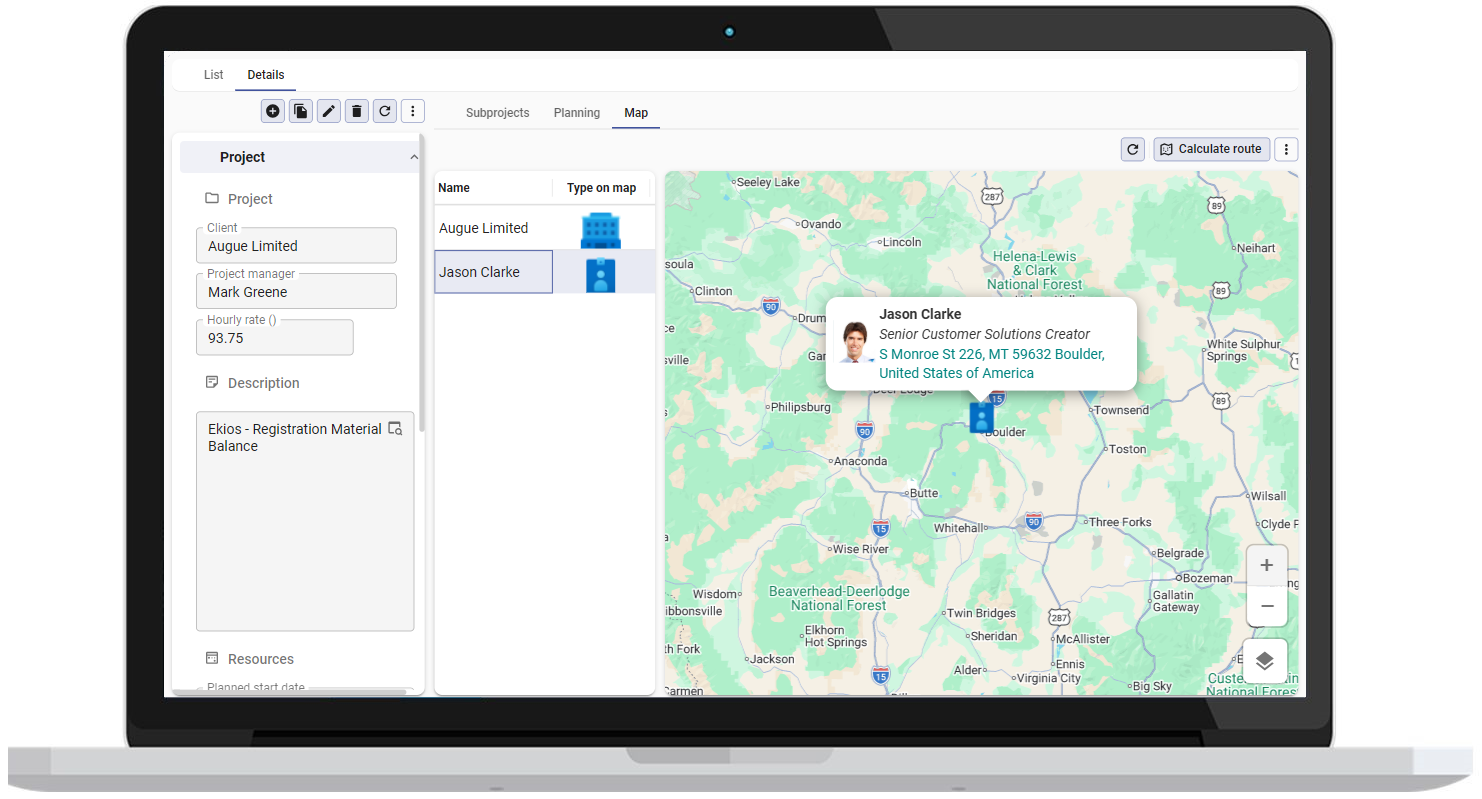 Map integration in an application
Security
The Thinkwise Platform is designed with security in mind, following the Security by Design principles. Its security is tested regularly, including through penetration tests. It provides controls to protect the confidentiality and integrity of information and to ensure availability to authorized users. Thinkwise is certified for ISO 27001 (information security) and ISO 9001 (quality management). The Thinkwise Platform supports different authentication protocols, like Personal Access Tokens (PATs), Single Sign-on (OpenID and ADFS), Client applications, and multi-factor authentication.
The Thinkwise Intelligent Application Manager provides role-based access control and entity-, row- and field-level authorization, while the Application Tier ensures that business rules are respected at all times, even when bulk importing data or when interfacing with third-party applications.
Scalability
The Thinkwise Platform is optimized for speed and scalability. The stateless Application Tier can easily be horizontally scaled for load balancing and failover purposes. This allows optimal use of the power of cloud platforms, such as Microsoft Azure, Amazon Web Services, Google Cloud, or IBM Cloud.
The Application Tier is developed with .NET, making it cross-platform and highly optimized for running in (Docker) containers.
Upcycler
With the Thinkwise Upcycler, a model can be derived from your existing legacy application and imported into the Software Factory. Depending on the legacy technology and the available metadata, the derived model already contains tables, columns, domains, controls, references, translations, screen types, and more.
The upcycle process consists of the following main steps:
- Extract the metadata from your legacy application.
- Run the upcycle. The Upcycler creates a model of your application in the Software Factory.
- Import the data from your legacy application.
- Enrich your application, for example with AI.
The Upcycler will also determine which parts of the legacy software are not used anymore and eliminate those parts automatically. Next to that, the remaining model can be enriched by analyzing the data combined with the best practices of Thinkwise.
If your legacy software did not enforce referential integrity, there may be inconsistencies in your data. The Upcycler will automatically detect any data inconsistencies, so these issues can be resolved immediately.
Because the data model has been derived from your legacy software, the Thinkwise Software Factory is able to automatically transform and import the data from your legacy application into your new Thinkwise application.
Ready-made Upcyclers are available for SQL Server, MySQL, DB2 for IBM i, Progress OpenEdge, PostgreSQL, Uniface, and Oracle. For other technologies, you can use the Generic Upcycler or create your own Upcycler.