2026.3
With Thinkwise Platform 2026.3, the Model Context Protocol (MCP) changes how you interact with your Thinkwise applications and their data.
MCP support was introduced as beta release in Thinkwise Platform 2026.2.12 and is generally available with this LTS release.
You can connect any MCP client, such as your preferred AI tool, to your business applications and the Software Factory
using the /mcp endpoint in Indicium.
Instead of navigating to the right screen and searching for data manually, you can ask your AI tool to find and analyze the data for you.
Adding data becomes easier too, because your AI tool can turn unstructured input, such as an email, document content, or a voice message,
into structured data in your database without any manual typing.
Because the MCP server is built into Indicium, you do not need any extra components, and you set up MCP and manage its access in the Intelligent Application Manager (IAM). To give AI tools and AI agents secure and granular access, follow our best practices for role-based access control, access delegation, and logging. MCP is freely available in development and test environments, so you can speed up development in the Software Factory and test MCP with end users. Using MCP in production requires an amended license agreement with Thinkwise, so contact your account manager for more information. To learn more, read our Community blogs Thinkwise Platform as MCP Server, Getting started with MCP, and MCP on the Software Factory.
You can also use MCP in the Software Factory, and together with our published skills, it significantly changes the way developers work. Your AI agent can take on tasks such as creating a data model, creating screen types, and setting up a Scheduler, so you can spend more time understanding, describing, and refining business needs. You can also hand over repetitive work while you review and decide, such as finally adding those missing unit tests for existing functionality. Unlike vibe coding, where AI leaves you with a mountain of generated code to maintain, your AI agent works with the model. This model-driven development and Technology-as-a-Service approach lets you deliver business value with as little code as possible.
The MQTT broker capabilities from Thinkwise Platform 2026.2 let you publish messages, and with this release, you can also subscribe to MQTT topics. A subscription listens to a topic on your message broker and starts a process flow every time a message arrives, whether it comes from a machine, a sensor, or another Thinkwise application. Your applications can now receive sensor data and machine status updates directly, enabling real-time interaction between the shop floor and your business applications.
With IAM on DB2 for IBM i, we take a major step toward running the entire Thinkwise Platform on IBM Power. We have already proven that it works, and we are now completing a dedicated Indicium distributable for IBM Power. You can then deploy Indicium and the Universal UI on a Red Hat Linux partition, on the same IBM Power machine that runs your DB2 databases.
The inline action bar is our answer to a long-standing and popular community idea: showing tasks on grid rows. We took this idea further, so you can now configure any action inline. Note that this is still a beta feature. We plan to improve the user experience and add support for card lists.
Besides MCP, developers also get a major upgrade to Model insight and the Thinkwise Workspace Listener for Linux and macOS. Thinkwise Deployment Center 4.0.0 is now also available for Linux, and you can use it to deploy IAM on DB2.
This release includes 19 community ideas, representing 367 votes.
Questions or suggestions about the release notes? Let us know in the Thinkwise Community!.
Contents
- Breaking
- Model Context Protocol (MCP) in the Thinkwise Platform
- Subscribe to an MQTT topic
- Support for DB2 for IBM i
- Intelligent Application Manager on DB2 for IBM i
- Data - Support for temporal tables in DB2
- Data - Exclude null values from unique index in DB2
- Business logic - Support for DYNAMIC RESULT SETS in DB2 procedures
- Business logic - Error handling for DB2 handlers, subroutines, and procedures
- Quality - Smoke tests now supported for DB2
- Enrichment - Support for data-driven enrichments for DB2
- New and changed in the Software Factory
- Models - AI-powered conversion of model code between database types
- Models - Finalized branches set to read-only
- Data - Removed case type setting for columns, task parameters, and report parameters
- Data - Domain element database value now supports 100 characters
- User Interface - Inline action bar
- User Interface - Add subtitles to open documents
- User Interface - Show or hide header and footer in modal screens
- User Interface - Set 'IN' or 'NOT IN' as default filter operator
- User Interface - Support for 'Help' pop-up in the Universal UI
- User Interface - Updated default action order for action bars
- User Interface - Removed 'Values' tab from cube view sort settings
- Processes - Process action 'Activate search'
- Processes - Software Factory now adheres to the extended property 'AllowProcessFlowsInLookupDialogs'
- Business logic - Updated column order in 'Functionality'
- Quality - Description column in Code review changes
- Access Control - Default user groups for the Software Factory
- Deployment - Application database name in post-synchronization code
- Deployment - Error details on database connection failure
- Deployment - Updated source code generation and execution
- Deployment - Improved layout of Deployment screens
- Integration & AI - Use relative paths for file references
- Integration & AI - Added 'Timeout' setting for web connection endpoints
- Enrichment - Re-generate model updates for enrichment runs
- Analysis - Changed function point calculation to Easy Functional Sizing (ISO/IEC 25986)
- Maintenance - Toggle to show query details for single-RDBMS-type models
- Deployment from IAM
- Deployment - Synchronize to IAM using the API
- Deployment - Added 'Synchronize to IAM' functionality to 'Creation' screen
- Deployment - Warning when generated code no longer matches the model
- Deployment - Download source code folder and synchronization script
- Database servers - Install an application database as an administrator
- Database servers - Upgrade an application database directly from IAM
- New and changed in the Intelligent Application Manager
- Fixed
- Data model changes
Breaking
Check CI/CD invocation of 'Verify' for 'Synchronize to IAM'
Software FactoryAs a result of adding Synchronize to IAM using the API, a breaking change has been introduced.
The task parameter Verify has been removed from the task Synchronize to IAM because it is no longer possible to disable it.
Verification is now always performed when synchronizing to IAM. This change affects synchronization using CI/CD. Check your CI/CD pipelines to ensure they are compatible with this change.
Synchronization using the Software Factory is not affected, as the parameter was already hidden.
Check CI/CD invocation of 'Execute all creation steps' task
Software FactoryAs a result of updates to the synchronization to IAM, significant changes have been made to synchronization parameters and their order in the task. This includes adding 'Synchronize to IAM' functionality to the 'Creation' screen.
Synchronization parameters have been added, renamed, or moved. If you use CI/CD to invoke this task, upgrading to this version introduces several breaking changes.
- Update parameter order for synchronization parameters - The parameters
run_sync,sync_run_type, andsync_target_iam_idare now placed beforeexecute_unit_testsandexecute_smoke_test. The parameters have been reordered between Thinkwise Platform version 2026.2.13 and 2026.2.14. Update the order of synchronization parameters in your CI/CD calls accordingly. - Update CI/CD invocation to include all synchronization parameters - Calling the synchronization task directly from the database without
including all synchronization parameters may now result in unintended behavior.
Always include all synchronization parameters in your CI/CD calls.
Pass
nullfor any synchronization parameters that are not applicable to your CI/CD call.
Use the examples below for a correct invocation:
Example: CI/CD invocation of 'Execute all creation steps' task using JSON
POST [indicium]/iam/sf/add_job_to_do_complete_creation
{
    "model_id": "MY_MODEL",
    "branch_id": "1.12",
    "execute_complete_creation": 0,
    "model_vrs_name": "1.13",
    "generate_definition": true,
    "generate_definition_error_handling": 1,
    "validate_definition": true,
    "validate_definition_error_handling": 3,
    "generate_source_code": true,
    "upgrade_method": 0,
    "write_code_files": false,
    "write_prog_objects": false,
    "execute_source_code": false,
    "runtime_configuration_id": "default",
    "execute_source_code_error_handling": 0,
    "run_sync": true,
    "sync_run_type": 0,
    "sync_target_iam_id": 1,
    "execute_unit_tests": false,
    "execute_smoke_test": false,
    "debug": 1
}
Example: CI/CD invocation of 'Execute all creation steps' task using SQL
declare @job_id id;

exec dbo.task_add_job_to_do_complete_creation
      @model_id                           = 'MY_MODEL',
      @branch_id                          = '1.12',
      @execute_complete_creation          = 0,
      @model_vrs_name                     = '1.13',
      @generate_definition                = 1,
      @generate_definition_error_handling = 1,
      @validate_definition                = 1,
      @validate_definition_error_handling = 3,
      @generate_source_code               = 1,
      @upgrade_method                     = 0,
      @write_code_files                   = 0,
      @write_prog_objects                 = 0,
      @execute_source_code                = 0,
      @runtime_configuration_id           = null,
      @execute_source_code_error_handling = null,
      @run_sync                           = 1,
      @sync_run_type                      = 0,
      @sync_target_iam_id                 = 1,
      @execute_unit_tests                 = 0,
      @execute_smoke_test                 = 0,
      @debug                              = 0,
      @job_id                             = @job_id output;
Important: Redeploy required objects to DB2 application schemas
Software Factory DB2From Thinkwise Platform 2026.3, Indicium requires the following functions and procedures on the schema of DB2 applications:
tsf_userandtsf_original_login- If these are not updated, user authorization does not work as expected.tsf_set_session_variableandtsf_clear_session_variables- If one of these is missing, Indicium cannot open connections to the application database.
The DB2_DB base model adds these objects to your work model.
You still need to deploy them to your application schema.
Deploy these objects directly after upgrading to Thinkwise Platform version 2026.3. Without these steps, the upgrade to 2026.3 does not succeed for DB2 models.
To deploy the objects:
- Go to menu Business Logic > Functionality.
- Deactivate the prefilter Hide generated.
- Search for the object name, see the list above.
- Deploy the object to your application on the tab Deploy.
Alternatively, upgrade the DB2 applications. The upgrade applies these objects automatically.
Moved trigger code group for DB2 models
Software Factory DB2Previously, INSTEAD OF triggers were part of the TRIGGERS code group for DB2 models.
This code group has been moved to the new code group INSTEAD_OF_TRIGGERS, aligning it with other supported RDBMS types.
This change helps prevent possible issues when using multiple RDBMS types in a model.
When you upgrade, the upgrade script automatically adds the new code group to models that use DB2 and have INSTEAD OF triggers.
The upgrade script also updates the code group of control procedures that have statically assigned templates.
The upgrade script cannot automatically modify the code group from TRIGGERS to INSTEAD_OF_TRIGGERS
for control procedures that use SQL assignments in combination with the TRIGGERS code group.
Modify the code group of these control procedures manually and inspect the control procedure code to make any necessary adjustments.
Model Context Protocol (MCP) in the Thinkwise Platform
In the Thinkwise Platform 2026.2.12 release,
support for the Model Context Protocol (MCP) was added.
This allows you to connect MCP clients to your Thinkwise application using the /mcp endpoint in Indicium.
MCP is freely available in develop and test environments, allowing you to accelerate development in the Software Factory and test MCP with end users. However, using MCP for production environments requires an amended license agreement with Thinkwise, as agentic AI via MCP typically automates and replaces human user interaction. Contact your account manager for more information.
Once set up, AI agents can perform various actions in your application, such as analyzing data and automating repetitive tasks. Additionally, connecting an MCP client allows developers to use AI agents when developing applications in the Software Factory. This includes tasks such as creating a data model, creating screen types, and setting up a Scheduler. For more information, see Set up MCP and use generative AI to develop an application.
MCP clients can authenticate using OAuth (via Client Applications with delegated roles) or PAT authentication, depending on what the client supports.
You can read more about MCP in our blog posts on the Community, which are regularly updated.
Manage API access for a client application
new Intelligent Application ManagerPreviously, for API access for a client application you could either grant No access or Full access. To give you more control, you can now delegate roles to client applications to limit their API access. This is useful for managing an MCP client's access to the Thinkwise Platform.
The following prerequisites must be met to use access delegation for a client application:
- The user must be allowed to delegate access. To set this up, go to the menu Authorization > Users > tab Form > group Access delegation and select the checkbox Allow access delegation.
- The application must be allowed to delegate access. To set this up, go to the menu Authorization > Applications > tab Form > group Settings and select the checkbox Allow access delegation.
To set up limited access for a client application, go to the menu Client apps > Client applications > tab Form > group Access. In the field API access, select Limited access from the drop-down list. For more information on how to set up a client application for access delegation, see User-delegated API access (OpenID).
Make roles available for delegation
new Intelligent Application ManagerYou could already create roles in the Software Factory and assign them to user groups. Now you can use these roles to manage client application access as well.
To make roles available for delegation, go to the menu Authorization > Applications > tab Authorization settings > tab Access delegation roles. This tab was previously named tab Personal access token roles and has been renamed. Select the checkbox Available for delegation for each role you want to make available. These roles can be assigned to both Personal Access Tokens (PATs) and client applications.
Once you have set up limited access, the tab Access delegation roles is added to the screen. You can select whether each role is:
- Enabled - This role is available for delegation to the client application. The client application can request this role, and the user can select it in the consent screen.
- Required - This role is required for delegation to the client application. The client application must always request this role. The user cannot deselect this role in the consent screen, but can still deny access entirely.
When a client application with limited access requests access, it must request scopes.
These should be requested in the format {application alias}/{role id}.
The supported scopes are the roles that you marked available in Access delegation roles for the client application.
These can be found at https://<base_url>/indicium/.well-known/openid-configuration.
The scopes that are requested by the client application are shown to the user in the consent screen. The user can select which of these roles to delegate.
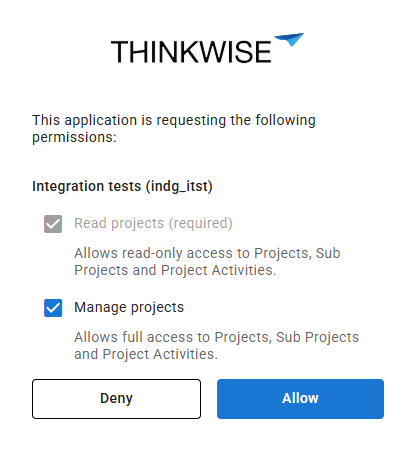 Users can allow or deny access to a client application using the consent screen
The following settings have also been renamed as part of this update:
- Default allow PAT is renamed to Default allow access delegation (menu Authorization > Tenants > tab Form). This allows users to manage access delegations by default within a tenant.
- Allow personal access token creation is renamed to Allow PAT management. This allows users to create, update, and delete PATs.
Finally, the Create IAM user and Update IAM user process actions now also include Allow access delegation as an input field. If no value is set for this input field, the value of Allow PAT management is used to preserve the behavior of existing integrations. The OpenID user template has been updated as well to include this setting.
Track and trace delegated access
new Software FactoryFor each branch in the Software Factory, you can decide to allow a PAT or client application to edit it via delegated access on behalf of a developer. This gives you control over which branches can be edited via delegated access, such as MCP.
You can find the checkbox Allow delegated mutations in the following locations:
- menu Model overview > Branches > Form.
- When you create a new branch via the menu Models > Switch branch.
You can also see whether a record was changed through delegated access, such as a PAT or an AI agent with the correct permissions. The trace fields now include a Modified by delegated access checkbox. It is selected when the last insert or update on a record was made via delegated access rather than directly by a user. Any manual change to the record clears the checkbox.
Lastly, the session variable tsf_is_delegated_request has been added to Indicium in 2026.2.13.
The variable indicates whether a request is authenticated using access delegation roles.
It has the following possible values:
1- The request is authenticated via a Client Application or a PAT that is scoped using access delegation roles.0- The request is authenticated via any other method, including a Client Application configured with Full access.
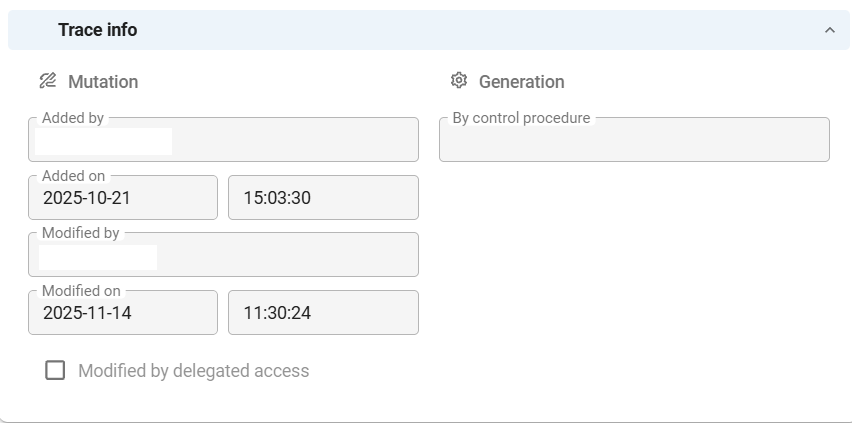 The 'Modified by delegated access' checkbox in the trace fields
Subscribe to an MQTT topic
new Software FactoryThe Thinkwise Platform 2026.2 release introduced the ability to set up message brokers in the Software Factory to publish messages using a process flow.
With this release, you can also set up subscriptions for message brokers. A subscription listens to a topic on the same message broker you use to publish messages, and reacts to messages published to that topic by any system, including other Thinkwise applications.
Subscriptions are more powerful than one-way message publishing, as they allow your application to react to events in real-time. A subscription continuously listens to an MQTT topic and starts a process flow every time a message is received on that topic. The process flow must be a system flow, since they are not started by a specific user and have no way to report back to Universal. Parts of the received message, such as the Payload or a User property, are mapped to variables of the process flow. This makes the value available for use throughout the process flow.
To set up a message broker, see Set up a message broker.
Enable MQTT subscriptions in Indicium
IndiciumBy default, MQTT subscriptions are disabled in Indicium. This is done to prevent multiple instances of Indicium from competing for the same subscriptions.
To enable subscriptions, add the following to one Indicium instance's appsettings.json:
"Agent": {
  "Enabled": true,
  "MessageBroker": {
    "MQTT": {
      "SubscriptionsEnabled": true
    }
  }
}
Create a process flow for the subscription
Before adding a subscription, create a process flow that handles the incoming messages from the subscription in the Software Factory. Parts of the received message, such as the payload, a topic level, or a user property, can be stored in process variables. You can then use these process variables in subsequent actions within the process flow to perform tasks based on the received message. For more information, see Create a new process flow in the Thinkwise documentation.
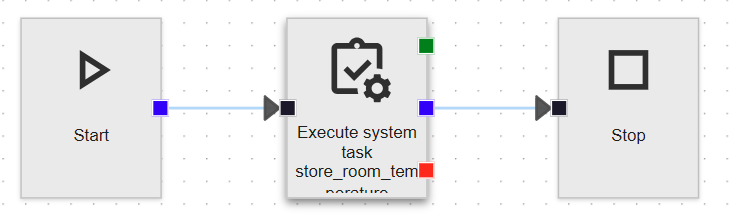 Example: process flow stores the received room temperature
Add a subscription
After creating the process flow, go to the menu Integration & AI > Message brokers > tab Subscription and add a new subscription.
Configure the following settings for the subscription:
- Subscription - The name of the subscription.
- Process flow - Select the process flow that should be triggered when a message is received on the specified topic. This field becomes read-only as soon as the subscription has one or more process variable mappings.
- Topic filter - The topic the subscription should listen to.
You can use the MQTT wildcards
+for a single topic level and#for the remaining levels, and the prefix$share/<group>/for a shared subscription. In addition, you can add a placeholder such as{room}for a topic level whose value you want to read into a process flow variable. - Maximum QoS level:
- 0 - At-most-once-delivery - The message is delivered at most once, and delivery is not guaranteed. This is the fastest level and is suited for fire-and-forget scenarios where occasional message loss is acceptable, such as frequent temperature updates.
- 1 - At-least-once-delivery - The message is delivered at least once, but may be delivered multiple times if acknowledgments are lost. This level provides a balance between speed and reliability.
- 2 - Exactly-once-delivery - The message is delivered exactly once by using a four-step handshake process. This is the slowest level, but ensures that messages are not duplicated or lost.
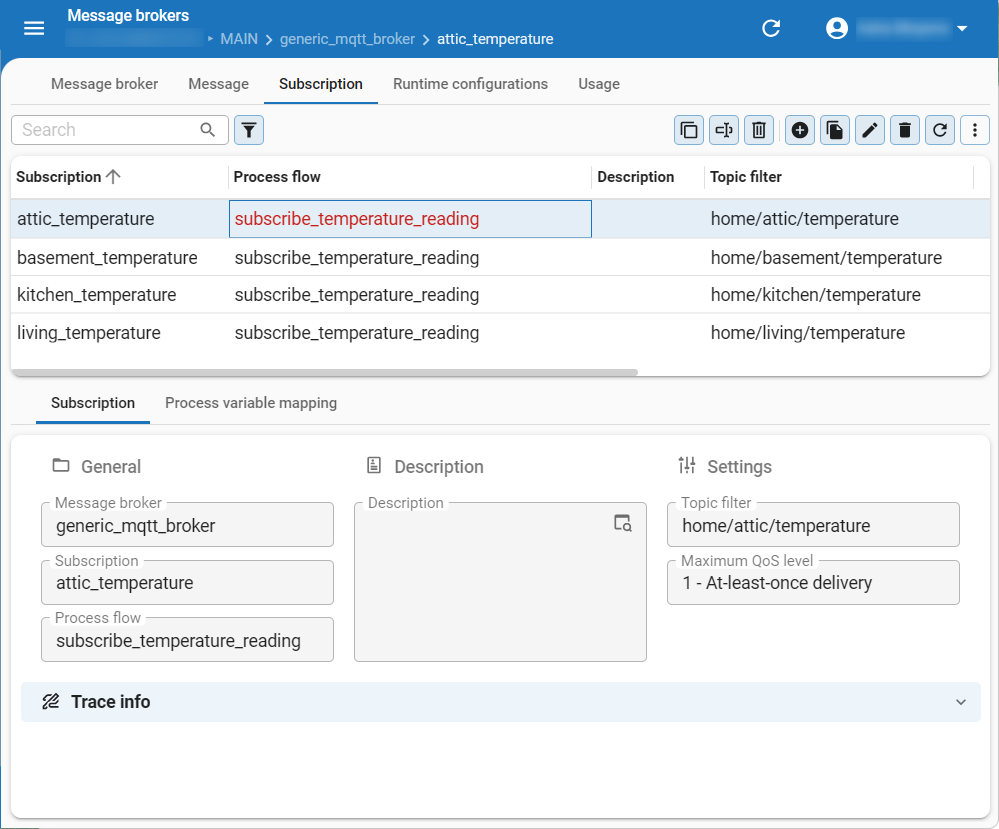 Add a subscription for a message broker
Map process flow variables
After you add a subscription, map the parts of the received message to the process variables of the process flow. You can map each process variable once per subscription. This ensures that the data received from the subscription is correctly routed to the corresponding process flow variables.
To do this, go to the tab Process variable mapping and Add a new process variable mapping.
Configure the following settings:
- Process variable - The name of the process flow variable to map.
- Retrieve value from - Specify where to retrieve the value from, for example the Topic parameter or the Payload.
- Topic parameter - If you selected Topic parameter as the source, specify the name of the parameter.
For example,
home/{room}/temperatureif you want to extract theroomparameter from the topic. - Apply JSON path - If you selected Payload as the source, specify the JSON path to extract the value.
For example,
$.valueto extract thevaluefield from the JSON payload.
- Topic parameter - If you selected Topic parameter as the source, specify the name of the parameter.
For example,
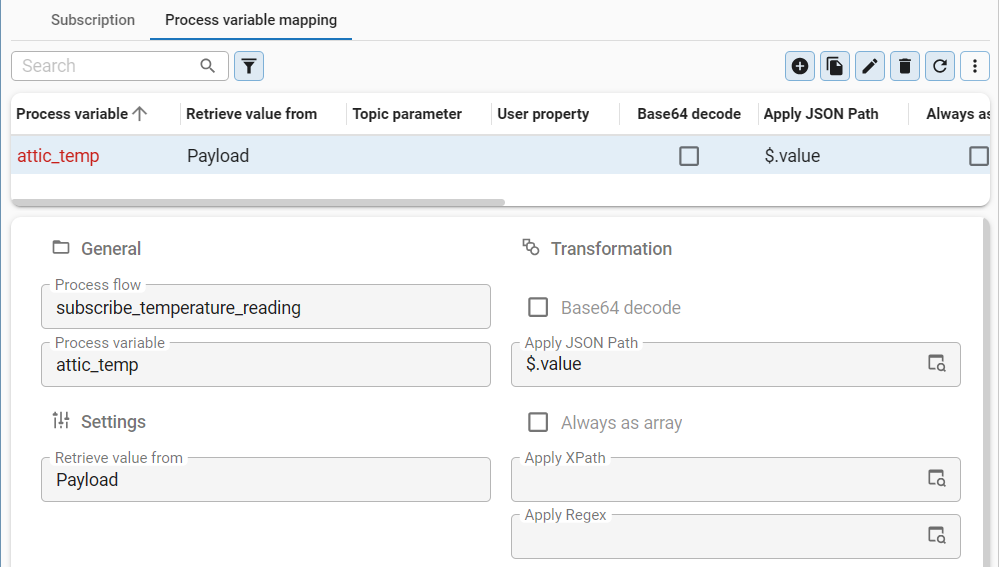 Map process flow variables
Example: Subscribe to temperature sensor readings
Example: Subscribe to temperature sensor readings
A building has temperature sensors that publish their readings to topics such as home/kitchen/temperature and home/office/temperature.
Each sensor publishes a payload in the form {"value": 21.5}.
Create the process flow Process temperature reading with the process variables room and temperature.
Add a subscription with the following settings:
- Subscription -
temperature_readings - Process flow -
Process temperature reading - Topic filter -
home/{room}/temperature - Maximum QoS level - 1 - At-least-once-delivery
Add the following process variable mappings for this subscription:
| Process variable | Retrieve value from | Topic parameter / JSON path |
|---|---|---|
room | Topic parameter | room, filled in automatically based on the placeholder in the Topic filter |
temperature | Payload | $.value |
When a sensor publishes a reading to home/kitchen/temperature,
the process flow Process temperature reading is started with room set to kitchen and temperature set to 21.5.
A second subscription on the same message broker shows the remaining Retrieve value from options.
Its Topic filter, home/{room}/{device}/status, has two placeholders: room and device.
Its process variable mappings include:
- The device status from the Payload, using the JSON path
$.status. - The firmware version from the User property
firmware. - The topic the message arrived on, using Actual topic.
Support for DB2 for IBM i
Support for DB2 for IBM i is something we have worked on across several releases. With this release, the Intelligent Application Manager can run on DB2 for IBM i.
This release also brings DB2 closer to the other supported database types, with support for temporal tables, smoke tests, and data-driven enrichments, among others. In future releases, we plan to expand support for DB2 for IBM i to allow for full-stack deployment of the Thinkwise Platform.
Upgrading to this version requires action for DB2 applications. See Important: Redeploy required objects to DB2 application schemas and Moved trigger code group for DB2 models.
Intelligent Application Manager on DB2 for IBM i
new Intelligent Application Manager DB2You can now deploy the Intelligent Application Manager (IAM) on DB2 for IBM i. This lets you run your environments fully on IBM hardware. Deploying IAM on DB2 for IBM i requires IBM i version 7.5.
To support IAM on DB2, a few size limits apply. In most cases, these limits will not affect your application:
- Icon and theme background data can be up to 10 MB.
- Report data can be up to 100 MB.
- Body and help texts, for example for email templates, can be up to 10 MB.
- The default value query for process variables can be up to 1 MB.
Data - Support for temporal tables in DB2
new DB2You can now enable system versioning for DB2 tables, extending a feature previously available only for SQL Server. System versioning automatically tracks the history of data changes, making it easier to audit changes, ensure compliance, and recover previous data.
To set up system versioning for a DB2 table, select the checkbox System versioning in menu Data > Data model > tab Tables > tab Form.
- DB2 does not have a Retention period.
- To use temporal tables in DB2, the pool user executing the upgrade script must have authorization for the
QIBM_DB_GENCOL_OVERRIDEfunction in DB2. For more information, see Overriding system generation column values in the IBM documentation.
Data - Exclude null values from unique index in DB2
new DB2When you create a unique index on a DB2 database, the index considers null as a unique value by default. This means only one record with a null value can exist in the table.
You can now exclude null values from the unique index for DB2 by
selecting the checkboxes Unique and Exclude null values (menu Data > Data model > tab Tables > tab Indexes).
Enabling these settings creates the index using UNIQUE WHERE NOT NULL, and nulls are no longer enforced for uniqueness.
These settings were already available for other RDBMS types.
Business logic - Support for DYNAMIC RESULT SETS in DB2 procedures
new DB2For a procedure header, DB2 requires a DYNAMIC RESULT SETS and a value equal to the maximum number of returned result sets before it can return a result.
For example, to return rows from customer_table as a single query result in a procedure, the header must include DYNAMIC RESULT SETS 1.
These options can now be configured in the Software Factory for DB2 procedures. To do this, go to Business logic > Subroutines (procedures) > Subroutine options and select DYNAMIC RESULT SETS. Then, in the field Value, enter the maximum number of returned result sets.
Business logic - Error handling for DB2 handlers, subroutines, and procedures
changeError handling is now available for DB2 handlers, subroutines, and procedures.
As a result, tsf_send_message is now included consistently.
Quality - Smoke tests now supported for DB2
newSmoke tests (menu Quality > Smoke tests) are now supported for DB2 models, in addition to SQL Server, Oracle, and PostgreSQL.
Enrichment - Support for data-driven enrichments for DB2
new DB2Support has been added for data-driven enrichments in DB2 models. To create a data-driven enrichment, select the checkbox Data driven (menu Enrichments > Model enrichments > tab Maintenance > tab Enrichment > tab Form). After selecting the checkbox, select a RDBMS type from the drop-down list. The selected RDBMS type determines on which environment the enrichment will be executed.
New and changed in the Software Factory
Models - AI-powered conversion of model code between database types
newYou can now convert model code and queries from one database type to another using generative AI. This speeds up adding a new database type to an existing model, building on the multi RDBMS support released in Thinkwise Platform 2026.2. These tasks become available when you have added two or more database types to your model.
You can convert code in a single template or for all code in a model at once.
To convert a single template, execute the task Convert template code (menu Business Logic > Functionality > Templates). Provide a source and target database type and a name for the new template. After conversion, assign the new template to program objects manually. For more information, see Assign the template.
To convert all code in a model at once, execute the task Convert code to RDBMS dialect (menu Models > Model overview > Branches > tab General settings > tab RDBMS types). In the task pop-up, select a Source RDBMS type and Target RDBMS type. Then, choose which logic concepts to convert by selecting the relevant checkboxes.
The conversion runs as a mass conversion enrichment in the background. You can review the generated code while the task is running. Verify the generated code before using it in production or continuing development, as the code is AI-generated and may contain mistakes.
For each logic concept, the conversion produces the following output:
- Prefilters get new query entries for the target database type.
- Control procedures get a new template for the target type. The template is assigned to the corresponding program objects where possible, and the control procedure is moved to review.
Lastly, the enrichment Mass convert the code from a source RDBMS type to a target RDBMS type is now also available in the menu Enrichments > Model enrichments.
The task runs only once per target database type to avoid conflicts from repeated conversions.
To run it again for the same target, remove the tags it added to converted control procedures
(for example, AUTO_CONVERTED_TO_DB2FORI for DB2 or AUTO_CONVERTED_TO_SQLSERVER for SQL Server).
For more control over individual results, use the task Convert template code instead.
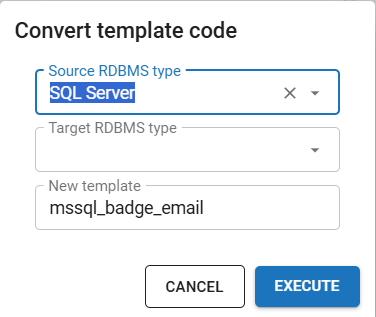 Convert template code task pop-up
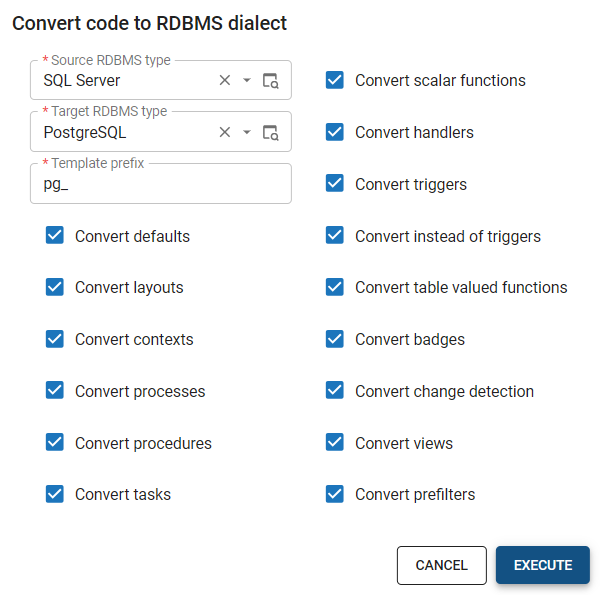 Convert code to RDBMS dialect task pop-up
Models - Finalized branches set to read-only
Community idea changeYou can choose from several merge strategies when merging a branch in the Software Factory. If you select Finalize branch, cannot be merged again, the branch would not be able to be merged again, but it could still be modified by users in the Software Factory. The finalized branch is now set to read-only for all users in the Software Factory. This prevents any further development or accidental changes on the branch.
Data - Removed case type setting for columns, task parameters, and report parameters
changePreviously, you could set the Case type to determine the capitalization of text for individual columns, task parameters, and report parameters. This capability has been removed to keep the case type defined in a single place and reduce the risk of inconsistencies. You can still define the Case type for a domain.
When upgrading to this version, the existing case type settings for individual columns, task parameters, and report parameters are migrated to new domains.
Data - Domain element database value now supports 100 characters
changePreviously, domain element database values were limited to 25 characters. You can now enter up to 100 characters, the same length as the element ID. This allows for the database value to match the element ID exactly, if desired.
User Interface - Inline action bar
beta Community idea newPreviously, action bars could only be placed around the grid. You can now place them directly within the active row using the Inline action bar, keeping actions close to the data the user is working with. It becomes visible when hovering over the active row, and follows the active row as users navigate through the grid.
Right now, the inline action bar is only available for grid screen components. Support for the inline action bar in card list components will follow soon.
To enable it, go to the menu User Interface > Screen types > tab Design. In the form of the grid screen component, select the checkbox Enable inline action bar.
Once this setting is enabled, a new action bar is added to the tab Action bars. Here, you can configure how the buttons are arranged, such as which buttons appear near the start, near the end, or in the overflow menu of the inline action bar. This is similar to how a custom action bar is set up.
As of this release, this feature is still in Beta. The actions now only show on hover on the selected row, which is not the most intuitive behavior. We are evaluating alternatives. Check the Thinkwise Community for further updates.
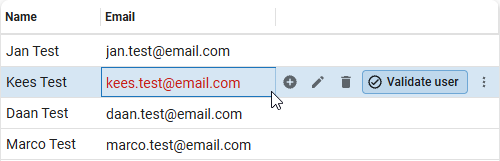 The inline action bar allows users to quickly select actions for the active row
User Interface - Add subtitles to open documents
Community idea newPreviously, open document tabs in the sidebar menu only displayed the document title, making it difficult to distinguish between multiple open instances of the same document.
You can now add subtitles for open document tabs to show the active record context. To do this, enable Show subtitles for the menu in the Software Factory (menu User Interface > Menus > tab Form > group Settings).
Enabling subtitles shows the value of the active record for that document under the document title. For example, if three 'Customers' tabs are open, the subtitle shows the name of the selected customer for each tab.
The subtitle is determined in the following order of precedence:
- The value of the lookup display column configured for that subject.
- The value of the last primary key column of that subject.
- If you are adding a new row, the subtitle shows 'new row'.
If none of this data is available, no subtitle is shown. If a subtitle is too long to fit, it is truncated with an ellipsis (...).
 Open document tabs with subtitles showing the active record context
User Interface - Show or hide header and footer in modal screens
Community idea newYou can now control whether to show the header or footer in a modal screen. This is useful if you want to use modal screens for custom dialogs, such as a wizard, where the header and footer are not needed.
In menu User Interface > Screen types, select a screen type and go to tab Form > group Modal settings. Select Show header or Show footer to show the header or footer, or clear the checkboxes to hide them.
User Interface - Set 'IN' or 'NOT IN' as default filter operator
newYou can now set the IN and NOT IN filter operators as the default filter condition for Alphanumeric and Numeric fields in the Filter pop-up. Users can use this operator to filter data on multiple values at once. For example, users can now filter an order overview to show only orders with the status Pending, Processing, or Shipped.
Default filter operators for all subjects can be set in the menu User Interface > Subjects > tab Default settings > group Filter. Filter operators for columns of the subject can be set in the menu User Interface > Subjects > tab Data > tab Filter.
User Interface - Support for 'Help' pop-up in the Universal UI
Community idea newThe Help pop-up is now supported in the Universal UI, allowing you to provide additional information or guidance for users.
Users can open the Help pop-up by selecting it from the profile menu or by pressing Alt + F1.
The Help pop-up displays the help text for the open document.
If no document is open, the general help pages are shown instead.
To add help text, add at least one page of text in the Software Factory (menu User Interface > Help). For more information, see Help.
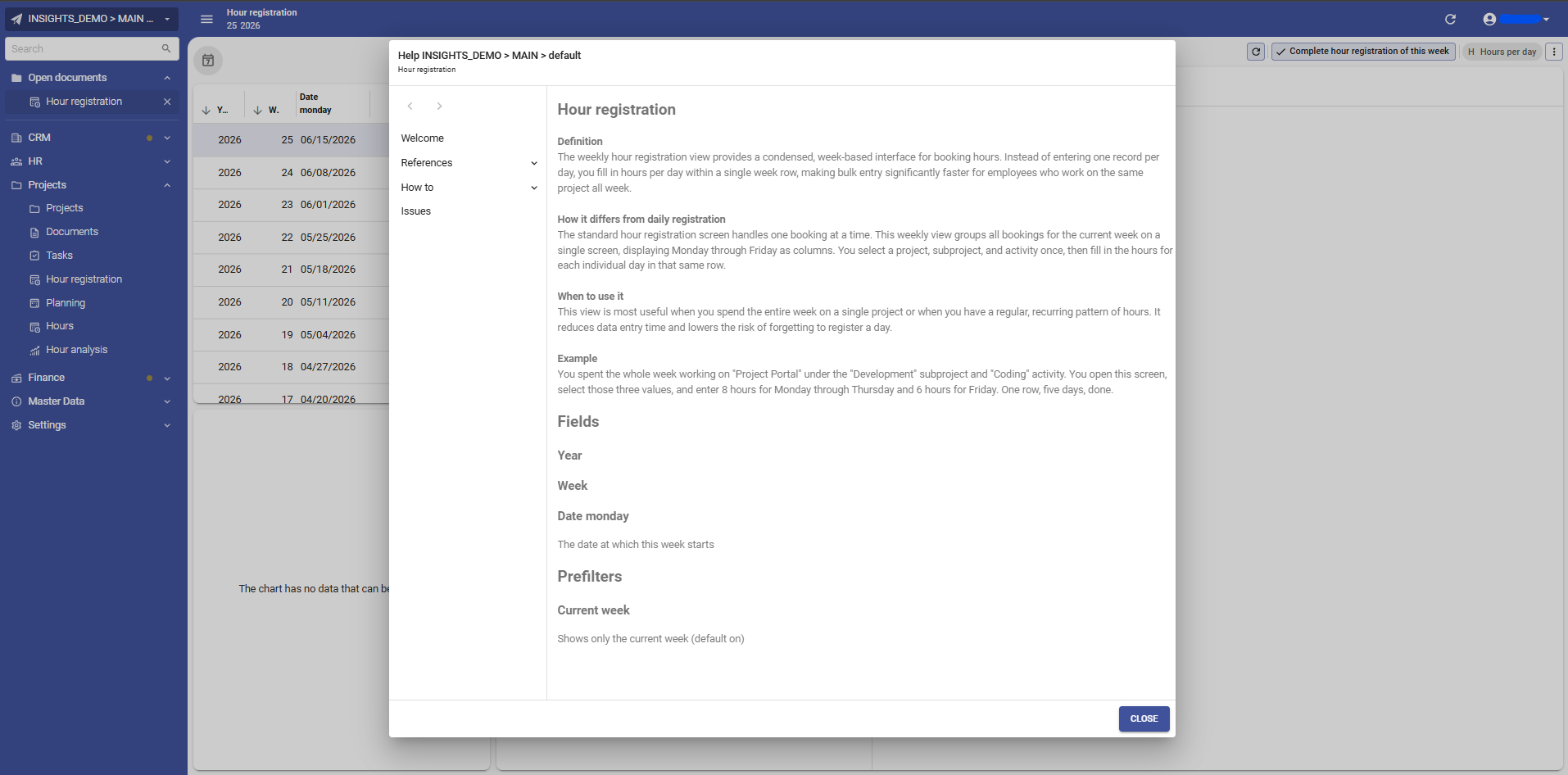 Help pop-up in the Universal UI showing help text for the open document
User Interface - Updated default action order for action bars
changeThe default order of the action buttons in an Action bar has been updated to show task, report, and cube view buttons first, followed by the CRUD buttons.
Previously, the CRUD buttons were displayed first, then the task, report, and cube view buttons. This would result in the CRUD buttons being displayed in different positions in each screen.
This change does not affect existing models, it only applies to new models or when the action bar is reset. The default order can still be modified in the menu Model overview > Branches > tab General settings > tab Default action bar.
User Interface - Removed 'Values' tab from cube view sort settings
changeThe sort settings for cube views (menu User Interface > Cubes > tab Cube views > tab Sort) have been updated.
Cube views and charts now use the setting Show top x. Use this setting to limit the number of category rows displayed in a cube view or chart. The Universal UI applies a default of '1000' on each dimension if the setting Show top x is not set.
Additionally, you can now only select Absolute for the setting Type of show top x, which determines how the top rows are displayed. The Percentage option has been deprecated.
Finally, the following changes have been made to the tab Cube views:
- The Values tab has been removed.
- The sort settings Show top x and Type of show top x have been moved to the tab Categories / Rows.
Grand totals and sub-totals are always calculated using the full dataset, regardless of the Show top x setting.
Processes - Process action 'Activate search'
newWe have added a new process action: Activate search (menu Processes > Process flows > tab Process actions). You can use it to activate the Search field in the context of a table. No input parameters are required for this process action.
The process action cannot be used as a trigger or starting step in a process flow. It is useful to bring focus to the search field in a table after performing other actions in a process flow. Therefore, it is typically used as the last step in a process flow.
For example, after a user selects a record in the main subject, the process flow can bring focus to the search field in the detail subject. This allows the user to continue their work seamlessly.
Screen component tabs are automatically opened by this process action. However, detail tabs must be activated using the process action Activate detail.
Processes - Software Factory now adheres to the extended property 'AllowProcessFlowsInLookupDialogs'
changeThe extended property AllowProcessFlowsInLookupDialogs controls whether process flows can be started from lookup pop-ups.
The Software Factory now adheres to this extended property. This allows process flows in the Software Factory to be started from lookup pop-ups, such as downloading an icon from the Icon screen.
Business logic - Updated column order in 'Functionality'
changeThe order of the columns in menu Business logic > Functionality has been updated to improve usability. The column Logic concept is now displayed in front of the Control procedure column. This makes it easier to see which code group a control procedure belongs to.
Quality - Description column in Code review changes
changePreviously, the tab Changes in Code review did not show the description of a changed control procedure or template. You can now see this in a new Description column (menu Quality > Code review > tab Changes). It shows the control procedure description or the template description, depending on which object changed.
 The new 'Description' column in the Code review changes tab
Access Control - Default user groups for the Software Factory
newYou can now limit what developers can do in the Software Factory using eight default user groups. This helps restrict access for AI agents and lets you scope down roles for specific tasks. For example, you can limit testers to registering test findings only, rather than giving them direct access to the data model, functionality, and more. You can create custom user groups in IAM based on these default roles.
application_logic_developer- Writes business logic and behavior: process flows, tasks, reports, functionality, and the dynamic model.data_subject_modeler- Builds the data layer and how it is consumed: table, column, and domain design, plus settings for individual subjects.integration_automation_engineer- Sets up external connections and database- and AI-driven automation: all of Integration & AI, plus Enrichments and the Thinkstore.platform_model_administrator- Oversees the Software Factory rather than contributing directly: the whole model group, plus the non-QA-related half of Analysis.qa_test_engineer- Verifies quality and its dashboards: the entire quality menu group, plus the test- and validation-related parts of Analysis.rbac_administrator- Sets up who can do what and who they are: everything related to access control and user management.release_deployment_manager- Ships and operates: deployment, plus the operations side of Maintenance, such as runtime configuration, hotfixes, and jobs.ui_ux_navigation_modeler- Sets up the shell around the data, not tied to any one table: modeling the application's UI, navigation, and messaging.
Deployment - Application database name in post-synchronization code
newYou can now use the name of your application database in post-synchronization code within a deployment package, using the new variable @tsf_appl_db_name.
This variable sits alongside the existing @model_id and @branch_id variables.
Post-synchronization code often needs to find or create the application registration in IAM for the database a deployment targets. With this variable, the same deployment package works in every environment, without hardcoding the database name into the code.
You can add this code in the menu Deployment > Deployment package > tab Post synchronization code. The Deployment Center sets the variable automatically with the application database name.
If you run the generated synchronization script yourself instead of through the Deployment Center,
the script carries the SSMS template parameter <@db_name,,> in that position.
Fill it in with the application database name to use the variable, or leave it untouched to keep the variable empty.
For example, to look up the application database registration for the current deployment:
declare @database_id id

select top 1 @database_id = database_id
from appl_db
where db_name = @tsf_appl_db_name
The variable @tsf_appl_db_name is not available for post-synchronization code for Synchronization to IAM or Synchronization to storage.
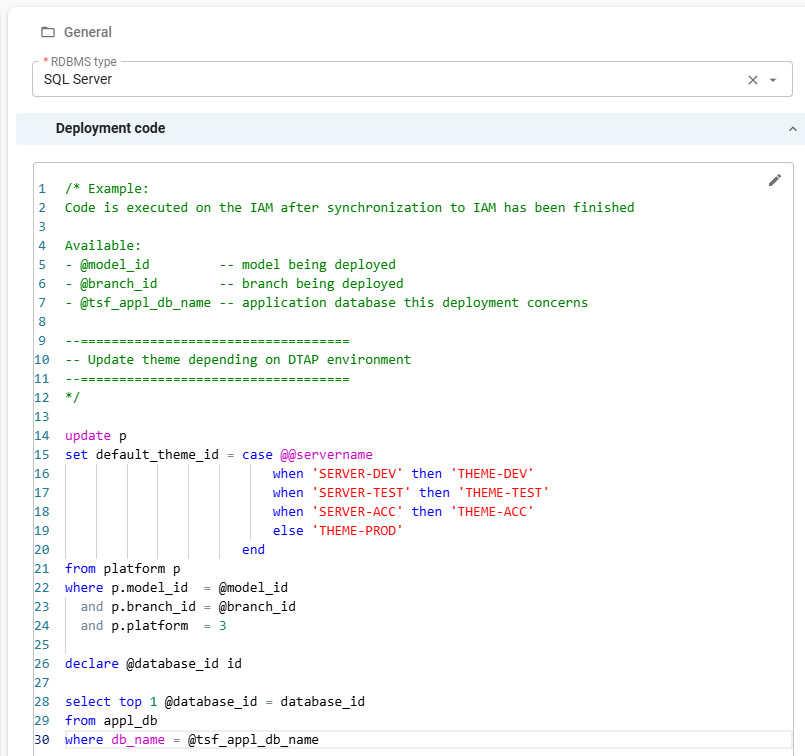 Deployment application database name in post-synchronization code
Deployment - Error details on database connection failure
newAn error message is now displayed in a pop-up if the Software Factory fails to connect to the database during the creation step Execute source code (menu Deployment > Creation > tab Execute source code). Previously, the log appeared empty with no indication of what went wrong. The same issue occurred when generating a SQL control procedure, and no program objects were successfully generated.
Deployment - Updated source code generation and execution
changeWe have updated source code generation and execution to improve the deployment process.
Source code generation
Previously, all code files were written to storage when generating source code, regardless of whether the deployment would be an install or an upgrade. You then had to decide afterwards which files to use. The Software Factory now writes separate Install and Upgrade folders. Each folder contains only the code files relevant to that deployment type.
As part of this change, the file specifications of all code files in the Thinkwise base models have been updated.
The path has been simplified from Source_code\Groups\[code_file_name].sql to [code_file_name].sql.
The full path, including the appropriate Install or Upgrade folder, is now constructed dynamically during generation.
In addition, code files with the Show at deployment setting disabled are no longer written to storage.
Execute source code
Previously, all code files were shown immediately after generating source code. The deployment type was determined only after connecting to the database. Non-relevant files were then deselected and locked, and the create code file was always shown, even when it was not applicable.
Now, code files are shown only after a database connection is established.
At that point, the deployment type is already known, and only the relevant code files are displayed.
The create code file is also no longer shown when an sf_model_info or sf_product_info table is detected, as this indicates an upgrade scenario.
After upgrading to this version of the platform, generate definitions and source code before running the next deployment.
Deployment - Improved layout of Deployment screens
changeThe following screens in menu Deployment have been updated for consistency and usability: Creation > tab Generate Definition, Creation > tab Generate Source Code, Synchronization to IAM, and Deployment Package.
- Action bar - The action bar in Creation > tab Generate Definition has been moved to tab Current and changed to a custom action bar with only relevant actions.
- Search - The Search component in tabs History and Steps now only searches relevant columns.
- Tab headers - Tab headers for tab Steps are now displayed consistently across all affected screens. The tab header for tab Progress in Deployment Package is also now shown.
- Step-related tasks - On-error tasks (Retry, Skip, Abort) and follow tasks (Follow active step, Unfollow active step) have been moved to tab Steps and their display type updated to Icon + text.
Integration & AI - Use relative paths for file references
newYou can now store file references relative to the root of a file storage location, instead of storing the full path. Changing where files are stored is now easier, as you no longer need to update all existing file references when the storage root changes.
You can use relative paths for all File storage types, except for Database.
To enable relative paths, select the checkbox Use storage-relative paths:
- In the Software Factory, this setting is available in:
- menu Integration & AI > File storage locations > tab Form
- menu Maintenance > Runtime configurations > tab File storage locations
- In the Intelligent Application Manager (IAM), this setting is available in:
- menu Authorization > Applications > tab General settings > tab File storage locations
New file storage locations use relative paths by default. Existing file storage locations continue to use absolute paths by default, so this does not affect existing file references.
This setting is also applied to process actions that work with file references (menu Processes > Process flows > tab Process actions > tab Input).
Enabling Use storage-relative paths on an existing file storage location does not convert existing file references. To migrate to relative paths, you must manually update the file references stored in your database.
Integration & AI - Added 'Timeout' setting for web connection endpoints
newYou can now set a Timeout for each web connection endpoint in the menu Integration & AI > Web connections > tab Endpoints > section General > group Settings.
This allows you to control how long your application waits for a response from each web connection endpoint.
You can enter a fixed value (for example, '100') or a parameter reference (for example, {request_timeout}).
If you add it as a parameter, the value is resolved at runtime, so the timeout can vary by environment or call.
Indicium support is planned for Thinkwise Platform 2026.3.11, releasing in about two weeks.
Enrichment - Re-generate model updates for enrichment runs
changePreviously, once you generated model updates for an enrichment run, you could not run the enrichment again. To make any changes, you had to cancel the enrichment run and start over.
You can now regenerate model updates as many times as needed and edit the parameters at any point. Once you update the parameters and execute the task Execute model updates, a pop-up is displayed with the following options:
- Cancel - Stop the execution and continue editing the parameters, or cancel the enrichment run entirely.
- Regenerate model updates - Discard the existing model updates and generate new ones based on the updated parameters.
- Continue - Execute the existing model updates as-is. To also get model updates based on the updated parameters, run Generate model updates manually afterward.
The task Cancel enrichment run is now also available on the tab Run enrichment. After canceling, you are returned to the tab Select enrichment automatically.
 Pop-up with options when executing model updates for an enrichment run
Analysis - Changed function point calculation to Easy Functional Sizing (ISO/IEC 25986)
changeYou can automatically calculate the number of function points for your application using the task Calculate function points (menu Analysis > Function point analysis).
The task now uses Easy Functional Sizing (ISO/IEC 25986), a streamlined function point standard developed by Nesma (Netherlands Software Metrics Association) that measures the functional size of software. This standard allows you to compare objective metrics across your applications, such as:
- Productivity - effort hours spent per function point delivered.
- Cost efficiency - cost per function point delivered.
- Delivery speed - function points delivered per month.
These metrics can be aggregated at different levels to support data-driven decision-making.
Our implementation of Easy Functional Sizing (ISO/IEC 25986) is certified by AgileBenchmark. You can request the certification details via your Thinkwise account manager.
Maintenance - Toggle to show query details for single-RDBMS-type models
Community idea newSince Thinkwise Platform version 2026.2, query data is stored in a dedicated query table per query type, for example tab_prefilter_query for prefilter queries.
For models with a single RDBMS type, the detail tab showing this record was hidden because it held only one value.
You can now always show these detail tabs, for example to view historical versions of a query. Select Always show query details in the menu Maintenance > Users > tab General.
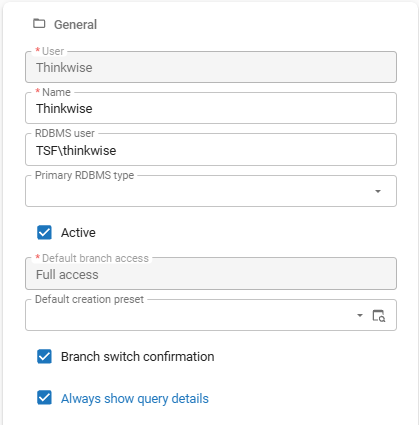 Select the checkbox 'Always show query details'
Deployment from IAM
Deployment - Synchronize to IAM using the API
new Software FactoryPreviously, synchronizing a model to IAM required the Software Factory to have direct access to the IAM database or required using the separate Deployer. This approach was not ideal for environments where the IAM and Software Factory are separated, such as in the Thinkwise Cloud. To address this, a new synchronization method has been added that uses the IAM API instead of direct database access.
In the menu Maintenance > IAM configurations you can select whether the Synchronization method is set to Database or API.
For the API method, you must provide a URL pointing to the target IAM environment (for example, https://server/indicium/iam/iam).
Then, execute the task Set pool user credentials to set up the necessary credentials.
Use credentials that have Main administrator or Developer mode rights on the target IAM.
All existing configurations are automatically set to Database when upgrading.
You can only set one synchronization method per IAM configuration. To synchronize with the same IAM using both methods, you need to create two separate IAM configurations.
As part of this update, the field Custom version name has been removed. The field As version is still available to specify a different version name. It is prefilled with the most recently used version name, or the branch name if no previous version name is available.
A breaking change was introduced as part of this feature. See Check CI/CD invocation of 'Verify' for 'Synchronize to IAM' for more information.
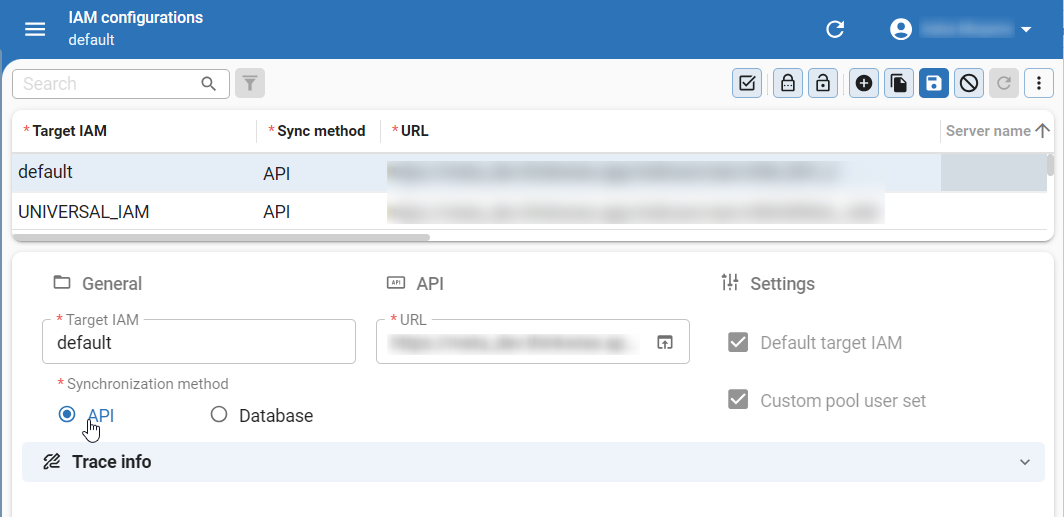 Select 'API' as the synchronization method
Deployment - Added 'Synchronize to IAM' functionality to 'Creation' screen
change Software FactoryAfter executing the source code of your application using Creation, you also need to synchronize the changes to IAM. These two steps were previously done in separate screens in the Software Factory, Creation and Synchronize to IAM respectively. To improve the development workflow, we have added Synchronize to IAM functionality into the Creation screen, allowing you to synchronize directly to IAM or to storage from Creation.
You can now include synchronization as part of the Creation when you execute the task Execute all creation steps (menu Deployment > Creation > tab Generate definition). Several controls for existing parameters in the task pop-up have been changed from Radio button to Combo to accommodate the new synchronization settings.
To configure the synchronization settings, select Synchronize to IAM in the task pop-up. After selecting this option, the field Version name becomes mandatory because it is used as the name under which the branch is synchronized. Synchronization runs after all preceding creation steps have completed. When synchronizing, the process now also checks for duplicate synchronization runs, missing pool user credentials, and an invalid synchronization type.
Furthermore, the tab Synchronize to IAM has been added to menu Deployment > Creation. This tab provides the same functionality and layout as the tab Synchronization in menu Deployment > Synchronize to IAM. Changing which modules or roles are synchronized, or modifying the post-synchronization code, still requires using the Synchronize to IAM menu.
Finally, Creation presets (menu Maintenance) have been updated with the option to include or exclude synchronization in a creation preset. The screen has been redesigned to make better use of the available space, and logic has been added to ensure that certain fields become mandatory when related fields are populated. Existing presets are left unchanged, so the synchronization option is not automatically enabled for them. If you want to include the synchronization step in a preset, create a new preset or update an existing one, optionally renaming it to reflect the change.
As part of this change, several parameters and task inputs have been added, renamed, moved, or excluded from the task Execute all creation steps. If you use CI/CD to invoke this task, upgrading to this version introduces a breaking change. For more information, see Check CI/CD invocation of 'Execute all creation steps' task.
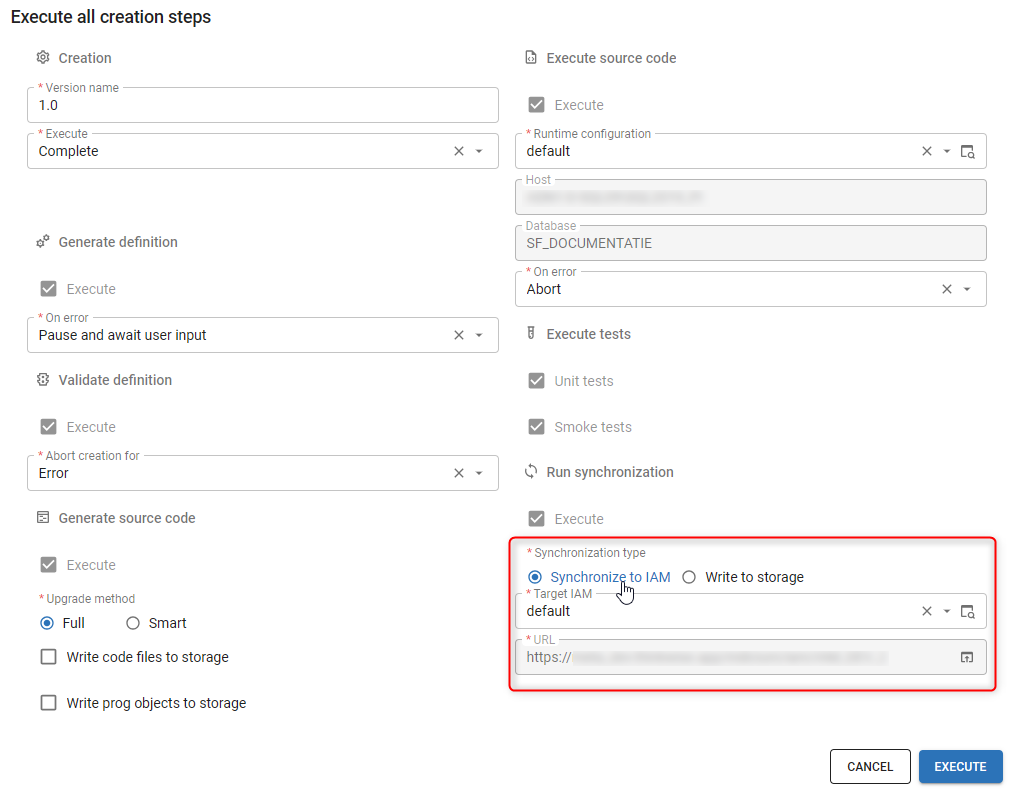 Synchronize to IAM is now included in 'Execute all creation steps'
Deployment - Warning when generated code no longer matches the model
newIt is now possible to upgrade an application database directly from IAM. This makes it important that the generated code still matches the model it is delivered under.
For this reason, you are now warned when the model has changed since the definition was last generated, or when there is no finished definition generation at all. This applies both when you generate source code (Deployment > Creation) and when you synchronize a model (Deployment > Synchronize to IAM). Neither warning stops the action.
Deployment - Download source code folder and synchronization script
new Software FactoryIn addition to deployment packages, you can now download the source code folder and the synchronization script. This gives you access to these files when the Software Factory runs in the cloud.
To download the source code folder, go to menu Deployment > Creation > tab Generate source code.
Run the task Generate source code with Code files, Program objects, or both selected.
This writes the files to storage.
When the task is finished, use the task  Download to download the source code folder as a ZIP file.
To download the synchronization script, run the task Synchronize to storage in one of these places:
- menu Deployment > Creation > tab Synchronize to IAM
- menu Deployment > Synchronize to IAM
When the task is finished, use the task
Download to download the script as a ZIP file.
Database servers - Install an application database as an administrator
new main administrator application administratorPreviously, main administrators and application administrators did not have the necessary access to install and upgrade application databases. Applications databases could only be upgraded from the Software Factory using the Creation task or via the separate Deployer.
To address this, main administrators and application administrators can now install an application database for a model version directly from IAM.
To install an application database, go to the menu Deployment > Database servers > tab List. Select a database with the status Ready to provision or Ready to install (see also Check the status of a database). Execute the task Deploy application database and complete the required fields in the task pop-up.
While a database is being deployed, its status changes to Deployment running.
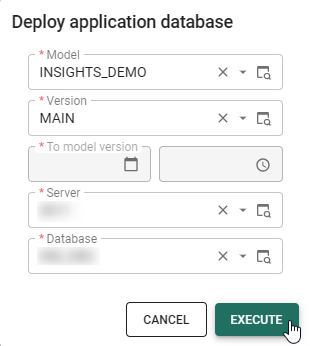 Select the required fields in the task pop-up
If a deployment fails, the database status changes to Deployment failed and an explanation is provided in the field Extra info (tab Form).
To restart a failed installation, remove or rename the database on the server. Execute the task Check database status to verify that the database status has changed to Ready to provision. Then, execute the task Deploy application database again to restart the deployment.
For troubleshooting, every deployment is logged and can be reviewed in the tab Deployment runs. The log includes the individual steps of the deployment, any errors encountered, and the point at which a failed deployment stopped.
When upgrading to this Thinkwise Platform version, synchronize existing model versions to IAM again. This ensures that the application databases can be installed correctly for the synchronized model versions.
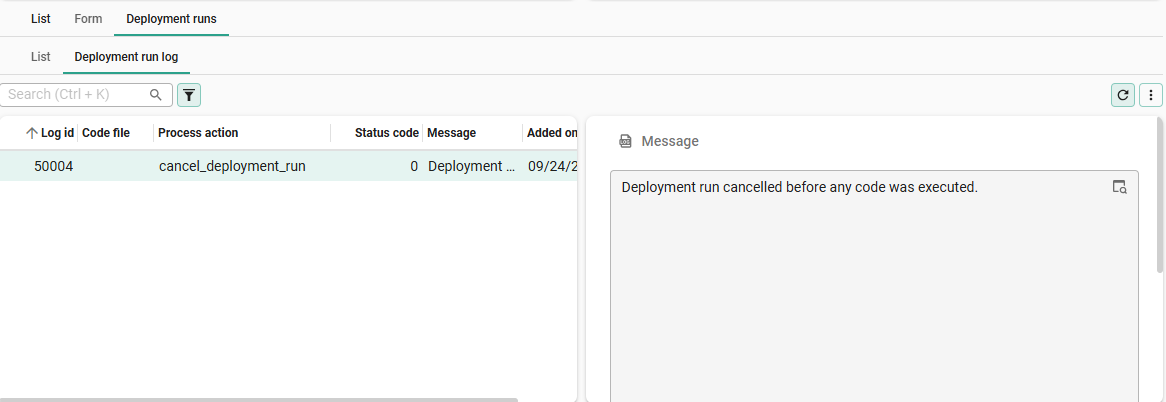 View the deployment logs in the tab 'Deployment runs'
Database servers - Upgrade an application database directly from IAM
new main administrator application administratorUntil release 2026.2.13, IAM could only take an empty database up to the first installed version. Every upgrade after that had to run from the Software Factory.
Now, administrators in IAM can also upgrade an installed application database to a newer model version directly from IAM. This is possible because the generated code can now be directly synchronized to IAM alongside the model.
Before upgrading, create a backup of the application database. This ensures that you can restore the database if the upgrade fails or any unexpected issues occur.
To perform an upgrade, go to the menu Deployment > Database servers > tab Databases, select the database, and execute the task Deploy application database. As soon as you choose the model version, the window shows what IAM found for this database before the upgrade starts.
Note that the menu item Database servers has moved out of Settings into a new menu group Deployment. Access is unchanged; only the roles main administrator and application administrator have access to this functionality.
IAM blocks the upgrade and executes nothing when the database is not ready:
- The database cannot be reached.
- The database holds a different model than the version being deployed.
- The version being deployed has no version to upgrade from.
- The version being deployed holds no upgrade for the RDBMS type of this database.
A renamed version is still recognized as the one the database is on.
Other situations only ask for a confirmation instead of blocking the upgrade. IAM asks you to confirm when:
- The database is not on the version this upgrade continues from.
- The previous deployment failed.
- The model has changed since the version was created.
If an upgrade fails, check the tab Deployment runs to see at which step it stopped. Do not remove or rename the database, as it contains your application data. Resolve the cause of the failure, then execute the task Deploy application database again.
When you choose to continue, IAM asks you to type the exact name of the database. Canceling or typing another name leaves the database untouched.
Every attempt is recorded under the database as a Deployment run, including attempts that were stopped. Each run shows which version it started from and which version it deployed to.
Next to Running, Successful, and Failed, a run can now be Prevented or Canceled. A run that is still waiting for confirmation can be canceled by executing the task Cancel deployment run, which frees the database for a new attempt.
- Existing model versions must be synchronized to IAM again after updating to Thinkwise Platform version 2026.3, before their database can be upgraded this way.
- An upgrade takes a database one version further, from the version it is on to the version built on top of it. Skipping versions in one run is not possible.
New and changed in the Intelligent Application Manager
Indicium - Updated required permissions for IAM databases
change IndiciumIndicium no longer requires 'Create schema' and 'Create table' permissions on the IAM database from Thinkwise Platform version 2026.2.14 onwards.
The following permissions for the database pool user (or maintenance pool user) are sufficient for SQL Server databases:
USE [db_name]
GRANT SELECT, INSERT, UPDATE, DELETE, EXECUTE ON SCHEMA::dbo TO [user];
Note that creating a new database from the Software Factory does require the additional permission:
USE master;
GRANT CREATE ANY DATABASE TO [login_name];
Authorization - Manage error log access for users
newPreviously, access to the Error log was limited to main administrators. Users who needed access for troubleshooting had to be given full administrator rights, which also allowed access to all administrative features. This is not always desirable.
Instead, you can now manage a user's access to the error log in menu Authorization > Users > tab Administrators > tab Log access. Select a Tenant (if applicable) and a User. To set an access period, select a Begins on and Ends on date.
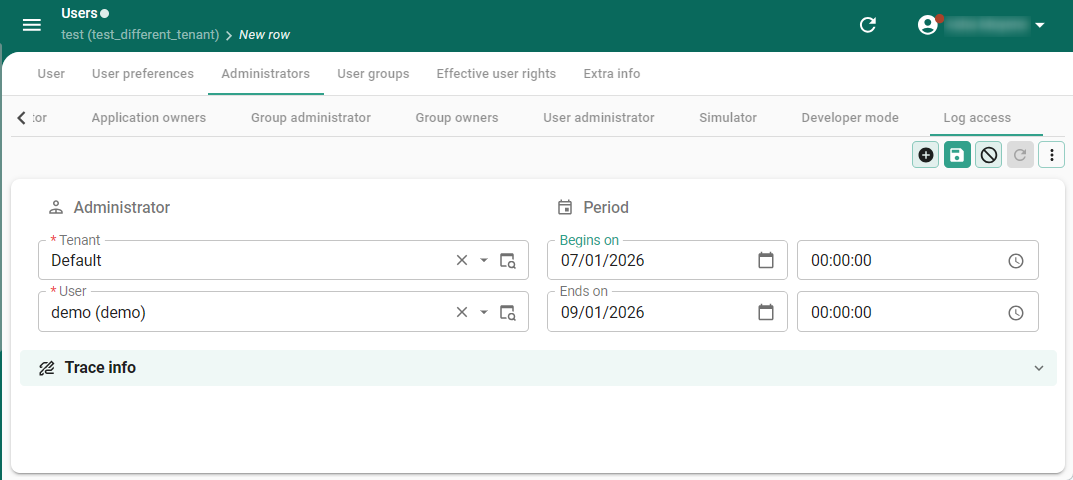 Manage error log access for users in the tab 'Log access'
Client applications - Warning to limit the number of client applications
change main administratorIndicium allows a maximum of five enabled client applications in IAM at the same time. Enabling more than five violates the license.
A warning message now alerts the main administrator when the number of enabled client applications exceeds five. Another client application must be disabled before enabling a new one.
You can disable a client application in IAM, in the menu Client apps > Client applications > tab Form, by deselecting the checkbox Enabled.
Database servers - Improved database server management
new main administrator application administratorYou can now configure a maintenance pool user per database server. This is useful for administrative tasks, such as database provisioning, installation, and upgrades.
Execute the task Set maintenance user credentials (menu Deployment > Database servers) and enter the credentials for the maintenance pool user. If a maintenance user is set, the checkbox Custom maintenance user set is enabled.
As part of this update, the menu item Servers has been moved from Advanced menu > Master data to Default menu > Deployment. The screen has been renamed to Database servers to better reflect its purpose.
Furthermore, main administrators and application administrators can now retrieve the status of the database by executing the task Check database status (menu Deployment > Database servers > tab List/Form). A column has been added in the tab List to show the database status for each server.
The following statuses are available:
- Ok - The database is reachable and contains a valid model.
- Ready to provision - The database server is reachable, but the database/schema does not yet exist.
- Ready to install - The database is present and accessible, but assumed empty; there is no model information stored in the database.
 Deployment running - An installation or upgrade of the database is in progress.
A new deployment cannot be started until this one is finished or canceled.
Deployment running - An installation or upgrade of the database is in progress.
A new deployment cannot be started until this one is finished or canceled. Deployment failed - The last installation or upgrade did not complete.
The reason is shown in the field Extra info (tab Form), and each step is logged in the tab Deployment runs.
Deployment failed - The last installation or upgrade did not complete.
The reason is shown in the field Extra info (tab Form), and each step is logged in the tab Deployment runs.- Unreachable - The database or database server is not accessible for use by the Thinkwise Platform.
- Unverified - No check has been done yet.
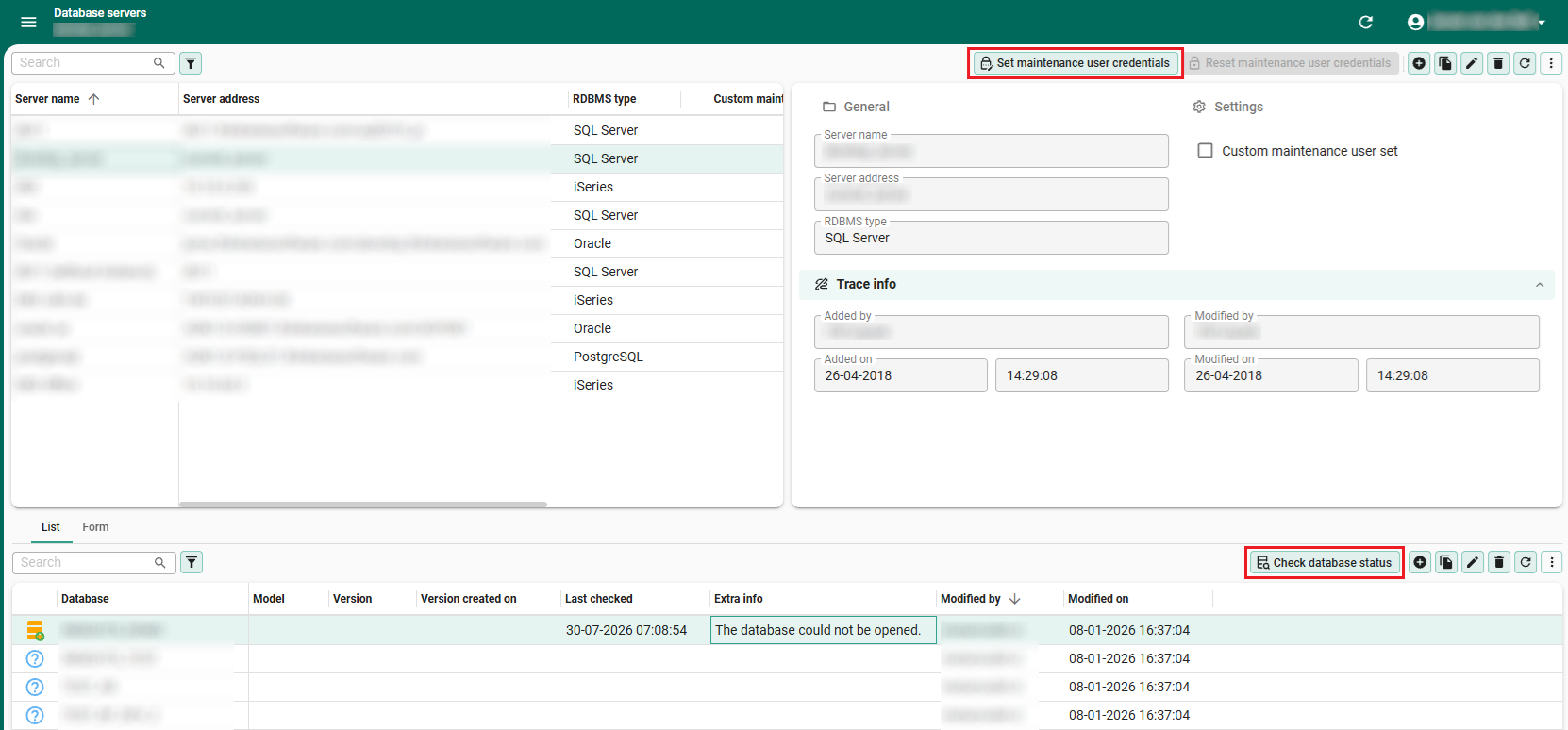 Renewed 'Database servers' screen with database status column
The model name, version name, and creation date and time are only shown for databases that were installed or upgraded using Thinkwise Platform version 2023.1 or later.
Web domains - Tenants and login options required
Community idea change IAM main administratorPreviously, a main administrator could activate a new web domain without assigned tenants or login options.
In such cases, all users could be locked out because nobody had a valid way to sign in.
This could happen when the new web domain took priority over the default * web domain.
Now, web domains work the same way as applications: they are not activated automatically. When a main administrator tries to activate a web domain without assigned tenants or login options, IAM blocks this and shows the following message: 'This web domain has not been fully configured. If there are no assigned tenants or no assigned login options, nobody will be able to sign in to the web domain.'
Before activating a web domain, assign at least one tenant and one login option in the menu Settings > Web domains, in tab Allowed tenants and tab Login options.
Fixed
- In the tab Process schedules (Processes > Process flows > Process schedules), the layout logic incorrectly set hidden fields to Mandatory. This has been fixed.
Data model changes
Data model changes for the Software Factory and IAM meta-models are listed here. This overview can be used as a reference to fix dynamic control procedures, dynamic model code or custom validations after an upgrade.
Table changes in the Software Factory
Changes
| SF - From table | SF - To table |
|---|---|
| - | message_broker_subscription |
| - | message_broker_subscription_mapping_mqtt |
| - | message_broker_subscription_mqtt |
| - | sync_object |
| code_file_code | - |
| generate_sync_scripts | generate_sync_object |
| generate_sync_scripts_step | generate_sync_object_step |
| install_code_file | - |
| sync_script | - |
Column changes in the Software Factory
Changes
| SF - Table | SF - From column | SF - To column | Mandatory | Default value |
|---|---|---|---|---|
| acceptance_status | - | delegated_update | 1 | 0 |
| action_bar | - | delegated_update | 1 | 0 |
| ambiguous_expression | - | delegated_update | 1 | 0 |
| appl_lang | - | delegated_update | 1 | 0 |
| audio_file | - | delegated_update | 1 | 0 |
| automl_model | - | delegated_update | 1 | 0 |
| automl_model_predictor | - | delegated_update | 1 | 0 |
| automl_model_target | - | delegated_update | 1 | 0 |
| branch | - | allow_delegated_mutation | 1 | 0 |
| branch | - | delegated_update | 1 | 0 |
| branch_appl_lang | - | delegated_update | 1 | 0 |
| branch_tag | - | delegated_update | 1 | 0 |
| business_process | - | delegated_update | 1 | 0 |
| business_process_attachment | - | delegated_update | 1 | 0 |
| business_process_diagram_link | - | delegated_update | 1 | 0 |
| business_process_diagram_link_control_point | - | delegated_update | 1 | 0 |
| business_process_diagram_node | - | delegated_update | 1 | 0 |
| business_process_tag | - | delegated_update | 1 | 0 |
| chart_legend_color | - | delegated_update | 1 | 0 |
| chart_legend_color_condition | - | delegated_update | 1 | 0 |
| code_file | - | delegated_update | 1 | 0 |
| code_grp | - | delegated_update | 1 | 0 |
| code_grp_tag | - | delegated_update | 1 | 0 |
| code_search | - | case_sensitive | 1 | 0 |
| code_search | - | include_comments | 1 | 0 |
| code_search | include_history | - | - | - |
| code_search | include_inactive_control_proc | include_inactive_code | 1 | 0 |
| code_search_history | - | case_sensitive | 1 | 0 |
| code_search_history | - | include_comments | 1 | 0 |
| code_search_history | include_history | - | - | - |
| code_search_history | include_inactive_control_proc | include_inactive_code | 1 | 0 |
| col | - | delegated_update | 1 | 0 |
| col | case_type | - | - | - |
| col_data_sensitivity_query | - | delegated_update | 1 | 0 |
| col_query | - | delegated_update | 1 | 0 |
| col_tag | - | delegated_update | 1 | 0 |
| color | - | delegated_update | 1 | 0 |
| concept_abbr | - | delegated_update | 1 | 0 |
| conditional_layout | - | delegated_update | 1 | 0 |
| conditional_layout_condition | - | delegated_update | 1 | 0 |
| conditional_layout_tag | - | delegated_update | 1 | 0 |
| conflict_resolvement_type | - | delegated_update | 1 | 0 |
| control_appearance | - | delegated_update | 1 | 0 |
| control_proc | - | delegated_update | 1 | 0 |
| control_proc_log | - | cpu_time | 0 | - |
| control_proc_log | - | no_of_reads | 0 | - |
| control_proc_log | - | no_of_writes | 0 | - |
| control_proc_tag | - | delegated_update | 1 | 0 |
| control_proc_template | - | delegated_update | 1 | 0 |
| control_tag | - | delegated_update | 1 | 0 |
| creation_preset | - | delegated_update | 1 | 0 |
| creation_preset | - | run_sync | 1 | 1 |
| creation_preset | - | sync_run_type | 0 | 0 |
| creation_preset | validation_result_creation | validate_definition_error_handling | 0 | 0 |
| cube | - | delegated_update | 1 | 0 |
| cube_field | - | delegated_update | 1 | 0 |
| cube_field_query | - | delegated_update | 1 | 0 |
| cube_tag | - | delegated_update | 1 | 0 |
| cube_view | - | delegated_update | 1 | 0 |
| cube_view_constant_line | - | delegated_update | 1 | 0 |
| cube_view_field | - | delegated_update | 1 | 0 |
| cube_view_field_conditional_layout | - | delegated_update | 1 | 0 |
| cube_view_field_filter | - | delegated_update | 1 | 0 |
| cube_view_field_total | - | delegated_update | 1 | 0 |
| cube_view_grp | - | delegated_update | 1 | 0 |
| cube_view_tag | - | delegated_update | 1 | 0 |
| custom_component | - | delegated_update | 1 | 0 |
| data_migration_col_query | - | delegated_update | 1 | 0 |
| data_migration_new_object | - | delegated_update | 1 | 0 |
| data_sensitive_name | - | delegated_update | 1 | 0 |
| data_set | - | delegated_update | 1 | 0 |
| data_set_col | - | delegated_update | 1 | 0 |
| data_set_query | - | delegated_update | 1 | 0 |
| data_set_tab | - | delegated_update | 1 | 0 |
| database_file | - | delegated_update | 1 | 0 |
| database_server | - | delegated_update | 1 | 0 |
| default_usr_grp | - | delegated_update | 1 | 0 |
| default_usr_grp_role | - | delegated_update | 1 | 0 |
| delta_action | - | delegated_update | 1 | 0 |
| delta_action_dependency | - | delegated_update | 1 | 0 |
| deployment_module | - | delegated_update | 1 | 0 |
| deployment_run | - | iam_rdbms_type | 0 | 0 |
| deployment_run | verify | - | - | - |
| diagram | - | delegated_update | 1 | 0 |
| diagram_tab | - | delegated_update | 1 | 0 |
| disk_sync_job | - | iam_rdbms_type | 0 | 0 |
| document | - | delegated_update | 1 | 0 |
| dom | - | delegated_update | 1 | 0 |
| dom_input_constraint | - | delegated_update | 1 | 0 |
| dom_input_constraint_query | - | delegated_update | 1 | 0 |
| dom_query | - | delegated_update | 1 | 0 |
| dom_tag | - | delegated_update | 1 | 0 |
| drag_drop | - | delegated_update | 1 | 0 |
| drag_drop_parmtr | - | delegated_update | 1 | 0 |
| dttp_conv | - | delegated_update | 1 | 0 |
| elemnt | - | delegated_update | 1 | 0 |
| elemnt_tag | - | delegated_update | 1 | 0 |
| email_provider | - | delegated_update | 1 | 0 |
| email_provider_configuration | - | delegated_update | 1 | 0 |
| enrichment | - | delegated_update | 1 | 0 |
| enrichment | - | rdbms_type | 0 | - |
| enrichment_grp | - | delegated_update | 1 | 0 |
| enrichment_parmtr | - | delegated_update | 1 | 0 |
| enrichment_run | - | parmtrs_changed | 1 | 0 |
| enrichment_template | - | delegated_update | 1 | 0 |
| execute_source_code | - | deployment_method | 0 | - |
| extender | - | delegated_update | 1 | 0 |
| extender_enum | - | delegated_update | 1 | 0 |
| extender_enum_value | - | delegated_update | 1 | 0 |
| external_object | - | delegated_update | 1 | 0 |
| external_object_tag | - | delegated_update | 1 | 0 |
| feature | - | delegated_update | 1 | 0 |
| feature_tag | - | delegated_update | 1 | 0 |
| field_alignment | - | delegated_update | 1 | 0 |
| file_storage | - | delegated_update | 1 | 0 |
| file_storage | - | use_storage_relative_path | 1 | 1 |
| file_storage_configuration | - | use_storage_relative_path | 0 | 1 |
| file_storage_extension_whitelist | - | delegated_update | 1 | 0 |
| font | - | delegated_update | 1 | 0 |
| font_face | - | delegated_update | 1 | 0 |
| forbidden_word | - | delegated_update | 1 | 0 |
| function_point_analysis | - | delegated_update | 1 | 0 |
| function_point_analysis_function | path | - | - | - |
| future_branch | - | delegated_update | 1 | 0 |
| future_model | - | delegated_update | 1 | 0 |
| gai_provider | - | delegated_update | 1 | 0 |
| gai_provider_configuration | - | delegated_update | 1 | 0 |
| generate_sync_object | - | delegated_update | 1 | 0 |
| generate_sync_object | generate_sync_scripts_status | generate_sync_object_status | 0 | 0 |
| generate_sync_object_step | - | delegated_update | 1 | 0 |
| generate_sync_object_step | generate_sync_scripts_name | generate_sync_object_name | 1 | - |
| generate_sync_object_step | generate_sync_scripts_step_id | generate_sync_object_step_id | 1 | - |
| generate_sync_object_step | generate_sync_scripts_step_status | generate_sync_object_step_status | 1 | - |
| help_index | - | delegated_update | 1 | 0 |
| iam_sync_job_step | - | iam_sync_job_step_type | 1 | - |
| iam_sync_job_step | - | sync_object_pk_hash | 0 | - |
| icon | - | delegated_update | 1 | 0 |
| icon_grp | - | delegated_update | 1 | 0 |
| icon_tag | - | delegated_update | 1 | 0 |
| indx | - | delegated_update | 1 | 0 |
| indx_col | - | delegated_update | 1 | 0 |
| indx_query | - | delegated_update | 1 | 0 |
| indx_tag | - | delegated_update | 1 | 0 |
| iteration | - | delegated_update | 1 | 0 |
| iteration_tag | - | delegated_update | 1 | 0 |
| linked_model | - | delegated_update | 1 | 0 |
| list_bar_grp | - | delegated_update | 1 | 0 |
| list_bar_grp_tag | - | delegated_update | 1 | 0 |
| list_bar_item | - | delegated_update | 1 | 0 |
| list_bar_item_tag | - | delegated_update | 1 | 0 |
| map | - | delegated_update | 1 | 0 |
| map_base_layer | - | delegated_update | 1 | 0 |
| map_data_mapping | - | delegated_update | 1 | 0 |
| map_overlay | - | delegated_update | 1 | 0 |
| menu | - | delegated_update | 1 | 0 |
| menu | - | show_sub_titles | 1 | 1 |
| merge_session | - | delegated_update | 1 | 0 |
| message_broker | - | delegated_update | 1 | 0 |
| message_broker_message | - | delegated_update | 1 | 0 |
| message_broker_message_input_parmtr | - | delegated_update | 1 | 0 |
| message_broker_message_mqtt | - | correlation_data | 0 | - |
| message_broker_message_mqtt | - | delegated_update | 1 | 0 |
| message_broker_message_mqtt_input_parmtr | - | delegated_update | 1 | 0 |
| message_broker_message_mqtt_input_parmtr | pre_processing | pre_processing | 1 | 0 |
| message_broker_message_mqtt_output_parmtr | - | delegated_update | 1 | 0 |
| message_broker_message_mqtt_usr_property | - | delegated_update | 1 | 0 |
| message_broker_message_output_parmtr | - | delegated_update | 1 | 0 |
| message_broker_mqtt | - | delegated_update | 1 | 0 |
| message_broker_mqtt | will_payload_format | will_payload_format | 0 | 0 |
| message_broker_mqtt_configuration | - | delegated_update | 1 | 0 |
| message_broker_subscription | - | delegated_update | 1 | 0 |
| message_broker_subscription_mapping_mqtt | - | delegated_update | 1 | 0 |
| message_broker_subscription_mqtt | - | delegated_update | 1 | 0 |
| message_broker_subscription_mqtt | - | subscription_identifier | 1 | - |
| model | - | delegated_update | 1 | 0 |
| model_settings | - | delegated_update | 1 | 0 |
| model_tag | - | delegated_update | 1 | 0 |
| model_vrs | - | archived_date_time | 0 | - |
| model_vrs | - | definition_generation_finish_date_time | 0 | - |
| model_vrs | - | delegated_update | 1 | 0 |
| model_vrs | - | from_branch_id | 0 | - |
| model_vrs | - | from_model_vrs_id | 0 | - |
| model_vrs_data_migration_col_query | - | delegated_update | 1 | 0 |
| module_grp | - | delegated_update | 1 | 0 |
| module_grp_tag | - | delegated_update | 1 | 0 |
| module_item | - | delegated_update | 1 | 0 |
| module_item_tag | - | delegated_update | 1 | 0 |
| msg | - | delegated_update | 1 | 0 |
| msg_option | - | delegated_update | 1 | 0 |
| oauth_server | - | delegated_update | 1 | 0 |
| oauth_server_configuration | - | delegated_update | 1 | 0 |
| object_name | - | delegated_update | 1 | 0 |
| partition_boundary | - | delegated_update | 1 | 0 |
| partition_scheme | - | delegated_update | 1 | 0 |
| platform | - | delegated_update | 1 | 0 |
| platform_excluded_menu | - | delegated_update | 1 | 0 |
| platform_excluded_process_flow | - | delegated_update | 1 | 0 |
| post_sync_code | - | delegated_update | 1 | 0 |
| printer | - | delegated_update | 1 | 0 |
| process_action | - | delegated_update | 1 | 0 |
| process_action_automl_model_predictor_input_parmtr | - | delegated_update | 1 | 0 |
| process_action_col_input_parmtr | - | delegated_update | 1 | 0 |
| process_action_fixed_input_parmtr | - | delegated_update | 1 | 0 |
| process_action_message_broker_message_input_parmtr | - | delegated_update | 1 | 0 |
| process_action_report_parmtr_input_parmtr | - | delegated_update | 1 | 0 |
| process_action_start_report_variant | - | delegated_update | 1 | 0 |
| process_action_start_tab_variant | - | delegated_update | 1 | 0 |
| process_action_start_task_variant | - | delegated_update | 1 | 0 |
| process_action_sub_flow_input_parmtr | - | delegated_update | 1 | 0 |
| process_action_tab_prefilter_input_parmtr | - | delegated_update | 1 | 0 |
| process_action_tag | - | delegated_update | 1 | 0 |
| process_action_task_parmtr_input_parmtr | - | delegated_update | 1 | 0 |
| process_action_web_connection_endpoint_parmtr_input_parmtr | - | delegated_update | 1 | 0 |
| process_action_web_connection_parmtr_input_parmtr | - | delegated_update | 1 | 0 |
| process_flow | - | delegated_update | 1 | 0 |
| process_flow_schedule | - | delegated_update | 1 | 0 |
| process_flow_tag | - | delegated_update | 1 | 0 |
| process_step | - | delegated_update | 1 | 0 |
| process_step_control_point | - | delegated_update | 1 | 0 |
| process_step_tag | - | delegated_update | 1 | 0 |
| process_variable | - | delegated_update | 1 | 0 |
| process_variable_query | - | delegated_update | 1 | 0 |
| prog_object | - | selected_for_install | 1 | 1 |
| prog_object | - | selected_for_upgrade | 1 | 1 |
| prog_object | selected | - | - | - |
| prog_object_archive | - | code_file_id | 0 | - |
| prog_object_archive | - | order_no | 0 | - |
| prog_object_archive | - | selected_for_install | 1 | 1 |
| prog_object_archive | - | selected_for_upgrade | 1 | 1 |
| prog_object_archive | generated_by_control_proc_id | - | - | - |
| prog_object_item_parmtr | - | parmtr_value_hash | 0 | - |
| prog_object_parmtr | - | parmtr_value_hash | 0 | - |
| prog_object_type | prog_object_prefix | - | - | - |
| prog_object_type | prog_object_suffix | - | - | - |
| query_conv | - | delegated_update | 1 | 0 |
| query_conv | branch_id | - | - | - |
| query_conv | model_id | - | - | - |
| rdbms | - | is_iam_rdbms_type | 1 | 0 |
| ref | - | delegated_update | 1 | 0 |
| ref_col | - | delegated_update | 1 | 0 |
| ref_col_tag | - | delegated_update | 1 | 0 |
| ref_tag | - | delegated_update | 1 | 0 |
| refresh_grp | - | delegated_update | 1 | 0 |
| report | - | delegated_update | 1 | 0 |
| report_conditional_layout | - | delegated_update | 1 | 0 |
| report_conditional_layout_condition | - | delegated_update | 1 | 0 |
| report_conditional_layout_tag | - | delegated_update | 1 | 0 |
| report_parmtr | - | delegated_update | 1 | 0 |
| report_parmtr | case_type | - | - | - |
| report_parmtr_query | - | delegated_update | 1 | 0 |
| report_parmtr_tag | - | delegated_update | 1 | 0 |
| report_ref | - | delegated_update | 1 | 0 |
| report_ref_col | - | delegated_update | 1 | 0 |
| report_ref_col_tag | - | delegated_update | 1 | 0 |
| report_ref_tag | - | delegated_update | 1 | 0 |
| report_tag | - | delegated_update | 1 | 0 |
| report_variant | - | delegated_update | 1 | 0 |
| report_variant_parmtr_query | - | delegated_update | 1 | 0 |
| report_variant_report_conditional_layout | - | delegated_update | 1 | 0 |
| report_variant_tag | - | delegated_update | 1 | 0 |
| requirement | - | delegated_update | 1 | 0 |
| requirement_attachment | - | delegated_update | 1 | 0 |
| requirement_planning_poker_msg | - | delegated_update | 1 | 0 |
| requirement_tag | - | delegated_update | 1 | 0 |
| report_variant_form | - | delegated_update | 1 | 0 |
| report_variant_look_up | - | delegated_update | 1 | 0 |
| report_variant_parmtr | - | delegated_update | 1 | 0 |
| role | - | delegated_update | 1 | 0 |
| role | use_for_ai_assistant | - | - | - |
| role_col | - | delegated_update | 1 | 0 |
| role_cube_view | - | delegated_update | 1 | 0 |
| role_grp | - | delegated_update | 1 | 0 |
| role_list_bar_grp | - | delegated_update | 1 | 0 |
| role_list_bar_item | - | delegated_update | 1 | 0 |
| role_menu | - | delegated_update | 1 | 0 |
| role_module_grp | - | delegated_update | 1 | 0 |
| role_module_item | - | delegated_update | 1 | 0 |
| role_process_flow | - | delegated_update | 1 | 0 |
| role_report | - | delegated_update | 1 | 0 |
| role_report_parmtr | - | delegated_update | 1 | 0 |
| role_subroutine | - | delegated_update | 1 | 0 |
| role_tab | - | delegated_update | 1 | 0 |
| role_tab_detail | - | delegated_update | 1 | 0 |
| role_tab_prefilter | - | delegated_update | 1 | 0 |
| role_tab_report | - | delegated_update | 1 | 0 |
| role_tab_task | - | delegated_update | 1 | 0 |
| role_tag | - | delegated_update | 1 | 0 |
| role_task | - | delegated_update | 1 | 0 |
| role_task_parmtr | - | delegated_update | 1 | 0 |
| role_tile | - | delegated_update | 1 | 0 |
| role_tile_grp | - | delegated_update | 1 | 0 |
| runtime_configuration | - | delegated_update | 1 | 0 |
| runtime_configuration | rdbms_type | rdbms_type | 1 | - |
| runtime_extended_property | - | delegated_update | 1 | 0 |
| sample_data_set | - | delegated_update | 1 | 0 |
| sample_data_set_data | - | delegated_update | 1 | 0 |
| scheduler | - | delegated_update | 1 | 0 |
| scheduler_view | - | delegated_update | 1 | 0 |
| scheduler_view_conditional_layout | - | delegated_update | 1 | 0 |
| scheduler_view_conditional_layout_condition | - | delegated_update | 1 | 0 |
| scheduler_view_conditional_layout_tag | - | delegated_update | 1 | 0 |
| scheduler_view_resource_col | - | delegated_update | 1 | 0 |
| screen_area | - | delegated_update | 1 | 0 |
| screen_component | - | component_action_bar_enabled | 1 | 0 |
| screen_component | - | delegated_update | 1 | 0 |
| screen_component_property | - | delegated_update | 1 | 0 |
| screen_component_tag | - | delegated_update | 1 | 0 |
| screen_type | - | delegated_update | 1 | 0 |
| screen_type | - | modal_show_footer | 1 | 1 |
| screen_type | - | modal_show_header | 1 | 1 |
| screen_type_breakpoint | - | delegated_update | 1 | 0 |
| screen_type_grp | - | delegated_update | 1 | 0 |
| sequence | - | delegated_update | 1 | 0 |
| sf_configuration | - | delegated_update | 1 | 0 |
| sf_configuration | - | skip_import_base_data_in_import_model | 1 | 0 |
| sf_configuration | - | skip_vrs_check_in_import_model | 1 | 0 |
| sf_configuration_appl_lang | - | delegated_update | 1 | 0 |
| sf_configuration_platform | - | delegated_update | 1 | 0 |
| smoke_test | - | delegated_update | 1 | 0 |
| specification_baseline | - | delegated_update | 1 | 0 |
| specification_status | - | delegated_update | 1 | 0 |
| storage | - | delegated_update | 1 | 0 |
| story_point | - | delegated_update | 1 | 0 |
| sub_name | - | delegated_update | 1 | 0 |
| sub_name_excluded_object | - | delegated_update | 1 | 0 |
| sub_name_grp | - | delegated_update | 1 | 0 |
| sub_report | - | delegated_update | 1 | 0 |
| subroutine | - | delegated_update | 1 | 0 |
| subroutine_option | - | delegated_update | 1 | 0 |
| subroutine_parmtr | - | delegated_update | 1 | 0 |
| subroutine_parmtr_tag | - | delegated_update | 1 | 0 |
| subroutine_return_col | - | delegated_update | 1 | 0 |
| subroutine_tag | - | delegated_update | 1 | 0 |
| sync_run | - | sync_url | 0 | - |
| sync_run | generate_sync_scripts_job_id | generate_sync_object_job_id | 0 | - |
| sync_run | sync_as_branch_id | vrs_name | 0 | - |
| sync_run | verify | - | - | - |
| sync_target_iam | - | delegated_update | 1 | 0 |
| sync_target_iam | - | rdbms_type | 1 | 0 |
| sync_target_iam | - | sync_method | 1 | - |
| sync_target_iam | - | sync_url | 0 | - |
| sync_target_iam | db_name | db_name | 0 | - |
| sync_target_iam | server_name | server_name | 0 | - |
| tab | - | delegated_update | 1 | 0 |
| tab | priority | - | - | - |
| tab | work_flow_tab_id | - | - | - |
| tab_check_constraint | - | delegated_update | 1 | 0 |
| tab_check_constraint_query | - | delegated_update | 1 | 0 |
| tab_data | - | delegated_update | 1 | 0 |
| tab_data_col_query | - | delegated_update | 1 | 0 |
| tab_prefilter | - | delegated_update | 1 | 0 |
| tab_prefilter_col | - | delegated_update | 1 | 0 |
| tab_prefilter_grp | - | delegated_update | 1 | 0 |
| tab_prefilter_query | - | delegated_update | 1 | 0 |
| tab_prefilter_tag | - | delegated_update | 1 | 0 |
| tab_query | - | delegated_update | 1 | 0 |
| tab_report | - | delegated_update | 1 | 0 |
| tab_report_grp | - | delegated_update | 1 | 0 |
| tab_report_parmtr | - | delegated_update | 1 | 0 |
| tab_tab_drag_drop | - | delegated_update | 1 | 0 |
| tab_tab_variant_drag_drop | - | delegated_update | 1 | 0 |
| tab_tag | - | delegated_update | 1 | 0 |
| tab_task | - | delegated_update | 1 | 0 |
| tab_task_grp | - | delegated_update | 1 | 0 |
| tab_task_parmtr | - | delegated_update | 1 | 0 |
| tab_variant | - | delegated_update | 1 | 0 |
| tab_variant_card_list | - | delegated_update | 1 | 0 |
| tab_variant_col | - | delegated_update | 1 | 0 |
| tab_variant_col_query | - | delegated_update | 1 | 0 |
| tab_variant_combined_filter | - | delegated_update | 1 | 0 |
| tab_variant_conditional_layout | - | delegated_update | 1 | 0 |
| tab_variant_cube | - | delegated_update | 1 | 0 |
| tab_variant_cube_view | - | delegated_update | 1 | 0 |
| tab_variant_detail | - | delegated_update | 1 | 0 |
| tab_variant_filter | - | delegated_update | 1 | 0 |
| tab_variant_form | - | delegated_update | 1 | 0 |
| tab_variant_grid | - | delegated_update | 1 | 0 |
| tab_variant_look_up | - | delegated_update | 1 | 0 |
| tab_variant_map | - | delegated_update | 1 | 0 |
| tab_variant_map_base_layer | - | delegated_update | 1 | 0 |
| tab_variant_map_data_mapping | - | delegated_update | 1 | 0 |
| tab_variant_map_overlay | - | delegated_update | 1 | 0 |
| tab_variant_prefilter | - | delegated_update | 1 | 0 |
| tab_variant_report | - | delegated_update | 1 | 0 |
| tab_variant_scheduler | - | delegated_update | 1 | 0 |
| tab_variant_scheduler_view | - | delegated_update | 1 | 0 |
| tab_variant_search | - | delegated_update | 1 | 0 |
| tab_variant_sort | - | delegated_update | 1 | 0 |
| tab_variant_tab_drag_drop | - | delegated_update | 1 | 0 |
| tab_variant_tab_variant_drag_drop | - | delegated_update | 1 | 0 |
| tab_variant_tag | - | delegated_update | 1 | 0 |
| tab_variant_task | - | delegated_update | 1 | 0 |
| tab_variant_tree | - | delegated_update | 1 | 0 |
| task_variant_form | - | delegated_update | 1 | 0 |
| task_variant_look_up | - | delegated_update | 1 | 0 |
| task_variant_parmtr | - | delegated_update | 1 | 0 |
| tag | - | delegated_update | 1 | 0 |
| task | - | delegated_update | 1 | 0 |
| task_conditional_layout | - | delegated_update | 1 | 0 |
| task_conditional_layout_condition | - | delegated_update | 1 | 0 |
| task_conditional_layout_tag | - | delegated_update | 1 | 0 |
| task_parmtr | - | delegated_update | 1 | 0 |
| task_parmtr | case_type | - | - | - |
| task_parmtr_query | - | delegated_update | 1 | 0 |
| task_parmtr_tag | - | delegated_update | 1 | 0 |
| task_ref | - | delegated_update | 1 | 0 |
| task_ref_col | - | delegated_update | 1 | 0 |
| task_ref_col_tag | - | delegated_update | 1 | 0 |
| task_ref_tag | - | delegated_update | 1 | 0 |
| task_tag | - | delegated_update | 1 | 0 |
| task_variant | - | delegated_update | 1 | 0 |
| task_variant_parmtr_query | - | delegated_update | 1 | 0 |
| task_variant_tag | - | delegated_update | 1 | 0 |
| task_variant_task_conditional_layout | - | delegated_update | 1 | 0 |
| template_prog_object_item | - | delegated_update | 1 | 0 |
| template_prog_object_item_parmtr | - | delegated_update | 1 | 0 |
| test_case | - | delegated_update | 1 | 0 |
| test_case_control_proc | - | delegated_update | 1 | 0 |
| test_case_run | - | delegated_update | 1 | 0 |
| test_msg | - | delegated_update | 1 | 0 |
| test_run | - | delegated_update | 1 | 0 |
| test_scenario | - | delegated_update | 1 | 0 |
| test_scenario_attachment | - | delegated_update | 1 | 0 |
| test_scenario_run | - | delegated_update | 1 | 0 |
| test_scenario_run_step | - | delegated_update | 1 | 0 |
| test_scenario_status | - | delegated_update | 1 | 0 |
| test_scenario_step | - | delegated_update | 1 | 0 |
| test_scenario_step_attachment | - | delegated_update | 1 | 0 |
| test_step | - | delegated_update | 1 | 0 |
| test_step_check | - | delegated_update | 1 | 0 |
| test_step_result | - | delegated_update | 1 | 0 |
| test_step_run | - | delegated_update | 1 | 0 |
| test_suite | - | delegated_update | 1 | 0 |
| theme | - | delegated_update | 1 | 0 |
| theme | application_list_active_background_gradient_color_1 | - | - | - |
| theme | application_list_active_background_gradient_color_2 | - | - | - |
| theme | application_list_active_background_gradient_direction | - | - | - |
| theme | application_list_active_font_id | - | - | - |
| theme | application_list_background_gradient_color_1 | - | - | - |
| theme | application_list_background_gradient_color_2 | - | - | - |
| theme | application_list_background_gradient_direction | - | - | - |
| theme | application_list_font_id | - | - | - |
| theme | application_list_mouse_over_background_gradient_color_1 | - | - | - |
| theme | application_list_mouse_over_background_gradient_color_2 | - | - | - |
| theme | application_list_mouse_over_background_gradient_direction | - | - | - |
| theme | application_list_mouse_over_font_id | - | - | - |
| theme | background_gradient_color_1 | - | - | - |
| theme | background_gradient_color_2 | - | - | - |
| theme | background_gradient_direction | - | - | - |
| theme | background_picture | - | - | - |
| theme | background_picture_data | - | - | - |
| theme | badge_background_color | - | - | - |
| theme | badge_font_id | - | - | - |
| theme | button_active_gradient_color_1 | - | - | - |
| theme | button_active_gradient_color_2 | - | - | - |
| theme | button_active_gradient_direction | - | - | - |
| theme | button_border_type | - | - | - |
| theme | button_font_id | - | - | - |
| theme | button_inactive_gradient_color_1 | - | - | - |
| theme | button_inactive_gradient_color_2 | - | - | - |
| theme | button_inactive_gradient_direction | - | - | - |
| theme | button_mouse_over_gradient_color_1 | - | - | - |
| theme | button_mouse_over_gradient_color_2 | - | - | - |
| theme | button_mouse_over_gradient_direction | - | - | - |
| theme | buttons_grouped | - | - | - |
| theme | combined_filter_border_color | - | - | - |
| theme | cube_active_cell_background_gradient_color_1 | - | - | - |
| theme | cube_active_cell_background_gradient_color_2 | - | - | - |
| theme | cube_active_cell_background_gradient_direction | - | - | - |
| theme | cube_active_cell_font_id | - | - | - |
| theme | cube_chart_background_color | - | - | - |
| theme | cube_chart_border_color | - | - | - |
| theme | cube_chart_palette_id | - | - | - |
| theme | cube_col_area_background_gradient_color_1 | - | - | - |
| theme | cube_col_area_background_gradient_color_2 | - | - | - |
| theme | cube_col_area_background_gradient_direction | - | - | - |
| theme | cube_col_area_font_id | - | - | - |
| theme | cube_cube_background_color | - | - | - |
| theme | cube_cube_border_color | - | - | - |
| theme | cube_data_area_background_gradient_color_1 | - | - | - |
| theme | cube_data_area_background_gradient_color_2 | - | - | - |
| theme | cube_data_area_background_gradient_direction | - | - | - |
| theme | cube_data_area_font_id | - | - | - |
| theme | cube_data_background_gradient_color_1 | - | - | - |
| theme | cube_data_background_gradient_color_2 | - | - | - |
| theme | cube_data_background_gradient_direction | - | - | - |
| theme | cube_data_font_id | - | - | - |
| theme | cube_field_area_background_gradient_color_1 | - | - | - |
| theme | cube_field_area_background_gradient_color_2 | - | - | - |
| theme | cube_field_area_background_gradient_direction | - | - | - |
| theme | cube_field_area_font_id | - | - | - |
| theme | cube_field_background_gradient_color_1 | - | - | - |
| theme | cube_field_background_gradient_color_2 | - | - | - |
| theme | cube_field_background_gradient_direction | - | - | - |
| theme | cube_field_border_color | - | - | - |
| theme | cube_field_font_id | - | - | - |
| theme | cube_field_mouse_over_background_gradient_color_1 | - | - | - |
| theme | cube_field_mouse_over_background_gradient_color_2 | - | - | - |
| theme | cube_field_mouse_over_background_gradient_direction | - | - | - |
| theme | cube_field_mouse_over_border_color | - | - | - |
| theme | cube_field_mouse_over_font_id | - | - | - |
| theme | cube_field_selected_background_gradient_color_1 | - | - | - |
| theme | cube_field_selected_background_gradient_color_2 | - | - | - |
| theme | cube_field_selected_background_gradient_direction | - | - | - |
| theme | cube_field_selected_border_color | - | - | - |
| theme | cube_field_selected_font_id | - | - | - |
| theme | cube_filter_area_background_gradient_color_1 | - | - | - |
| theme | cube_filter_area_background_gradient_color_2 | - | - | - |
| theme | cube_filter_area_background_gradient_direction | - | - | - |
| theme | cube_filter_area_font_id | - | - | - |
| theme | cube_grand_total_background_gradient_color_1 | - | - | - |
| theme | cube_grand_total_background_gradient_color_2 | - | - | - |
| theme | cube_grand_total_background_gradient_direction | - | - | - |
| theme | cube_grand_total_font_id | - | - | - |
| theme | cube_row_area_background_gradient_color_1 | - | - | - |
| theme | cube_row_area_background_gradient_color_2 | - | - | - |
| theme | cube_row_area_background_gradient_direction | - | - | - |
| theme | cube_row_area_font_id | - | - | - |
| theme | cube_selected_cell_background_gradient_color_1 | - | - | - |
| theme | cube_selected_cell_background_gradient_color_2 | - | - | - |
| theme | cube_selected_cell_background_gradient_direction | - | - | - |
| theme | cube_selected_cell_font_id | - | - | - |
| theme | cube_total_background_gradient_color_1 | - | - | - |
| theme | cube_total_background_gradient_color_2 | - | - | - |
| theme | cube_total_background_gradient_direction | - | - | - |
| theme | cube_total_font_id | - | - | - |
| theme | document_background_gradient_color_1 | - | - | - |
| theme | document_background_gradient_color_2 | - | - | - |
| theme | document_background_gradient_direction | - | - | - |
| theme | document_filter_font_id | - | - | - |
| theme | document_picture | - | - | - |
| theme | document_picture_data | - | - | - |
| theme | document_show_document_icons | - | - | - |
| theme | document_tab_active_background_gradient_color_1 | - | - | - |
| theme | document_tab_active_background_gradient_color_2 | - | - | - |
| theme | document_tab_active_background_gradient_direction | - | - | - |
| theme | document_tab_active_header_font_id | - | - | - |
| theme | document_tab_content_border_color | - | - | - |
| theme | document_tab_header_border_color | - | - | - |
| theme | document_tab_height_method | - | - | - |
| theme | document_tab_inactive_background_gradient_color_1 | - | - | - |
| theme | document_tab_inactive_background_gradient_color_2 | - | - | - |
| theme | document_tab_inactive_background_gradient_direction | - | - | - |
| theme | document_tab_inactive_header_font_id | - | - | - |
| theme | document_tab_manual_height | - | - | - |
| theme | document_tab_mouse_over_background_gradient_color_1 | - | - | - |
| theme | document_tab_mouse_over_background_gradient_color_2 | - | - | - |
| theme | document_tab_mouse_over_background_gradient_direction | - | - | - |
| theme | document_tab_mouse_over_header_font_id | - | - | - |
| theme | footer_background_gradient_color_1 | - | - | - |
| theme | footer_background_gradient_color_2 | - | - | - |
| theme | footer_background_gradient_direction | - | - | - |
| theme | footer_font_id | - | - | - |
| theme | form_active_field_border_color | - | - | - |
| theme | form_active_field_non_edit_border_color | - | - | - |
| theme | form_background_color | - | - | - |
| theme | form_border_color | - | - | - |
| theme | form_content_border_color | - | - | - |
| theme | form_controls_show_disabled | - | - | - |
| theme | form_controls_show_edit | - | - | - |
| theme | form_controls_show_nav | - | - | - |
| theme | form_controls_show_only_on_mouse_over | - | - | - |
| theme | form_controls_show_refresh | - | - | - |
| theme | form_disabled_field_font_color | - | - | - |
| theme | form_editable_field_background_gradient_color_1 | - | - | - |
| theme | form_editable_field_background_gradient_color_2 | - | - | - |
| theme | form_editable_field_background_gradient_direction | - | - | - |
| theme | form_field_border_color | - | - | - |
| theme | form_field_font_id | - | - | - |
| theme | form_field_non_edit_background_gradient_color_1 | - | - | - |
| theme | form_field_non_edit_background_gradient_color_2 | - | - | - |
| theme | form_field_non_edit_background_gradient_direction | - | - | - |
| theme | form_field_non_edit_border_color | - | - | - |
| theme | form_field_non_edit_font_id | - | - | - |
| theme | form_grp_label_font_id | - | - | - |
| theme | form_header_border_color | - | - | - |
| theme | form_invalid_field_font_color | - | - | - |
| theme | form_label_active_font_id | - | - | - |
| theme | form_label_font_id | - | - | - |
| theme | form_mand_field_background_gradient_color_1 | - | - | - |
| theme | form_mand_field_background_gradient_color_2 | - | - | - |
| theme | form_mand_field_background_gradient_direction | - | - | - |
| theme | form_mand_field_font_color | - | - | - |
| theme | form_read_only_field_background_gradient_color_1 | - | - | - |
| theme | form_read_only_field_background_gradient_color_2 | - | - | - |
| theme | form_read_only_field_background_gradient_direction | - | - | - |
| theme | form_read_only_field_font_color | - | - | - |
| theme | form_scroll_in_form | - | - | - |
| theme | form_tab_active_background_gradient_color_1 | - | - | - |
| theme | form_tab_active_background_gradient_color_2 | - | - | - |
| theme | form_tab_active_background_gradient_direction | - | - | - |
| theme | form_tab_height_method | - | - | - |
| theme | form_tab_inactive_background_gradient_color_1 | - | - | - |
| theme | form_tab_inactive_background_gradient_color_2 | - | - | - |
| theme | form_tab_inactive_background_gradient_direction | - | - | - |
| theme | form_tab_manual_height | - | - | - |
| theme | form_tab_mouse_over_background_gradient_color_1 | - | - | - |
| theme | form_tab_mouse_over_background_gradient_color_2 | - | - | - |
| theme | form_tab_mouse_over_background_gradient_direction | - | - | - |
| theme | grid_aggregate_background_gradient_color_1 | - | - | - |
| theme | grid_aggregate_background_gradient_color_2 | - | - | - |
| theme | grid_aggregate_background_gradient_direction | - | - | - |
| theme | grid_aggregate_font_id | - | - | - |
| theme | grid_background_color | - | - | - |
| theme | grid_fixed_column_line_color | - | - | - |
| theme | grid_focus_cell_background_gradient_color_1 | - | - | - |
| theme | grid_focus_cell_background_gradient_color_2 | - | - | - |
| theme | grid_focus_cell_background_gradient_direction | - | - | - |
| theme | grid_focus_cell_border_color | - | - | - |
| theme | grid_focus_cell_border_type | - | - | - |
| theme | grid_focus_cell_font_id | - | - | - |
| theme | grid_font_id | - | - | - |
| theme | grid_grp_border_color | - | - | - |
| theme | grid_grp_text_alignment | - | - | - |
| theme | grid_header_active_font_id | - | - | - |
| theme | grid_header_background_gradient_color_1 | - | - | - |
| theme | grid_header_background_gradient_color_2 | - | - | - |
| theme | grid_header_background_gradient_direction | - | - | - |
| theme | grid_header_font_id | - | - | - |
| theme | grid_header_line_color | - | - | - |
| theme | grid_header_mouse_over_background_gradient_color_1 | - | - | - |
| theme | grid_header_mouse_over_background_gradient_color_2 | - | - | - |
| theme | grid_header_mouse_over_background_gradient_direction | - | - | - |
| theme | grid_header_mouse_over_border_color | - | - | - |
| theme | grid_header_mouse_over_border_type | - | - | - |
| theme | grid_header_mouse_over_font_id | - | - | - |
| theme | grid_line_color | - | - | - |
| theme | grid_look_up_font_id | - | - | - |
| theme | grid_look_up_mouse_over_font_id | - | - | - |
| theme | grid_row_active_background_gradient_color_1 | - | - | - |
| theme | grid_row_active_background_gradient_color_2 | - | - | - |
| theme | grid_row_active_background_gradient_direction | - | - | - |
| theme | grid_row_active_border_color | - | - | - |
| theme | grid_row_active_border_type | - | - | - |
| theme | grid_row_active_font_id | - | - | - |
| theme | grid_row_alternating_background_gradient_color_1 | - | - | - |
| theme | grid_row_mouse_over_background_gradient_color_1 | - | - | - |
| theme | grid_row_mouse_over_background_gradient_color_2 | - | - | - |
| theme | grid_row_mouse_over_background_gradient_direction | - | - | - |
| theme | grid_row_mouse_over_border_color | - | - | - |
| theme | grid_row_mouse_over_border_type | - | - | - |
| theme | grid_row_mouse_over_font_id | - | - | - |
| theme | grid_row_selected_background_gradient_color_1 | - | - | - |
| theme | grid_row_selected_background_gradient_color_2 | - | - | - |
| theme | grid_row_selected_background_gradient_direction | - | - | - |
| theme | grid_row_selected_border_color | - | - | - |
| theme | grid_row_selected_border_type | - | - | - |
| theme | grid_row_selected_font_id | - | - | - |
| theme | grid_row_show_vertical_grid_lines | - | - | - |
| theme | grid_row_use_alternative_background_color | - | - | - |
| theme | grid_summary_line_color | - | - | - |
| theme | header_background_gradient_color_1 | - | - | - |
| theme | header_background_gradient_color_2 | - | - | - |
| theme | header_background_gradient_direction | - | - | - |
| theme | header_font_id | - | - | - |
| theme | list_bar_background_gradient_color_1 | - | - | - |
| theme | list_bar_background_gradient_color_2 | - | - | - |
| theme | list_bar_background_gradient_direction | - | - | - |
| theme | list_bar_header_border_color | - | - | - |
| theme | list_bar_header_border_type | - | - | - |
| theme | list_bar_header_font_id | - | - | - |
| theme | list_bar_header_gradient_color_1 | - | - | - |
| theme | list_bar_header_gradient_color_2 | - | - | - |
| theme | list_bar_header_gradient_direction | - | - | - |
| theme | list_bar_header_mouse_over_border_color | - | - | - |
| theme | list_bar_header_mouse_over_border_type | - | - | - |
| theme | list_bar_header_mouse_over_font_id | - | - | - |
| theme | list_bar_header_mouse_over_gradient_color_1 | - | - | - |
| theme | list_bar_header_mouse_over_gradient_color_2 | - | - | - |
| theme | list_bar_header_mouse_over_gradient_direction | - | - | - |
| theme | list_bar_item_border_line | - | - | - |
| theme | list_bar_item_border_line_color | - | - | - |
| theme | list_bar_item_border_line_thickness | - | - | - |
| theme | list_bar_item_font_id | - | - | - |
| theme | list_bar_item_gradient_color_1 | - | - | - |
| theme | list_bar_item_gradient_color_2 | - | - | - |
| theme | list_bar_item_gradient_direction | - | - | - |
| theme | list_bar_item_mouse_over_border_color | - | - | - |
| theme | list_bar_item_mouse_over_border_type | - | - | - |
| theme | list_bar_item_mouse_over_font_id | - | - | - |
| theme | list_bar_item_mouse_over_gradient_color_1 | - | - | - |
| theme | list_bar_item_mouse_over_gradient_color_2 | - | - | - |
| theme | list_bar_item_mouse_over_gradient_direction | - | - | - |
| theme | list_bar_picture_body | - | - | - |
| theme | list_bar_picture_body_data | - | - | - |
| theme | list_bar_picture_footer | - | - | - |
| theme | list_bar_picture_footer_data | - | - | - |
| theme | list_bar_picture_header | - | - | - |
| theme | list_bar_picture_header_data | - | - | - |
| theme | list_bar_show_list_bar_item_icons | - | - | - |
| theme | menu_background_gradient_color_1 | - | - | - |
| theme | menu_background_gradient_color_2 | - | - | - |
| theme | menu_background_gradient_direction | - | - | - |
| theme | menu_font_id | - | - | - |
| theme | module_background_gradient_color_1 | - | - | - |
| theme | module_background_gradient_color_2 | - | - | - |
| theme | module_background_gradient_direction | - | - | - |
| theme | module_grp_font_id | - | - | - |
| theme | module_grp_mouse_over_font_id | - | - | - |
| theme | module_item_font_id | - | - | - |
| theme | module_item_mouse_over_font_id | - | - | - |
| theme | module_mouse_over_background_gradient_color_1 | - | - | - |
| theme | module_mouse_over_background_gradient_color_2 | - | - | - |
| theme | module_mouse_over_background_gradient_direction | - | - | - |
| theme | module_mouse_over_border_color | - | - | - |
| theme | module_show_module_item_icons | - | - | - |
| theme | module_tree_line_color | - | - | - |
| theme | popup_background_gradient_color_1 | - | - | - |
| theme | popup_background_gradient_color_2 | - | - | - |
| theme | popup_background_gradient_direction | - | - | - |
| theme | ribbon_background_gradient_color_1 | - | - | - |
| theme | ribbon_background_gradient_color_2 | - | - | - |
| theme | ribbon_background_gradient_direction | - | - | - |
| theme | ribbon_font_id | - | - | - |
| theme | ribbon_header_background_color | - | - | - |
| theme | ribbon_item_mouse_over_background_gradient_color_1 | - | - | - |
| theme | ribbon_item_mouse_over_background_gradient_color_2 | - | - | - |
| theme | ribbon_item_mouse_over_background_gradient_direction | - | - | - |
| theme | ribbon_mouse_over_background_gradient_color_1 | - | - | - |
| theme | ribbon_mouse_over_background_gradient_color_2 | - | - | - |
| theme | ribbon_mouse_over_background_gradient_direction | - | - | - |
| theme | ribbon_mouse_over_header_background_color | - | - | - |
| theme | scroll_bar_gradient_color_1 | - | - | - |
| theme | scroll_bar_gradient_color_2 | - | - | - |
| theme | scroll_bar_gradient_direction | - | - | - |
| theme | scroll_bar_mouse_over_gradient_color_1 | - | - | - |
| theme | scroll_bar_mouse_over_gradient_color_2 | - | - | - |
| theme | scroll_bar_mouse_over_gradient_direction | - | - | - |
| theme | splash_button_border_color | - | - | - |
| theme | splash_button_border_type | - | - | - |
| theme | splash_button_color | - | - | - |
| theme | splash_button_font_id | - | - | - |
| theme | splash_field_font_id | - | - | - |
| theme | splash_label_font_id | - | - | - |
| theme | splash_show_address | - | - | - |
| theme | splash_show_lines | - | - | - |
| theme | splash_show_title | - | - | - |
| theme | splitter_color | - | - | - |
| theme | splitter_document_color | - | - | - |
| theme | splitter_line_color | - | - | - |
| theme | stretch_background_picture | - | - | - |
| theme | tab_active_background_gradient_color_1 | - | - | - |
| theme | tab_active_background_gradient_color_2 | - | - | - |
| theme | tab_active_background_gradient_direction | - | - | - |
| theme | tab_active_header_font_id | - | - | - |
| theme | tab_content_border_color | - | - | - |
| theme | tab_disabled_background_gradient_color_1 | - | - | - |
| theme | tab_disabled_background_gradient_color_2 | - | - | - |
| theme | tab_disabled_background_gradient_direction | - | - | - |
| theme | tab_disabled_header_font_id | - | - | - |
| theme | tab_disabled_mouse_over_background_gradient_color_1 | - | - | - |
| theme | tab_disabled_mouse_over_background_gradient_color_2 | - | - | - |
| theme | tab_disabled_mouse_over_background_gradient_direction | - | - | - |
| theme | tab_disabled_mouse_over_header_font_id | - | - | - |
| theme | tab_header_border_color | - | - | - |
| theme | tab_height_method | - | - | - |
| theme | tab_inactive_background_gradient_color_1 | - | - | - |
| theme | tab_inactive_background_gradient_color_2 | - | - | - |
| theme | tab_inactive_background_gradient_direction | - | - | - |
| theme | tab_inactive_header_font_id | - | - | - |
| theme | tab_inactive_mouse_over_background_gradient_color_1 | - | - | - |
| theme | tab_inactive_mouse_over_background_gradient_color_2 | - | - | - |
| theme | tab_inactive_mouse_over_background_gradient_direction | - | - | - |
| theme | tab_inactive_mouse_over_header_font_id | - | - | - |
| theme | tab_manual_height | - | - | - |
| theme | tab_mouse_over_background_gradient_color_1 | - | - | - |
| theme | tab_mouse_over_background_gradient_color_2 | - | - | - |
| theme | tab_mouse_over_background_gradient_direction | - | - | - |
| theme | tab_mouse_over_header_font_id | - | - | - |
| theme | tab_show_detail_icons | - | - | - |
| theme | theme_type | theme_type | 1 | 1 |
| theme | tile_background_gradient_color_1 | - | - | - |
| theme | tile_background_gradient_color_2 | - | - | - |
| theme | tile_background_gradient_direction | - | - | - |
| theme | tile_border_color | - | - | - |
| theme | tile_font_id | - | - | - |
| theme | tile_grp_background_color | - | - | - |
| theme | tile_grp_border_color | - | - | - |
| theme | tile_grp_font_id | - | - | - |
| theme | tile_grp_mouse_over_background_color | - | - | - |
| theme | tile_menu_background_color | - | - | - |
| theme | tile_menu_background_picture | - | - | - |
| theme | tile_menu_background_picture_data | - | - | - |
| theme | tile_mouse_over_background_gradient_color_1 | - | - | - |
| theme | tile_mouse_over_background_gradient_color_2 | - | - | - |
| theme | tile_mouse_over_background_gradient_direction | - | - | - |
| theme | tile_mouse_over_border_color | - | - | - |
| theme | tile_mouse_over_font_id | - | - | - |
| theme | tile_selected_background_gradient_color_1 | - | - | - |
| theme | tile_selected_background_gradient_color_2 | - | - | - |
| theme | tile_selected_background_gradient_direction | - | - | - |
| theme | tile_selected_border_color | - | - | - |
| theme | tile_selected_font_id | - | - | - |
| theme_tag | - | delegated_update | 1 | 0 |
| tile | - | delegated_update | 1 | 0 |
| tile_grp | - | delegated_update | 1 | 0 |
| tile_grp_tag | - | delegated_update | 1 | 0 |
| tile_tag | - | delegated_update | 1 | 0 |
| transl_object | - | delegated_update | 1 | 0 |
| transl_object_transl | - | delegated_update | 1 | 0 |
| unit_test | - | delegated_update | 1 | 0 |
| unit_test_col_filter | - | delegated_update | 1 | 0 |
| unit_test_data_set | - | delegated_update | 1 | 0 |
| unit_test_msg | - | delegated_update | 1 | 0 |
| unit_test_query | - | delegated_update | 1 | 0 |
| usr | - | always_show_query_detail | 1 | 0 |
| usr | - | delegated_update | 1 | 0 |
| usr_branch_diagram_settings | - | delegated_update | 1 | 0 |
| usr_business_process | - | delegated_update | 1 | 0 |
| usr_feature | - | delegated_update | 1 | 0 |
| usr_iteration | - | delegated_update | 1 | 0 |
| validation | - | delegated_update | 1 | 0 |
| validation_configuration | - | delegated_update | 1 | 0 |
| validation_grp | - | delegated_update | 1 | 0 |
| web_connection | - | delegated_update | 1 | 0 |
| web_connection_configuration | - | delegated_update | 1 | 0 |
| web_connection_endpoint | - | delegated_update | 1 | 0 |
| web_connection_endpoint | - | endpoint_timeout | - | - |
| web_connection_endpoint_form_field | - | delegated_update | 1 | 0 |
| web_connection_endpoint_output_parmtr | - | delegated_update | 1 | 0 |
| web_connection_endpoint_output_parmtr_tag | - | delegated_update | 1 | 0 |
| web_connection_endpoint_parmtr | - | delegated_update | 1 | 0 |
| web_connection_endpoint_parmtr_tag | - | delegated_update | 1 | 0 |
| web_connection_endpoint_query_string_parmtr | - | delegated_update | 1 | 0 |
| web_connection_endpoint_request_header | - | delegated_update | 1 | 0 |
| web_connection_endpoint_tag | - | delegated_update | 1 | 0 |
| web_connection_parmtr | - | delegated_update | 1 | 0 |
| web_connection_parmtr_tag | - | delegated_update | 1 | 0 |
| web_connection_tag | - | delegated_update | 1 | 0 |
| work | - | delegated_update | 1 | 0 |
| work_attachment | - | delegated_update | 1 | 0 |
| work_link | - | delegated_update | 1 | 0 |
| work_link_type | - | delegated_update | 1 | 0 |
| work_status | - | delegated_update | 1 | 0 |
| work_tag | - | delegated_update | 1 | 0 |
Table changes in the Intelligent Application Manager
Changes
| IAM - From table | IAM - To table |
|---|---|
| - | appl_db_deployment_run |
| - | appl_db_deployment_run_log |
| - | openid_client_gui_appl_role |
| - | post_sync_code |
| - | prog_object |
| - | sf_message_broker_subscription |
| - | sf_message_broker_subscription_mapping_mqtt |
| - | sf_message_broker_subscription_mqtt |
| - | usr_log_access |
| gui_appl_authorization_pat | gui_appl_authorization_delegation |
| install_code_file | - |
Column changes in the Intelligent Application Manager
Changes
| IAM - Table | IAM - From column | IAM - To column | Mandatory | Default value |
|---|---|---|---|---|
| appl_db | - | appl_db_branch_id | 0 | - |
| appl_db | - | appl_db_model_id | 0 | - |
| appl_db | - | appl_db_status | 1 | 4 |
| appl_db | - | branch_date_time | 0 | - |
| appl_db | - | extra_info | 0 | - |
| appl_db | - | last_checked | 0 | - |
| appl_db | - | last_deployment_run_id | 0 | - |
| appl_db | - | maintenance_gui_appl_id | 0 | - |
| branch | - | archived_date_time | 0 | - |
| branch | - | definition_generation_finish_date_time | 0 | - |
| branch | - | from_branch_id | 0 | - |
| branch | - | from_model_vrs_id | 0 | - |
| branch | - | model_last_modified_date_time | 0 | - |
| branch | - | model_last_modified_type_of_object | 0 | - |
| branch | - | model_vrs_id | 0 | - |
| col | - | has_elemnt | 0 | - |
| global_settings | - | appl_db_deployment_run_retention | 1 | 90 |
| gui_appl | allow_pat | allow_delegation | 1 | 0 |
| iam_file_storage | - | use_storage_relative_path | 0 | - |
| menu | - | show_sub_titles | 1 | 1 |
| msg | - | alt_transl_msg_id | 0 | - |
| openid_client | required_consent | required_consent | 1 | 1 |
| openid_provider_usr_template | - | allow_access_delegation_claim_id | 0 | - |
| openid_provider_usr_template | - | allow_access_delegation_static_value | 0 | 0 |
| ref | - | look_up_display_has_elemnt | 0 | - |
| ref | - | transl_has_elemnt | 0 | - |
| report_parmtr | - | has_elemnt | 0 | - |
| report_ref | - | look_up_display_has_elemnt | 0 | - |
| report_ref | - | transl_has_elemnt | 0 | - |
| role | use_for_ai_assistant | - | - | - |
| screen_type | - | max_height_value | 0 | - |
| screen_type | - | max_width_value | 0 | - |
| screen_type | - | modal_show_footer | 1 | 1 |
| screen_type | - | modal_show_header | 1 | 1 |
| screen_type | max_height_value | - | - | - |
| screen_type | max_width_value | - | - | - |
| server | - | encrypted_password | 0 | - |
| server | - | encrypted_user_name | 0 | - |
| sf_file_storage | - | use_storage_relative_path | 0 | - |
| sf_message_broker_message_mqtt | - | correlation_data | 0 | - |
| sf_message_broker_subscription_mqtt | - | subscription_identifier | 0 | - |
| task_parmtr | - | has_elemnt | 0 | - |
| task_ref | - | look_up_display_has_elemnt | 0 | - |
| task_ref | - | transl_has_elemnt | 0 | - |
| theme | application_list_active_background_gradient_color_1 | - | - | - |
| theme | application_list_active_background_gradient_color_2 | - | - | - |
| theme | application_list_active_background_gradient_direction | - | - | - |
| theme | application_list_active_font_id | - | - | - |
| theme | application_list_background_gradient_color_1 | - | - | - |
| theme | application_list_background_gradient_color_2 | - | - | - |
| theme | application_list_background_gradient_direction | - | - | - |
| theme | application_list_font_id | - | - | - |
| theme | application_list_mouse_over_background_gradient_color_1 | - | - | - |
| theme | application_list_mouse_over_background_gradient_color_2 | - | - | - |
| theme | application_list_mouse_over_background_gradient_direction | - | - | - |
| theme | application_list_mouse_over_font_id | - | - | - |
| theme | background_gradient_color_1 | - | - | - |
| theme | background_gradient_color_2 | - | - | - |
| theme | background_gradient_direction | - | - | - |
| theme | background_picture | - | - | - |
| theme | background_picture_data | - | - | - |
| theme | badge_background_color | - | - | - |
| theme | badge_font_id | - | - | - |
| theme | button_active_gradient_color_1 | - | - | - |
| theme | button_active_gradient_color_2 | - | - | - |
| theme | button_active_gradient_direction | - | - | - |
| theme | button_border_type | - | - | - |
| theme | button_font_id | - | - | - |
| theme | button_inactive_gradient_color_1 | - | - | - |
| theme | button_inactive_gradient_color_2 | - | - | - |
| theme | button_inactive_gradient_direction | - | - | - |
| theme | button_mouse_over_gradient_color_1 | - | - | - |
| theme | button_mouse_over_gradient_color_2 | - | - | - |
| theme | button_mouse_over_gradient_direction | - | - | - |
| theme | buttons_grouped | - | - | - |
| theme | combined_filter_border_color | - | - | - |
| theme | cube_active_cell_background_gradient_color_1 | - | - | - |
| theme | cube_active_cell_background_gradient_color_2 | - | - | - |
| theme | cube_active_cell_background_gradient_direction | - | - | - |
| theme | cube_active_cell_font_id | - | - | - |
| theme | cube_chart_background_color | - | - | - |
| theme | cube_chart_border_color | - | - | - |
| theme | cube_chart_palette_id | - | - | - |
| theme | cube_col_area_background_gradient_color_1 | - | - | - |
| theme | cube_col_area_background_gradient_color_2 | - | - | - |
| theme | cube_col_area_background_gradient_direction | - | - | - |
| theme | cube_col_area_font_id | - | - | - |
| theme | cube_cube_background_color | - | - | - |
| theme | cube_cube_border_color | - | - | - |
| theme | cube_data_area_background_gradient_color_1 | - | - | - |
| theme | cube_data_area_background_gradient_color_2 | - | - | - |
| theme | cube_data_area_background_gradient_direction | - | - | - |
| theme | cube_data_area_font_id | - | - | - |
| theme | cube_data_background_gradient_color_1 | - | - | - |
| theme | cube_data_background_gradient_color_2 | - | - | - |
| theme | cube_data_background_gradient_direction | - | - | - |
| theme | cube_data_font_id | - | - | - |
| theme | cube_field_area_background_gradient_color_1 | - | - | - |
| theme | cube_field_area_background_gradient_color_2 | - | - | - |
| theme | cube_field_area_background_gradient_direction | - | - | - |
| theme | cube_field_area_font_id | - | - | - |
| theme | cube_field_background_gradient_color_1 | - | - | - |
| theme | cube_field_background_gradient_color_2 | - | - | - |
| theme | cube_field_background_gradient_direction | - | - | - |
| theme | cube_field_border_color | - | - | - |
| theme | cube_field_font_id | - | - | - |
| theme | cube_field_mouse_over_background_gradient_color_1 | - | - | - |
| theme | cube_field_mouse_over_background_gradient_color_2 | - | - | - |
| theme | cube_field_mouse_over_background_gradient_direction | - | - | - |
| theme | cube_field_mouse_over_border_color | - | - | - |
| theme | cube_field_mouse_over_font_id | - | - | - |
| theme | cube_field_selected_background_gradient_color_1 | - | - | - |
| theme | cube_field_selected_background_gradient_color_2 | - | - | - |
| theme | cube_field_selected_background_gradient_direction | - | - | - |
| theme | cube_field_selected_border_color | - | - | - |
| theme | cube_field_selected_font_id | - | - | - |
| theme | cube_filter_area_background_gradient_color_1 | - | - | - |
| theme | cube_filter_area_background_gradient_color_2 | - | - | - |
| theme | cube_filter_area_background_gradient_direction | - | - | - |
| theme | cube_filter_area_font_id | - | - | - |
| theme | cube_grand_total_background_gradient_color_1 | - | - | - |
| theme | cube_grand_total_background_gradient_color_2 | - | - | - |
| theme | cube_grand_total_background_gradient_direction | - | - | - |
| theme | cube_grand_total_font_id | - | - | - |
| theme | cube_row_area_background_gradient_color_1 | - | - | - |
| theme | cube_row_area_background_gradient_color_2 | - | - | - |
| theme | cube_row_area_background_gradient_direction | - | - | - |
| theme | cube_row_area_font_id | - | - | - |
| theme | cube_selected_cell_background_gradient_color_1 | - | - | - |
| theme | cube_selected_cell_background_gradient_color_2 | - | - | - |
| theme | cube_selected_cell_background_gradient_direction | - | - | - |
| theme | cube_selected_cell_font_id | - | - | - |
| theme | cube_total_background_gradient_color_1 | - | - | - |
| theme | cube_total_background_gradient_color_2 | - | - | - |
| theme | cube_total_background_gradient_direction | - | - | - |
| theme | cube_total_font_id | - | - | - |
| theme | document_background_gradient_color_1 | - | - | - |
| theme | document_background_gradient_color_2 | - | - | - |
| theme | document_background_gradient_direction | - | - | - |
| theme | document_filter_font_id | - | - | - |
| theme | document_picture | - | - | - |
| theme | document_picture_data | - | - | - |
| theme | document_show_document_icons | - | - | - |
| theme | document_tab_active_background_gradient_color_1 | - | - | - |
| theme | document_tab_active_background_gradient_color_2 | - | - | - |
| theme | document_tab_active_background_gradient_direction | - | - | - |
| theme | document_tab_active_header_font_id | - | - | - |
| theme | document_tab_content_border_color | - | - | - |
| theme | document_tab_header_border_color | - | - | - |
| theme | document_tab_height_method | - | - | - |
| theme | document_tab_inactive_background_gradient_color_1 | - | - | - |
| theme | document_tab_inactive_background_gradient_color_2 | - | - | - |
| theme | document_tab_inactive_background_gradient_direction | - | - | - |
| theme | document_tab_inactive_header_font_id | - | - | - |
| theme | document_tab_manual_height | - | - | - |
| theme | document_tab_mouse_over_background_gradient_color_1 | - | - | - |
| theme | document_tab_mouse_over_background_gradient_color_2 | - | - | - |
| theme | document_tab_mouse_over_background_gradient_direction | - | - | - |
| theme | document_tab_mouse_over_header_font_id | - | - | - |
| theme | footer_background_gradient_color_1 | - | - | - |
| theme | footer_background_gradient_color_2 | - | - | - |
| theme | footer_background_gradient_direction | - | - | - |
| theme | footer_font_id | - | - | - |
| theme | form_active_field_border_color | - | - | - |
| theme | form_active_field_non_edit_border_color | - | - | - |
| theme | form_background_color | - | - | - |
| theme | form_border_color | - | - | - |
| theme | form_content_border_color | - | - | - |
| theme | form_controls_show_disabled | - | - | - |
| theme | form_controls_show_edit | - | - | - |
| theme | form_controls_show_nav | - | - | - |
| theme | form_controls_show_only_on_mouse_over | - | - | - |
| theme | form_controls_show_refresh | - | - | - |
| theme | form_disabled_field_font_color | - | - | - |
| theme | form_editable_field_background_gradient_color_1 | - | - | - |
| theme | form_editable_field_background_gradient_color_2 | - | - | - |
| theme | form_editable_field_background_gradient_direction | - | - | - |
| theme | form_field_border_color | - | - | - |
| theme | form_field_font_id | - | - | - |
| theme | form_field_non_edit_background_gradient_color_1 | - | - | - |
| theme | form_field_non_edit_background_gradient_color_2 | - | - | - |
| theme | form_field_non_edit_background_gradient_direction | - | - | - |
| theme | form_field_non_edit_border_color | - | - | - |
| theme | form_field_non_edit_font_id | - | - | - |
| theme | form_grp_label_font_id | - | - | - |
| theme | form_header_border_color | - | - | - |
| theme | form_invalid_field_font_color | - | - | - |
| theme | form_label_active_font_id | - | - | - |
| theme | form_label_font_id | - | - | - |
| theme | form_mand_field_background_gradient_color_1 | - | - | - |
| theme | form_mand_field_background_gradient_color_2 | - | - | - |
| theme | form_mand_field_background_gradient_direction | - | - | - |
| theme | form_mand_field_font_color | - | - | - |
| theme | form_read_only_field_background_gradient_color_1 | - | - | - |
| theme | form_read_only_field_background_gradient_color_2 | - | - | - |
| theme | form_read_only_field_background_gradient_direction | - | - | - |
| theme | form_read_only_field_font_color | - | - | - |
| theme | form_scroll_in_form | - | - | - |
| theme | form_tab_active_background_gradient_color_1 | - | - | - |
| theme | form_tab_active_background_gradient_color_2 | - | - | - |
| theme | form_tab_active_background_gradient_direction | - | - | - |
| theme | form_tab_height_method | - | - | - |
| theme | form_tab_inactive_background_gradient_color_1 | - | - | - |
| theme | form_tab_inactive_background_gradient_color_2 | - | - | - |
| theme | form_tab_inactive_background_gradient_direction | - | - | - |
| theme | form_tab_manual_height | - | - | - |
| theme | form_tab_mouse_over_background_gradient_color_1 | - | - | - |
| theme | form_tab_mouse_over_background_gradient_color_2 | - | - | - |
| theme | form_tab_mouse_over_background_gradient_direction | - | - | - |
| theme | grid_aggregate_background_gradient_color_1 | - | - | - |
| theme | grid_aggregate_background_gradient_color_2 | - | - | - |
| theme | grid_aggregate_background_gradient_direction | - | - | - |
| theme | grid_aggregate_font_id | - | - | - |
| theme | grid_background_color | - | - | - |
| theme | grid_fixed_column_line_color | - | - | - |
| theme | grid_focus_cell_background_gradient_color_1 | - | - | - |
| theme | grid_focus_cell_background_gradient_color_2 | - | - | - |
| theme | grid_focus_cell_background_gradient_direction | - | - | - |
| theme | grid_focus_cell_border_color | - | - | - |
| theme | grid_focus_cell_border_type | - | - | - |
| theme | grid_focus_cell_font_id | - | - | - |
| theme | grid_font_id | - | - | - |
| theme | grid_grp_border_color | - | - | - |
| theme | grid_grp_text_alignment | - | - | - |
| theme | grid_header_active_font_id | - | - | - |
| theme | grid_header_background_gradient_color_1 | - | - | - |
| theme | grid_header_background_gradient_color_2 | - | - | - |
| theme | grid_header_background_gradient_direction | - | - | - |
| theme | grid_header_font_id | - | - | - |
| theme | grid_header_line_color | - | - | - |
| theme | grid_header_mouse_over_background_gradient_color_1 | - | - | - |
| theme | grid_header_mouse_over_background_gradient_color_2 | - | - | - |
| theme | grid_header_mouse_over_background_gradient_direction | - | - | - |
| theme | grid_header_mouse_over_border_color | - | - | - |
| theme | grid_header_mouse_over_border_type | - | - | - |
| theme | grid_header_mouse_over_font_id | - | - | - |
| theme | grid_line_color | - | - | - |
| theme | grid_look_up_font_id | - | - | - |
| theme | grid_look_up_mouse_over_font_id | - | - | - |
| theme | grid_row_active_background_gradient_color_1 | - | - | - |
| theme | grid_row_active_background_gradient_color_2 | - | - | - |
| theme | grid_row_active_background_gradient_direction | - | - | - |
| theme | grid_row_active_border_color | - | - | - |
| theme | grid_row_active_border_type | - | - | - |
| theme | grid_row_active_font_id | - | - | - |
| theme | grid_row_alternating_background_gradient_color_1 | - | - | - |
| theme | grid_row_mouse_over_background_gradient_color_1 | - | - | - |
| theme | grid_row_mouse_over_background_gradient_color_2 | - | - | - |
| theme | grid_row_mouse_over_background_gradient_direction | - | - | - |
| theme | grid_row_mouse_over_border_color | - | - | - |
| theme | grid_row_mouse_over_border_type | - | - | - |
| theme | grid_row_mouse_over_font_id | - | - | - |
| theme | grid_row_selected_background_gradient_color_1 | - | - | - |
| theme | grid_row_selected_background_gradient_color_2 | - | - | - |
| theme | grid_row_selected_background_gradient_direction | - | - | - |
| theme | grid_row_selected_border_color | - | - | - |
| theme | grid_row_selected_border_type | - | - | - |
| theme | grid_row_selected_font_id | - | - | - |
| theme | grid_row_show_vertical_grid_lines | - | - | - |
| theme | grid_row_use_alternative_background_color | - | - | - |
| theme | grid_summary_line_color | - | - | - |
| theme | header_background_gradient_color_1 | - | - | - |
| theme | header_background_gradient_color_2 | - | - | - |
| theme | header_background_gradient_direction | - | - | - |
| theme | header_font_id | - | - | - |
| theme | list_bar_background_gradient_color_1 | - | - | - |
| theme | list_bar_background_gradient_color_2 | - | - | - |
| theme | list_bar_background_gradient_direction | - | - | - |
| theme | list_bar_header_border_color | - | - | - |
| theme | list_bar_header_border_type | - | - | - |
| theme | list_bar_header_font_id | - | - | - |
| theme | list_bar_header_gradient_color_1 | - | - | - |
| theme | list_bar_header_gradient_color_2 | - | - | - |
| theme | list_bar_header_gradient_direction | - | - | - |
| theme | list_bar_header_mouse_over_border_color | - | - | - |
| theme | list_bar_header_mouse_over_border_type | - | - | - |
| theme | list_bar_header_mouse_over_font_id | - | - | - |
| theme | list_bar_header_mouse_over_gradient_color_1 | - | - | - |
| theme | list_bar_header_mouse_over_gradient_color_2 | - | - | - |
| theme | list_bar_header_mouse_over_gradient_direction | - | - | - |
| theme | list_bar_item_border_line | - | - | - |
| theme | list_bar_item_border_line_color | - | - | - |
| theme | list_bar_item_border_line_thickness | - | - | - |
| theme | list_bar_item_font_id | - | - | - |
| theme | list_bar_item_gradient_color_1 | - | - | - |
| theme | list_bar_item_gradient_color_2 | - | - | - |
| theme | list_bar_item_gradient_direction | - | - | - |
| theme | list_bar_item_mouse_over_border_color | - | - | - |
| theme | list_bar_item_mouse_over_border_type | - | - | - |
| theme | list_bar_item_mouse_over_font_id | - | - | - |
| theme | list_bar_item_mouse_over_gradient_color_1 | - | - | - |
| theme | list_bar_item_mouse_over_gradient_color_2 | - | - | - |
| theme | list_bar_item_mouse_over_gradient_direction | - | - | - |
| theme | list_bar_picture_body | - | - | - |
| theme | list_bar_picture_body_data | - | - | - |
| theme | list_bar_picture_footer | - | - | - |
| theme | list_bar_picture_footer_data | - | - | - |
| theme | list_bar_picture_header | - | - | - |
| theme | list_bar_picture_header_data | - | - | - |
| theme | list_bar_show_list_bar_item_icons | - | - | - |
| theme | menu_background_gradient_color_1 | - | - | - |
| theme | menu_background_gradient_color_2 | - | - | - |
| theme | menu_background_gradient_direction | - | - | - |
| theme | menu_font_id | - | - | - |
| theme | module_background_gradient_color_1 | - | - | - |
| theme | module_background_gradient_color_2 | - | - | - |
| theme | module_background_gradient_direction | - | - | - |
| theme | module_grp_font_id | - | - | - |
| theme | module_grp_mouse_over_font_id | - | - | - |
| theme | module_item_font_id | - | - | - |
| theme | module_item_mouse_over_font_id | - | - | - |
| theme | module_mouse_over_background_gradient_color_1 | - | - | - |
| theme | module_mouse_over_background_gradient_color_2 | - | - | - |
| theme | module_mouse_over_background_gradient_direction | - | - | - |
| theme | module_mouse_over_border_color | - | - | - |
| theme | module_show_module_item_icons | - | - | - |
| theme | module_tree_line_color | - | - | - |
| theme | popup_background_gradient_color_1 | - | - | - |
| theme | popup_background_gradient_color_2 | - | - | - |
| theme | popup_background_gradient_direction | - | - | - |
| theme | ribbon_background_gradient_color_1 | - | - | - |
| theme | ribbon_background_gradient_color_2 | - | - | - |
| theme | ribbon_background_gradient_direction | - | - | - |
| theme | ribbon_font_id | - | - | - |
| theme | ribbon_header_background_color | - | - | - |
| theme | ribbon_item_mouse_over_background_gradient_color_1 | - | - | - |
| theme | ribbon_item_mouse_over_background_gradient_color_2 | - | - | - |
| theme | ribbon_item_mouse_over_background_gradient_direction | - | - | - |
| theme | ribbon_mouse_over_background_gradient_color_1 | - | - | - |
| theme | ribbon_mouse_over_background_gradient_color_2 | - | - | - |
| theme | ribbon_mouse_over_background_gradient_direction | - | - | - |
| theme | ribbon_mouse_over_header_background_color | - | - | - |
| theme | scroll_bar_gradient_color_1 | - | - | - |
| theme | scroll_bar_gradient_color_2 | - | - | - |
| theme | scroll_bar_gradient_direction | - | - | - |
| theme | scroll_bar_mouse_over_gradient_color_1 | - | - | - |
| theme | scroll_bar_mouse_over_gradient_color_2 | - | - | - |
| theme | scroll_bar_mouse_over_gradient_direction | - | - | - |
| theme | splitter_color | - | - | - |
| theme | splitter_document_color | - | - | - |
| theme | splitter_line_color | - | - | - |
| theme | stretch_background_picture | - | - | - |
| theme | tab_active_background_gradient_color_1 | - | - | - |
| theme | tab_active_background_gradient_color_2 | - | - | - |
| theme | tab_active_background_gradient_direction | - | - | - |
| theme | tab_active_header_font_id | - | - | - |
| theme | tab_content_border_color | - | - | - |
| theme | tab_disabled_background_gradient_color_1 | - | - | - |
| theme | tab_disabled_background_gradient_color_2 | - | - | - |
| theme | tab_disabled_background_gradient_direction | - | - | - |
| theme | tab_disabled_header_font_id | - | - | - |
| theme | tab_disabled_mouse_over_background_gradient_color_1 | - | - | - |
| theme | tab_disabled_mouse_over_background_gradient_color_2 | - | - | - |
| theme | tab_disabled_mouse_over_background_gradient_direction | - | - | - |
| theme | tab_disabled_mouse_over_header_font_id | - | - | - |
| theme | tab_header_border_color | - | - | - |
| theme | tab_height_method | - | - | - |
| theme | tab_inactive_background_gradient_color_1 | - | - | - |
| theme | tab_inactive_background_gradient_color_2 | - | - | - |
| theme | tab_inactive_background_gradient_direction | - | - | - |
| theme | tab_inactive_header_font_id | - | - | - |
| theme | tab_inactive_mouse_over_background_gradient_color_1 | - | - | - |
| theme | tab_inactive_mouse_over_background_gradient_color_2 | - | - | - |
| theme | tab_inactive_mouse_over_background_gradient_direction | - | - | - |
| theme | tab_inactive_mouse_over_header_font_id | - | - | - |
| theme | tab_manual_height | - | - | - |
| theme | tab_mouse_over_background_gradient_color_1 | - | - | - |
| theme | tab_mouse_over_background_gradient_color_2 | - | - | - |
| theme | tab_mouse_over_background_gradient_direction | - | - | - |
| theme | tab_mouse_over_header_font_id | - | - | - |
| theme | tab_show_detail_icons | - | - | - |
| theme | theme_type | theme_type | 1 | 1 |
| theme | tile_background_gradient_color_1 | - | - | - |
| theme | tile_background_gradient_color_2 | - | - | - |
| theme | tile_background_gradient_direction | - | - | - |
| theme | tile_border_color | - | - | - |
| theme | tile_font_id | - | - | - |
| theme | tile_grp_background_color | - | - | - |
| theme | tile_grp_border_color | - | - | - |
| theme | tile_grp_font_id | - | - | - |
| theme | tile_grp_mouse_over_background_color | - | - | - |
| theme | tile_menu_background_color | - | - | - |
| theme | tile_menu_background_picture | - | - | - |
| theme | tile_menu_background_picture_data | - | - | - |
| theme | tile_mouse_over_background_gradient_color_1 | - | - | - |
| theme | tile_mouse_over_background_gradient_color_2 | - | - | - |
| theme | tile_mouse_over_background_gradient_direction | - | - | - |
| theme | tile_mouse_over_border_color | - | - | - |
| theme | tile_mouse_over_font_id | - | - | - |
| theme | tile_selected_background_gradient_color_1 | - | - | - |
| theme | tile_selected_background_gradient_color_2 | - | - | - |
| theme | tile_selected_background_gradient_direction | - | - | - |
| theme | tile_selected_border_color | - | - | - |
| theme | tile_selected_font_id | - | - | - |
| usr_general | - | allow_access_delegation | 1 | 0 |
| web_connection_endpoint | - | endpoint_timeout | 0 | - |
| web_domain | - | active | 1 | 0 |